
You are using an out of date browser. It may not display this or other websites correctly.
You should upgrade or use an alternative browser.
You should upgrade or use an alternative browser.

Jedzkie
The Master of White Spaces
- Messages
- 632
- Points
- 28
- Age
- 34
- Location
- Philippines
- Discord
- ✪ Jedzkie#0662
- IRC Nickname
- Jedzkie
- Github
- Jedzkie
- Emulator
- Client Version
- 2016-03-16 RE
you must execute youre item_db.sql, item_db2.sql, item_db_re.sql, mob_db.sql, mob_db2.sql, mob_db_re.sql in your ragnarok database.
Jedzkie
The Master of White Spaces
- Messages
- 632
- Points
- 28
- Age
- 34
- Location
- Philippines
- Discord
- ✪ Jedzkie#0662
- IRC Nickname
- Jedzkie
- Github
- Jedzkie
- Emulator
- Client Version
- 2016-03-16 RE
you must re-install your flux cp, how to reinstall? delete the cp_* files in your ragnarok database.

Valiente
New member
- Messages
- 90
- Points
- 0
I have done that more than 10x already. Any other solutions that you can recommend?you must re-install your flux cp, how to reinstall? delete the cp_* files in your ragnarok database.
quesoph
New member
Delete your cp_* in your database then delete the files inside
FLUX_ROOT/data/schemas/charmapdb/ and
Then install or update everything.
FLUX_ROOT/data/schemas/charmapdb/ and
Code:
FLUX_ROOT/data/schemas/logindb/Valiente
New member
- Messages
- 90
- Points
- 0
I just did that, now it skips the installation process.Delete your cp_* in your database then delete the files inside
FLUX_ROOT/data/schemas/charmapdb/andThen install or update everything.Code:FLUX_ROOT/data/schemas/logindb/
Last edited by a moderator:

jTynne
High Council
- Messages
- 249
- Points
- 0
- Emulator
This is something I inquired about on the Git project page; Currently, it's not compatible because Hercules makes usage of two fields for atk / matk, and equip_level became equip_level_min and equip_level_max. Xantara's CP is written for rAthena, which still uses the atk:matk and equip_level fields.
I'm in the process of trying to find someone to update the item module contents so that the control panel supports latest Hercules. This will happen hopefully sooner rather than later.
RE: http://herc.ws/board/topic/1692-flux-item-monster-database-issues/
As for your having issues skipping the install page, go into your config/application.php file and modify the session key to a different name, or, clear your browser cookies.
I'm in the process of trying to find someone to update the item module contents so that the control panel supports latest Hercules. This will happen hopefully sooner rather than later.
RE: http://herc.ws/board/topic/1692-flux-item-monster-database-issues/
As for your having issues skipping the install page, go into your config/application.php file and modify the session key to a different name, or, clear your browser cookies.
Last edited by a moderator:
Valiente
New member
- Messages
- 90
- Points
- 0
Flux skips the installation process when I delete the schemas inside these folders: FLUX_ROOT/data/schemas/charmapdb/ and FLUX_ROOT/data/schemas/logindb/This is something I inquired about on the Git project page; Currently, it's not compatible because Hercules makes usage of two fields for atk / matk, and equip_level became equip_level_min and equip_level_max. Xantara's CP is written for rAthena, which still uses the atk:matk and equip_level fields.
I'm in the process of trying to find someone to update the item module contents so that the control panel supports latest Hercules. This will happen hopefully sooner rather than later.
RE: http://herc.ws/board/topic/1692-flux-item-monster-database-issues/
As for your having issues skipping the install page, go into your config/application.php file and modify the session key to a different name, or, clear your browser cookies.
Should I really delete these schemas? I believe they are necessary for the installation.
It doesn't work.Hi, i have modified the fluxcp modules to make it compatible with hercules,
you can try the attachment below.
This file goes to modulesitem
It's working fine with me using hercules database, hope it helps.

Last edited by a moderator:
jTynne
High Council
- Messages
- 249
- Points
- 0
- Emulator
Try this, placed inside of the module folder: http://www.rune-midgard.com/item.zip
Now, it won't get everything to display properly (I haven't been able to get MATK or equip_level_max to work.. sorry!) ;_;
Now, it won't get everything to display properly (I haven't been able to get MATK or equip_level_max to work.. sorry!) ;_;
Valiente
New member
- Messages
- 90
- Points
- 0
No, just the attack part, just commented them out. Still trying to figure out how to modify the code.OH! My partial-fix is for RE-mode >.< Sorry ;; Are you getting an error about the equip_level column?


Najara
New member
Same issue here. It worked fine with rAthena, but unfortunately it doesn't with Hercules.
I ran it in de-bug mode and the following message was given:
Message: MySQL error (SQLSTATE: 42S22, ERROR: 1054): Unknown column 'attack' in 'field list'
public_html/cp/modules/item/index.php:276
Quick edit, oh... I just read you posted another thread stating the same issue. My bad.
I ran it in de-bug mode and the following message was given:
Message: MySQL error (SQLSTATE: 42S22, ERROR: 1054): Unknown column 'attack' in 'field list'
public_html/cp/modules/item/index.php:276
Quick edit, oh... I just read you posted another thread stating the same issue. My bad.
Last edited by a moderator:
This is the one I've been using and it's working fine with me.
Attack and Matk is working fine in the Item List and View page.
Just extract the to the correct folders.
Modules.7z goes to modules/item/
item.7z goes to themes/themeyouareusing/item/
Edit:
Added screenshots:
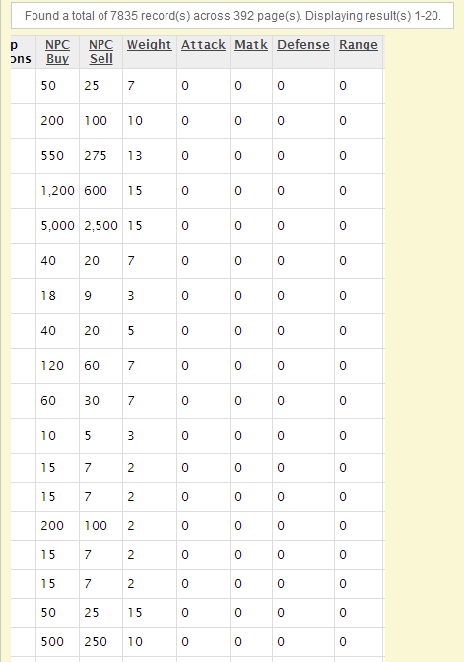
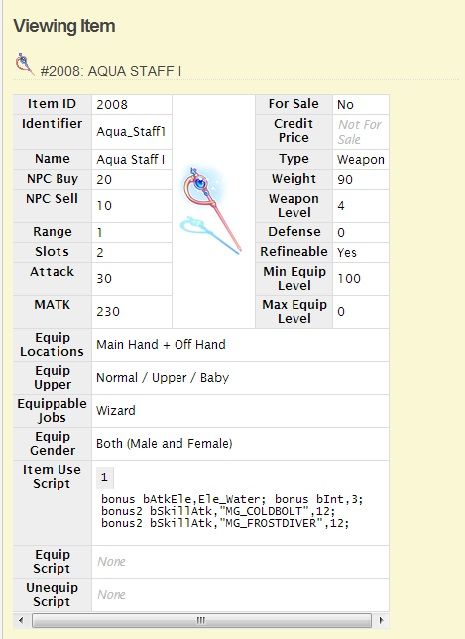 modules.7z
item.7z
Attack and Matk is working fine in the Item List and View page.
Just extract the to the correct folders.
Modules.7z goes to modules/item/
item.7z goes to themes/themeyouareusing/item/
Edit:
Added screenshots:


item.7z
Attachments
Last edited by a moderator:
Najara
New member
Strange... I don't know about Valiente, but it still doesn't seem to work for me.
The error message has changed though:
Message: MySQL error (SQLSTATE: 42S22, ERROR: 1054): Unknown column 'matk' in 'field list'
File: /public_html/cp/modules/item/index.php:297
The error message has changed though:
Message: MySQL error (SQLSTATE: 42S22, ERROR: 1054): Unknown column 'matk' in 'field list'
File: /public_html/cp/modules/item/index.php:297
Last edited by a moderator: