
- Content Author
- Realanan
File Name: Advanced GRF Tool Suite
File Submitter: rosfus
File Submitted: 14 Jan 2014
File Category: Client Resources
Introduction
RO client GRF file although with high compression ratio compression feature, but not a perfect key protection mechanisms that currently most of the characteristics of SF headdress and articles are free to copy the data , resulting in almost every Ragnarok Private Server client configuration are the same . Therefore, in order to protect the fruits of hard work Ragnarok Private Server workers, Advanced GRF system came into being.
The version of the file system on the basis of GRF2.0 original structure, embedded advanced symmetric key encryption algorithm, the file is no longer open GRF GRF just unpacked using a program can unlock, but need only produce who did not know a key to open GRF file.
Advanced GRF Tool Suite package contains four programs:
This program is release in 2007. Very popular in China. Supports all Ragnarok Online versions prior 2013.12.23. Sometimes antivirus software will prompt DLL has a virus, but I guarantee that it is safe.

Package directory structure
Advanced GRF Tool Suite
|
--
AGRF&RGZ Tool
|
--
AGRFTool.exe
--
zlib.dll
|
--
AGRF Patch Offline Updater
|
--
AGRFOfflineUpdater.exe
--
exit.bmp
--
skin.bmp
--
start.bmp
--
zlib.dll
|
--
AGRF Patch Updater
|
--
UpdRes
|
-- exit.bmp
-- site.bmp
-- skin.bmp
-- start.bmp
--
AGRFUpdater.exe
--
zlib.dll
|
--
AGRF Patch Updater Configure
|
-- AGRFUpdaterConfig.exe
|
--
AGRF Client DLL
|
-- cps.dll
--
zlib.dll
--
Web Sample
|
-- board.gif
--
patch_allow.txt
--
patch_execute.txt
--
patch2014.txt
--
rosfus2014.html
--
serverclose.html
-- style.css
InterFace

Button Description
Compression
Filter

Advanced GRF update Configurator
Relation
Profile type 3 radio buttons are used to select the currently opened or saved, depending on the configuration file name reference file.
The two buttons in case you want to use the complete set of reference documents.
Description
These are automatically updated, a common configuration file offline and update the client cps.dll.
Note: Definition Offline Updater some configuration items is somewhat different.
The following are three configuration files required for the project and project significance.
Automatic
Updater: Updater_Title, Updater_Resource_Dir,Updater_Skin_BMP, Updater_Start_BMP, Updater_Site_BMP, Updater_Exit_BMP,Http_Domain, Http_Path, Http_Notice, Http_Close, Http_List, Http_Allow,FTP_Domain, FTP_Path, FTP_UID, FTP_PWD, PatchInfo, GrfFile, AGrfKey, ExeFile,ExeParam, SiteUrl, Button1URL, Button2URL, Button3URL
Offline
Updater: Updater_Skin_BMP ( directory skin.bmp current ), Updater_Start_BMP ( the current directory start.bmp),Updater_Exit_BMP ( directory exit.bmp current ), Http_List ( Offline Updater updates the list of files in a list format with automatic Update List Updater), Offline_Caption, Offline_Version, PatchInfo, GrfFile, AGrfKey, ExeFile.
Offline
Updater directory format: The updater, configuration files , zlib.dll, 3个bmp files , gpf \ rgz update files , update the list of files can beplaced in the same directory.
Cps.dll: AGrfKey
Advanced GRF client DLL
Just copy the DLL client to the client directory, overwriting the original cps.dll file.
Automatically update the file,RGZ and GPF File Production
RGZ
Update files are typically asked that the x.exe x.lub or other files, not in the directory "data\" .
GPF
All files contained in the directory "data\"
AGRFTool
RGZ Production

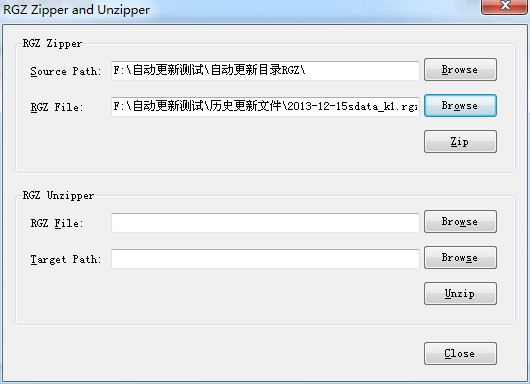
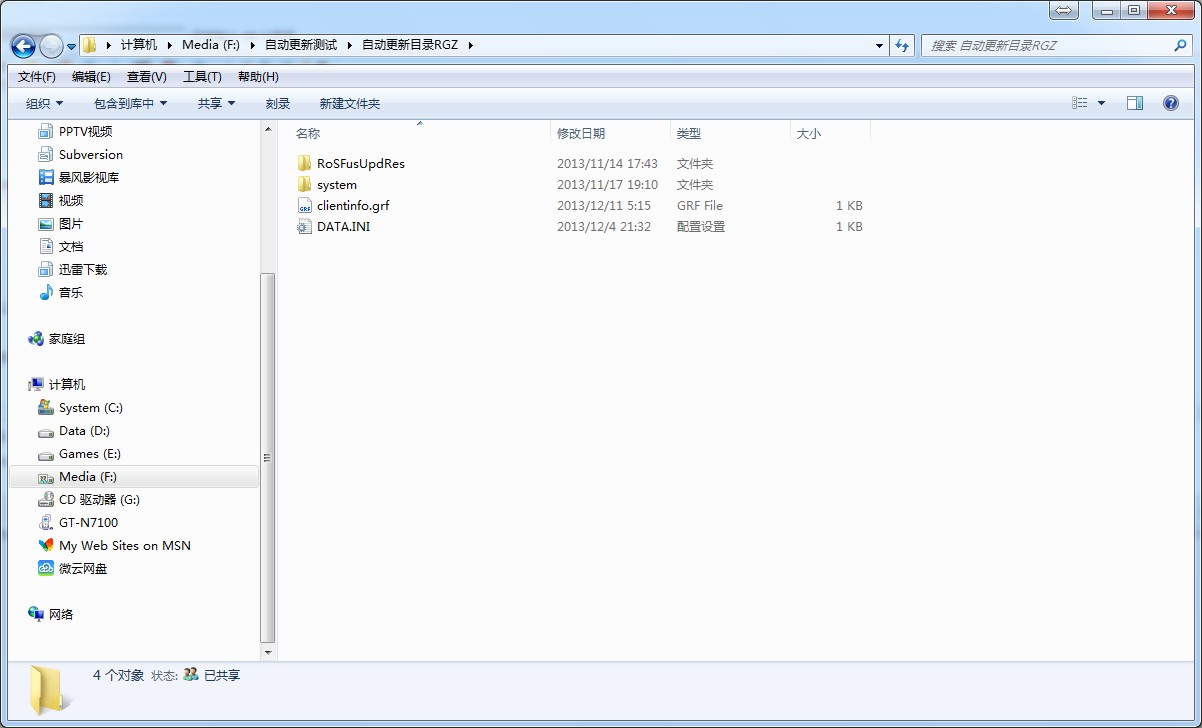
Will need to send files to the client , the client's directory structure into an empty folder, for example: F:\AutomaticUpdatesRGZ\
Select AGRTool in RGZ button to [Open] the production program interface. Example by just doing a directory to select resources and output directories . Well -defined file name.
After the completion point of all [Zip] button.

GPF Production
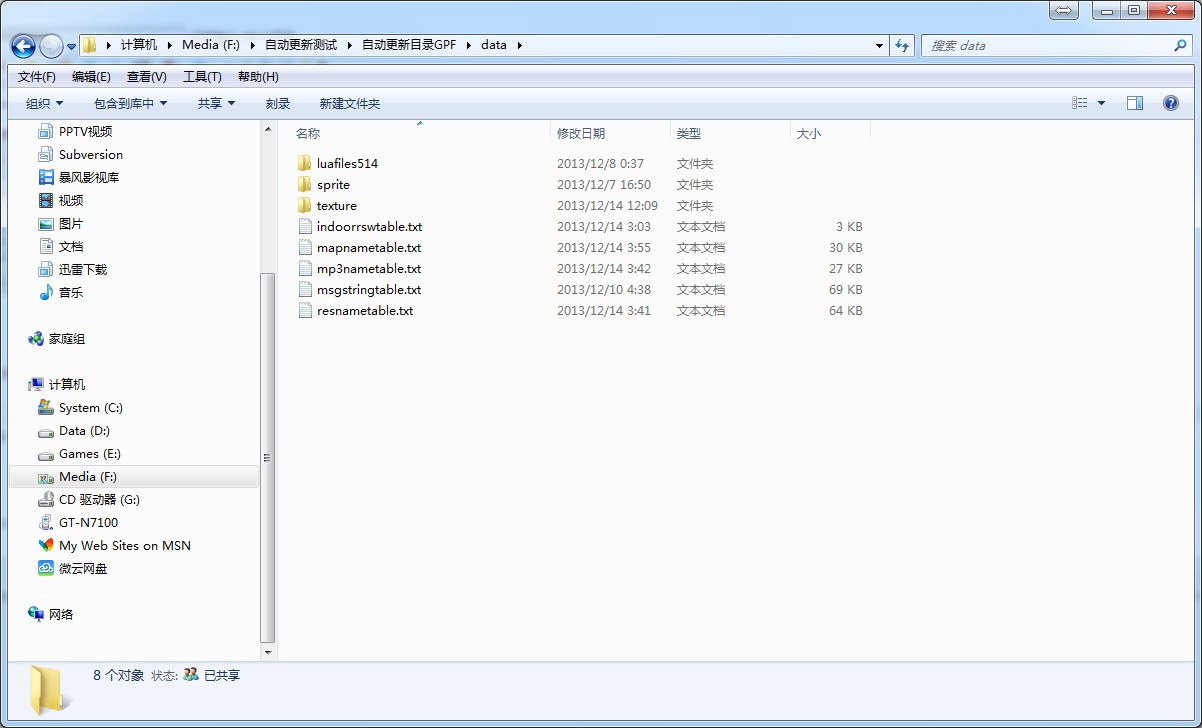
Will need to send to the client data.grf files , according to data directory structure into an empty folder, for example: F:\AutomaticUpdatesGPF\data\, please remember gpf document root directory is defined data, rather than ro root.
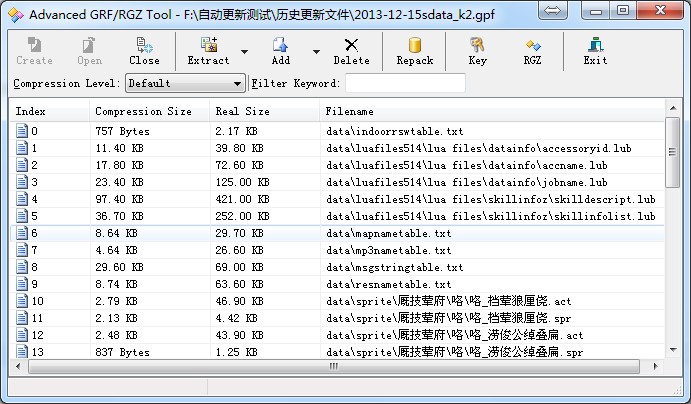
On AGRTool click [Create] button to create an empty gpf file and define the file name and then click the [ADD] button to select the directory for storing files earlier . Below , please note that the program's title is Create a file name and path.

Special features encryption
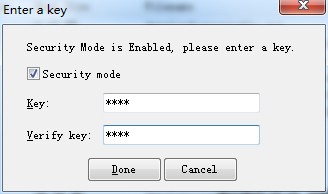
If you need to encrypt data files, please click [Key] button in the program interface checked Security Mode, and enter the password .

Special features compression
There are four levels of compression can be selected, in general we have chosen is Default, but my personal preference is the Best Compression ie the best compression ratio.

Repack
After completing all the above steps, click [Repack] button to complete the update files produced.
Click here to download this file

File Submitter: rosfus
File Submitted: 14 Jan 2014
File Category: Client Resources
Introduction
RO client GRF file although with high compression ratio compression feature, but not a perfect key protection mechanisms that currently most of the characteristics of SF headdress and articles are free to copy the data , resulting in almost every Ragnarok Private Server client configuration are the same . Therefore, in order to protect the fruits of hard work Ragnarok Private Server workers, Advanced GRF system came into being.
The version of the file system on the basis of GRF2.0 original structure, embedded advanced symmetric key encryption algorithm, the file is no longer open GRF GRF just unpacked using a program can unlock, but need only produce who did not know a key to open GRF file.
Advanced GRF Tool Suite package contains four programs:
- Advanced GRF Tool (Advanced GRF production tools , and support for the production and unpack files RGZ),
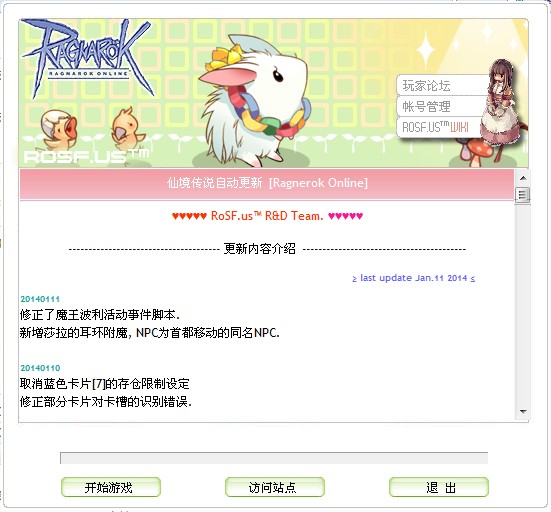
- Advanced GRF automatic updater (kRO imitate official updater production, shouldering Advanced GRF file automatic update task ),
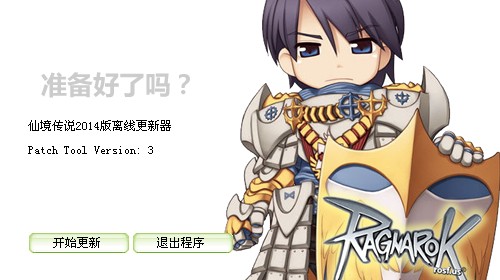
- Advanced GRF offline updater , Advanced GRF automatically updated Configurator (can easily customize Advanced GRF updater for each parameter),
- Advanced GRF client DLL (and with it, the client ordinary supports Advanced GRF files).
This program is release in 2007. Very popular in China. Supports all Ragnarok Online versions prior 2013.12.23. Sometimes antivirus software will prompt DLL has a virus, but I guarantee that it is safe.
Package directory structure
Advanced GRF Tool Suite
|
--
AGRF&RGZ Tool
|
--
AGRFTool.exe
--
zlib.dll
|
--
AGRF Patch Offline Updater
|
--
AGRFOfflineUpdater.exe
--
exit.bmp
--
skin.bmp
--
start.bmp
--
zlib.dll
|
--
AGRF Patch Updater
|
--
UpdRes
|
-- exit.bmp
-- site.bmp
-- skin.bmp
-- start.bmp
--
AGRFUpdater.exe
--
zlib.dll
|
--
AGRF Patch Updater Configure
|
-- AGRFUpdaterConfig.exe
|
--
AGRF Client DLL
|
-- cps.dll
--
zlib.dll
--
Web Sample
|
-- board.gif
--
patch_allow.txt
--
patch_execute.txt
--
patch2014.txt
--
rosfus2014.html
--
serverclose.html
-- style.css
InterFace
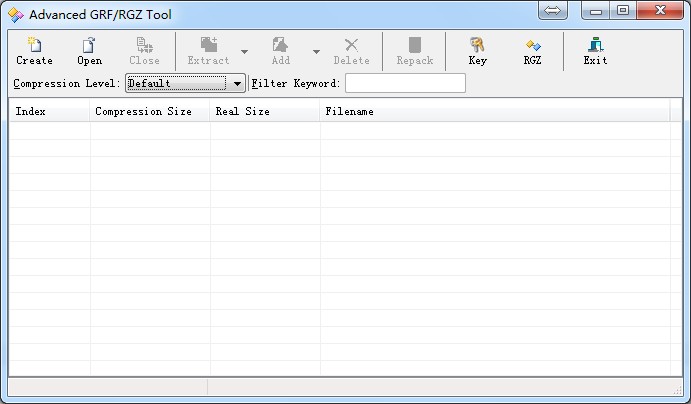
Button Description
- Create New GRF file
- Open Open GRF file
- Close Close GRF file
- Extract The selected projects will be unpacked (containing the unpacked files and all solutions buns menu)
- Add Add File (Contains directories and add submenus from GRF file)
- Delete Delete selected items
- Repack The current re-GRF file compression
- Key GRF file key set
- RGZ Open RGZ pack / unpack function
- Exit Exit the program
Compression
- Level: set the compression ratio GRF file. Divided into four grades: default, fastest, best compression ratio, not compressed. This option can be set at any time.
Filter
- Keyword: filter out the project in line with the string input box.
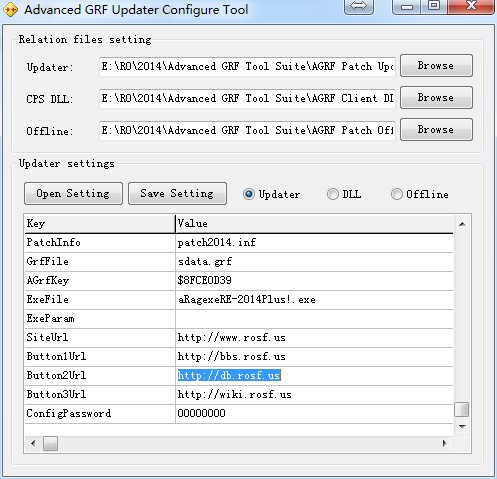
Advanced GRF update Configurator
Relation
- Files setting: Reference document settings.
- Updater: Select Advanced GRF automatic updates can be.
- CPS DLL: Select Advanced GRF client cps.dll file.
- Offline: select Advanced GRF Offline Updater.
- Updater settings: Advanced GRF automatic update settings.
- Open Setting: Open the configuration file.
- Save Setting: Save the configuration file.
Profile type 3 radio buttons are used to select the currently opened or saved, depending on the configuration file name reference file.
The two buttons in case you want to use the complete set of reference documents.
Description
- Updater_Title Automatic Updater title . ( example : RoSF.us Online Upper)
- Updater_Resource_Dir Automatic updater resource directory. (relative directory does not contain /example: UpdRes)
- Updater_Skin_BMP Skin file is automatically updated. (stored in the resource directory of the file name, the same example: skin.bmp)
- Updater_Start_BMP Button to start the game auto updater file . (example: start.bmp)
- Updater_Site_BMP Button to access the site automatically updates the file . (example: site.bmp)
- Updater_Exit_BMP Automatic updater file eject button. (example: exit.bmp)
- ---
- Http_Domain Web domain. (without http:// without domain final / example: www.sina.com.cn)
- Http_Path Web absolute path. (path in front with / does not contain the domain name. cases: /ropatch)
- Http_Notice Announcements page file name. (without the path example: ro_notice.html)
- Http_Close Announcements page file name down for maintenance. (without the path example: ro_close.html)
- Http_List List of update files. (without the path example: ro_list.txt)
- Http_Allow Startup configuration file name. (without the path example: ro_allow.txt)
- ---
- FTP_Domain Patch file to download FTP domain. (without ftp://, without domain final / Example: ftp.rosf.us)
- FTP_Path FTP path. (path in front with / does not contain the domain name. cases :/ropatch)
- FTP_UID FTP login user name. (anonymous login can be left blank )
- FTP_PWD FTP login password. (anonymous login can be left blank )
- ---
- Offline_Caption Offline Updater title.
- Offline_Version Offline Updater version.
- ---
- PatchInfo Update schedule automatic updates to save the file. (without the path example: Ropatch.inf)
- GrfFile GRF file needs to be updated. (without the path example: sdata.grf)
- AGrfKey Key GRF file. (No encryption can be left blank. Values in this column after saving and reopening will become a string of numbers, if you want to re-edit the settings, do not forget to re- enter the correct key again.)
- ExeFile Client launcher file name. (without the path example: Sakexe.exe)
- ExeParam Client initiates startup parameters. (example : 1sak1)
- ---
- SiteUrl Updater "Access Sites" button site URL. (includes all URL example :. http://www.sina.com.cn/index.htm)
- Button1URL Similar to the three buttons in the top right corner of the kRO the updater . Specify the corresponding web page URL.
- Button2URL Same
- Button3URL Same
- ---
- ConfigPassword Password to open the configuration file. If you set a password to open the configuration file will be asked to enter a password, otherwise it is impossible to open the configuration file. When no password can be left blank.
These are automatically updated, a common configuration file offline and update the client cps.dll.
Note: Definition Offline Updater some configuration items is somewhat different.
The following are three configuration files required for the project and project significance.
Automatic
Updater: Updater_Title, Updater_Resource_Dir,Updater_Skin_BMP, Updater_Start_BMP, Updater_Site_BMP, Updater_Exit_BMP,Http_Domain, Http_Path, Http_Notice, Http_Close, Http_List, Http_Allow,FTP_Domain, FTP_Path, FTP_UID, FTP_PWD, PatchInfo, GrfFile, AGrfKey, ExeFile,ExeParam, SiteUrl, Button1URL, Button2URL, Button3URL
Offline
Updater: Updater_Skin_BMP ( directory skin.bmp current ), Updater_Start_BMP ( the current directory start.bmp),Updater_Exit_BMP ( directory exit.bmp current ), Http_List ( Offline Updater updates the list of files in a list format with automatic Update List Updater), Offline_Caption, Offline_Version, PatchInfo, GrfFile, AGrfKey, ExeFile.
Offline
Updater directory format: The updater, configuration files , zlib.dll, 3个bmp files , gpf \ rgz update files , update the list of files can beplaced in the same directory.
Cps.dll: AGrfKey
Advanced GRF client DLL
Just copy the DLL client to the client directory, overwriting the original cps.dll file.
Automatically update the file,RGZ and GPF File Production
RGZ
Update files are typically asked that the x.exe x.lub or other files, not in the directory "data\" .
GPF
All files contained in the directory "data\"
AGRFTool
RGZ Production
Will need to send files to the client , the client's directory structure into an empty folder, for example: F:\AutomaticUpdatesRGZ\
Select AGRTool in RGZ button to [Open] the production program interface. Example by just doing a directory to select resources and output directories . Well -defined file name.
After the completion point of all [Zip] button.
GPF Production
Will need to send to the client data.grf files , according to data directory structure into an empty folder, for example: F:\AutomaticUpdatesGPF\data\, please remember gpf document root directory is defined data, rather than ro root.
On AGRTool click [Create] button to create an empty gpf file and define the file name and then click the [ADD] button to select the directory for storing files earlier . Below , please note that the program's title is Create a file name and path.
Special features encryption
If you need to encrypt data files, please click [Key] button in the program interface checked Security Mode, and enter the password .
Special features compression
There are four levels of compression can be selected, in general we have chosen is Default, but my personal preference is the Best Compression ie the best compression ratio.
Repack
After completing all the above steps, click [Repack] button to complete the update files produced.
Click here to download this file
