cant use asura strike?

Miyazono Kaori

New member
Messages
4
Points
0
i just got back after a year. downloaded latest emulator on github then set up a client. everything seems fine but i change job to champion use zen fury zen then cant use asura? is there any new or changes about asura?

edit: eveyrtime i use fury my client displays a abrasive icon on the right side of the client
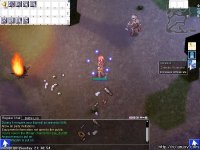
screenForce008.jpg

edit again: found the fix https://github.com/dastgirp/Hercules/commit/1e572d0bd99b2f1f2b6a29f0184c9fb28e0db655

 
Last edited by a moderator:
Recent recent release was buggy including usables like fly wing that has itemskill on it. Sometimes is did not function as intended. I recommend use the prior release version.

I dont know why Herc did not release like Release v2020.02.09+1 as they did it before to address critical issue.

 
Last edited by a moderator:
i just got back after a year. downloaded latest emulator on github then set up a client. everything seems fine but i change job to champion use zen fury zen then cant use asura? is there any new or changes about asura?

edit: eveyrtime i use fury my client displays a abrasive icon on the right side of the client

View attachment 5717

edit again: found the fix https://github.com/dastgirp/Hercules/commit/1e572d0bd99b2f1f2b6a29f0184c9fb28e0db655


hi i had a same problem with you, i see you already solved the problem, can you give some toturial how to fix it? i really newbie and cant understand it what is this C file and H file :(

 
Last edited by a moderator:
Update your herc to latest, it will solve the problem

 
this is how i do it (im newbie too, so i dont know if this the easier or harder way)

im using anacondaq emulator for newbie btw

first im install https://git-scm.com/downloads

after that go to your hercules emulator folder (im using anacondaq pre-re so my folder is"hercules_PRERE")

right clickon the folder(hercules_PRERE)

select "Git Bash Here"

then type "git clone https://github.com/HerculesWS/Hercules.git"

it will download some files, 

after download finish go download kenpachi .patch above

copy the .patch to your emulator folder

again right click on emulator folder, choose "Git Bash Here"

and type "git apply (yourpatchfilename).patch" HIT YOUR ENTER HARD DUDE! :)

after that, go to emulator folder, open 

Hercules-14.sln

Hercules-15.sln

Hercules-16.sln

using https://visualstudio.microsoft.com/vs/whatsnew/,, klik on Build bar on top, and choose build solution, DONE!  :)

note : i see anacondaq said there was a betterway, using hercules compiler but im newbie and never use it before so i dont know how it works maybe you can try it :)


this is how i do it (im newbie too, so i dont know if this the easier or harder way)

im using anacondaq emulator for newbie btw

first im install https://git-scm.com/downloads

after that go to your hercules emulator folder (im using anacondaq pre-re so my folder is"hercules_PRERE")

right clickon the folder(hercules_PRERE)

select "Git Bash Here"

then type "git clone https://github.com/HerculesWS/Hercules.git"

it will download some files, 

after download finish go download kenpachi .patch above

copy the .patch to your emulator folder

again right click on emulator folder, choose "Git Bash Here"

and type "git apply (yourpatchfilename).patch" HIT YOUR ENTER HARD DUDE! :)

after that, go to emulator folder, open 

Hercules-14.sln

Hercules-15.sln

Hercules-16.sln

using https://visualstudio.microsoft.com/vs/whatsnew/,, klik on Build bar on top, and choose build solution, DONE!  :)

note : i see anacondaq said there was a betterway, using hercules compiler but im newbie and never use it before so i dont know how it works maybe you can try it :)
for this u will need visual studio 2019 right?

coz when i compile the solution in visual studio 2019, it shows build error. need build tools v142

 
note : i see anacondaq said there was a betterway, using hercules compiler but im newbie and never use it before so i dont know how it works maybe you can try it :) 
No no no, this is just a "project", only for playing, not for real cases. cygwin has tons of cons, (much slower performance, and in latest hashes of hercules emulator can't compiled at all, many errors).

Better if you will stick to VS Community 2019

for this u will need visual studio 2019 right?
Yes, VS Community 2019 and mark checkbox in installer on C++

It will install everything. When you will open SLN file, right click on solution -> retarget solution, and press OK.

Build -> Clean Solution

Build -> Compile.

 
Back
Top