
You are using an out of date browser. It may not display this or other websites correctly.
You should upgrade or use an alternative browser.
You should upgrade or use an alternative browser.
[Guide] Create your server & Client (2016/08)
- Thread starter Monsieur Panda
- Start date

It should be possible if you change it on sql_connection file (https://github.com/HerculesWS/Hercules/blob/stable/conf/global/sql_connection.conf#L46) but I wouldn't recommend doing so as this will probably make queries take longer.Hey. Can i use a MySQL dB from Other Server ? Because i have too

hadiesyafiq
New member
Need help...i just rent vps digitalocean debian 9 i follow the guide but not work

Chatterboy
New member
what is the exact problem?Need help...i just rent vps digitalocean debian 9 i follow the guide but not work

zidclide
New member
- Messages
- 1
- Points
- 0
- Github
- Rohi
I'm new to Hercules. Because I learned developing RO private server using rAthena but I red that hercules is better on pre-renewal.
And this is my first guide here.
Am I too late for everything?
and also can I test this with local on windows 7.
And this is my first guide here.
Am I too late for everything?
and also can I test this with local on windows 7.
Whenever I try to execute Step C.2 i get message git not found.
I have tried to install git, but it still says the same.-
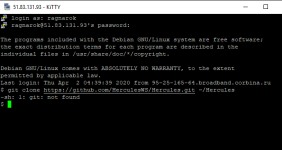
Somehow it got solved, I'm not sure how, but I did the following:
tried "git_config --list" to receive message git_config not found, installed git using "sudo apt-get install git-core", then typed git to receive list of options, and then it started to work.
I have tried to install git, but it still says the same.-
Somehow it got solved, I'm not sure how, but I did the following:
tried "git_config --list" to receive message git_config not found, installed git using "sudo apt-get install git-core", then typed git to receive list of options, and then it started to work.
Last edited by a moderator:
The guide really needs to be updated, with some screenshots and notes on what each step does.
Literally with each step I get a lot of issues.
At the moment I can't do steps in D part, because they lead to non existing files, such as "nano conf/inter-server.conf"
That file does not exist in conf folder.
Literally with each step I get a lot of issues.
At the moment I can't do steps in D part, because they lead to non existing files, such as "nano conf/inter-server.conf"
That file does not exist in conf folder.
Last edited by a moderator:
I have been trying to set up online server for two days, and somehow no one knows what to do?
How am i supposed to do this with outdated guides, that don't work for latest release?
it could be much easier if the guide was something than a monkey task - watch and repeat, but the way it's written - watch and repeat, I really don't understand much, and can't go around issues on my own.
How am i supposed to do this with outdated guides, that don't work for latest release?
it could be much easier if the guide was something than a monkey task - watch and repeat, but the way it's written - watch and repeat, I really don't understand much, and can't go around issues on my own.
Kurimon1393
New member
- Messages
- 0
- Points
- 0
DO you have to Download mirror 1 and mirror 2 ?? :O im new to this
Chatterboy
New member
If you don't understand completely how to run. Here watch and learn visually here and how, its a bit different but much easy to understand while watching it running from scratch to finishHi everyone! i am a newbie and got no idea about programming, kinda wanna learn how to make this. First question is, are you required to subscribe to those server things that he posted? if yes, why? anyone willing to help and guide a complete idiot?
Last edited by a moderator:

So when I run rsu-kro-rag-lite-updater (step II.A) it gives a "mirror server down, try again later" error. Always.
I've also tried getting the most up-to-date version of this from here: http://nn.ai4rei.net/dev/rsu/
and I get the error "failed to retrieve 1_patch.txt"
What's going on here? What do I do? Is this guide out of date too, or do i just need to wait?
Edit - I've also tried installing the up-to-date kRO client from here:
and ran the patcher it comes with.... the updater there says mirror server is down.
I've also tried getting the most up-to-date version of this from here: http://nn.ai4rei.net/dev/rsu/
and I get the error "failed to retrieve 1_patch.txt"
What's going on here? What do I do? Is this guide out of date too, or do i just need to wait?
Edit - I've also tried installing the up-to-date kRO client from here:
and ran the patcher it comes with.... the updater there says mirror server is down.
Last edited by a moderator:

mastabomba
New member
- Messages
- 13
- Points
- 0
BGM parameter files 404 not found. Any other links that works?Hello,
For some reason, I decided to write my own guide for super newbie people. And when I say newbie, I say REAL newbie. I will not ask you to learn anything or saying rude things like "go google ffs".
I believe people that want to create their server are not necessary interested being a linux master or whatever. Never people are saying that before leaning guitar, people should learn how string and guitar are made.
Enough talk, lets start !
Prerequisites
[snipped]
- Patience, meticulousness, cogitation
- kRO full client: Mirror #1 (mediafire), Mirror #2 (Direct Link from my ftp)
- kRO last actual compatible exe: Mirror #1 (mega.nz), Mirror #2 (Direct Link from my ftp)
- Setup exe: Download (Page), Mirror #1 (Direct Link from my ftp)
- N.E.M.O. Diff Patcher Download (git)
- BGM parameter files. Download (Direct Link herc.ws), Mirror #1 (Direct Link from my ftp)
- Translation Package. Download (git)
- Putty: Download (Page)
- If Putty does not work, use Kitty Download (Page)
- 1~2 hours of your time
Last edited by a moderator:
mastabomba
New member
- Messages
- 13
- Points
- 0
for client step II A 1, patcher returns mirror under maintenance and latest rsu lite says no suitable mirror server found (S1).

https://herc.ws/board/topic/15592-collection-official-full-clients-latest-kro/?tab=comments#comment-86070BGM parameter files 404 not found. Any other links that works?
mastabomba
New member
- Messages
- 13
- Points
- 0
Good evenning!
first of all thank you for the amazing guide! I am new to Hercules, helped me alot.
Still have some issue to start the server.
1.
first of all thank you for the amazing guide! I am new to Hercules, helped me alot.
Still have some issue to start the server.
1.
Code:
: DB error - Table 'ragnarok.loginlog' doesn't exist
[COLOR=#f39c12][I]I used to upload all SQL Files to the DB... how do fix this? [/I][/COLOR]

	2. [Error]: Skip wrong packet id: 0x2710
	[Error]: --- failed assertion --------------------------------------------
	[Error]: socket.c:832: '0' in function `rfifoskip'
	[Error]: 0x5614920e4eb5 nullpo_backtrace_print
	[Error]:        /home/ragnarok/Hercules/src/common/nullpo.c:77
	[Error]: 0x5614920e4eb5 assert_report
	[Error]:        /home/ragnarok/Hercules/src/common/nullpo.c:147
	[Error]: 0x5614920f7bad rfifoskip
	[Error]:        /home/ragnarok/Hercules/src/common/socket.c:848
	[Error]: 0x5614920d361c lclif_parse_packet
	[Error]:        /home/ragnarok/Hercules/src/login/lclif.c:512
	[Error]: 0x5614920d3281 lclif_parse
	[Error]:        /home/ragnarok/Hercules/src/login/lclif.c:419
	[Error]: 0x5614920f8325 do_sockets
	[Error]:        /home/ragnarok/Hercules/src/common/socket.c:1081
	[Error]: 0x5614920ceee1 main
	[Error]:        /home/ragnarok/Hercules/src/common/core.c:541
	[Error]: 0x7f5ed9c372e0 ???
	[Error]:        ???:0
	[Error]: 0x5614920cf0c9 ???
	[Error]:        ???:0
	[Error]: 0xffffffffffffffff ???
	[Error]:        ???:0
	[Error]: --- end failed assertion ----------------------------------------

[COLOR=#f39c12][I]Checked google etc most failed assertion problem get solved when update Hercules... but I used from git last day. [/I][/COLOR]

	3. [Error]: Can not connect to login-server.
	[Error]: The server communication passwords (default s1/p1) are probably invalid.
	[Error]: Also, please make sure your login db has the correct communication username/passwords and the gender of the account is S.
	[Error]: The communication passwords are set in /conf/map/map-server.conf and /conf/char/char-server.conf

[COLOR=#f39c12][I]Check any file, insert everywhere the same user and pass... as well as in db. [/I][/COLOR]

[I]Thank you for your time! [/I]
mastabomba
New member
- Messages
- 13
- Points
- 0
check steps on sql-files and from phpmyadminGood evenning!
first of all thank you for the amazing guide! I am new to Hercules, helped me alot.
Still have some issue to start the server.
1.
: DB error - Table 'ragnarok.loginlog' doesn't existI used to upload all SQL Files to the DB... how do fix this? 2. [Error]: Skip wrong packet id: 0x2710 [Error]: --- failed assertion -------------------------------------------- [Error]: socket.c:832: '0' in function `rfifoskip' [Error]: 0x5614920e4eb5 nullpo_backtrace_print [Error]: /home/ragnarok/Hercules/src/common/nullpo.c:77 [Error]: 0x5614920e4eb5 assert_report [Error]: /home/ragnarok/Hercules/src/common/nullpo.c:147 [Error]: 0x5614920f7bad rfifoskip [Error]: /home/ragnarok/Hercules/src/common/socket.c:848 [Error]: 0x5614920d361c lclif_parse_packet [Error]: /home/ragnarok/Hercules/src/login/lclif.c:512 [Error]: 0x5614920d3281 lclif_parse [Error]: /home/ragnarok/Hercules/src/login/lclif.c:419 [Error]: 0x5614920f8325 do_sockets [Error]: /home/ragnarok/Hercules/src/common/socket.c:1081 [Error]: 0x5614920ceee1 main [Error]: /home/ragnarok/Hercules/src/common/core.c:541 [Error]: 0x7f5ed9c372e0 ??? [Error]: ???:0 [Error]: 0x5614920cf0c9 ??? [Error]: ???:0 [Error]: 0xffffffffffffffff ??? [Error]: ???:0 [Error]: --- end failed assertion ----------------------------------------Checked google etc most failed assertion problem get solved when update Hercules... but I used from git last day. 3. [Error]: Can not connect to login-server. [Error]: The server communication passwords (default s1/p1) are probably invalid. [Error]: Also, please make sure your login db has the correct communication username/passwords and the gender of the account is S. [Error]: The communication passwords are set in /conf/map/map-server.conf and /conf/char/char-server.confCheck any file, insert everywhere the same user and pass... as well as in db. Thank you for your time!
Code:: DB error - Table 'ragnarok.loginlog' doesn't exist [COLOR=#f39c12][I]I used to upload all SQL Files to the DB... how do fix this? [/I][/COLOR] 2. [Error]: Skip wrong packet id: 0x2710 [Error]: --- failed assertion -------------------------------------------- [Error]: socket.c:832: '0' in function `rfifoskip' [Error]: 0x5614920e4eb5 nullpo_backtrace_print [Error]: /home/ragnarok/Hercules/src/common/nullpo.c:77 [Error]: 0x5614920e4eb5 assert_report [Error]: /home/ragnarok/Hercules/src/common/nullpo.c:147 [Error]: 0x5614920f7bad rfifoskip [Error]: /home/ragnarok/Hercules/src/common/socket.c:848 [Error]: 0x5614920d361c lclif_parse_packet [Error]: /home/ragnarok/Hercules/src/login/lclif.c:512 [Error]: 0x5614920d3281 lclif_parse [Error]: /home/ragnarok/Hercules/src/login/lclif.c:419 [Error]: 0x5614920f8325 do_sockets [Error]: /home/ragnarok/Hercules/src/common/socket.c:1081 [Error]: 0x5614920ceee1 main [Error]: /home/ragnarok/Hercules/src/common/core.c:541 [Error]: 0x7f5ed9c372e0 ??? [Error]: ???:0 [Error]: 0x5614920cf0c9 ??? [Error]: ???:0 [Error]: 0xffffffffffffffff ??? [Error]: ???:0 [Error]: --- end failed assertion ---------------------------------------- [COLOR=#f39c12][I]Checked google etc most failed assertion problem get solved when update Hercules... but I used from git last day. [/I][/COLOR] 3. [Error]: Can not connect to login-server. [Error]: The server communication passwords (default s1/p1) are probably invalid. [Error]: Also, please make sure your login db has the correct communication username/passwords and the gender of the account is S. [Error]: The communication passwords are set in /conf/map/map-server.conf and /conf/char/char-server.conf [COLOR=#f39c12][I]Check any file, insert everywhere the same user and pass... as well as in db. [/I][/COLOR] [I]Thank you for your time! [/I]
Last edited by a moderator:
Hi,
I followed all the steps and when i launched 2015-05-13aRagexe_patched, i had some issues as "System/Font/RixSquirrel_10.eot" didn't exists. I downloaded this file and the others as "RixLoveangel_10.eot", etc.., put them in the correct folder, and now when I launched the exe, I have the classic blue circle on Windows 10 and the game closed itself. How can I see some logs ? Maybe you had already encountered this problem...
Thanks for your support.
I followed all the steps and when i launched 2015-05-13aRagexe_patched, i had some issues as "System/Font/RixSquirrel_10.eot" didn't exists. I downloaded this file and the others as "RixLoveangel_10.eot", etc.., put them in the correct folder, and now when I launched the exe, I have the classic blue circle on Windows 10 and the game closed itself. How can I see some logs ? Maybe you had already encountered this problem...
Thanks for your support.