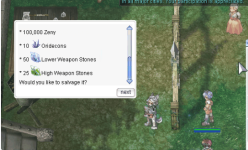
Hello guys, I don't know if this is a client version or script but how to add that item icon in dialogue?
View attachment 7760
[ Q ] How to show item ICONS inside NPC dialogue (Hercules)?
[ A ] Use item *links* in your messages: getitemlink(<item_id>

────────────────────────────────────────────────────────
REQUIREMENTS (client-side)
────────────────────────────────────────────────────────
1) A client that supports item links (any modern 2014+ client is fine).
2) When diffing your client (e.g. NEMO), enable:
- “Enable Item Link” (sometimes named “Enable Monster & Item Link”).
That’s it — no custom LUA needed.
Note: Zeny does not have a built-in icon in dialogue; only items do.
────────────────────────────────────────────────────────
MINIMAL HERCULES NPC EXAMPLE
────────────────────────────────────────────────────────
prontera,155,180,4 script ItemIconDemo 4_F_KAFRA1,{
mes "Required materials:";
mes " ^000000* 100,000 Zeny^000000";
mesf(" ^000000* %d x %s^000000", 10, getitemlink(984)); // Oridecon
mesf(" ^000000* %d x %s^000000", 50, getitemlink(7063)); // Lower Weapon Stone (example id)
mesf(" ^000000* %d x %s^000000", 25, getitemlink(7064)); // High Weapon Stone (example id)
mes "Would you like to salvage it?";
next;
switch(select("Yes:No")) {
case 1:
mes "You chose ^00AAFFYes^000000.";
close;
default:
mes "Come back later.";
close;
}
}
/// NOTES:
/// - Replace 7063/7064 with your server’s real item IDs.
/// - getitemlink() renders the item name clickable and shows its small icon
/// automatically in the dialogue window.
/// - You can also use it inside mesf/select strings anywhere you print text.
────────────────────────────────────────────────────────
COMMON PITFALLS
────────────────────────────────────────────────────────
• Using getitemname() — this prints only text (no icon). Use getitemlink().
• Old client or diff without “Item Link” → icons won’t show.
• Expecting Zeny icon → not supported natively; print plain text for Zeny.
────────────────────────────────────────────────────────