xyrox
New member
- Messages
- 3
- Points
- 0
Hello community.
My server works on a local network on a raspberry PI. I would like to put it online to play with my friends. But when they try to connect, they are blocked between the server login and the server char.
I don't have an error message. Only this.
Do you have any idea why it doesn't work?
Thx
My server works on a local network on a raspberry PI. I would like to put it online to play with my friends. But when they try to connect, they are blocked between the server login and the server char.
I don't have an error message. Only this.
network.conf[Status]: Connection of the account 'admin' accepted.
[Info]: Closed connection from 'xx.xx.xx.xx'.
map_server.conf/*
* List here any LAN subnets this server is in.
* Example:
* - char- (or map-) server's IP in LAN is 192.168.0.10
* - Public IP is 198.51.100.37
* If the list contains "192.168.0.10:255.255.255.0", any clients connecting
* from the same 192.168.0.0/24 network will be presented with the LAN IP
* (192.168.0.10) in the server list, rather than the public IP (198.51.100.37).
*/
lan_subnets: (
"wan_ip",
"192.168.1.1:255.0.0.0",
"127.0.0.1:255.0.0.0",
//"92.138.126.123:255.0.0.0",
//"192.168.1.1:255.255.255.0",
)
/*
* List here any IP ranges a char- or map-server can connect from.
* A wildcard of "0.0.0.0:0.0.0.0" means that server connections are allowed
* from ANY IP. (not recommended).
*/
allowed: (
"192.168.1.10:255.0.0.0",
"wan_ip:255.0.0.0",
//"0.0.0.0:0.0.0.0",
//"127.0.0.1:255.0.0.0",
//"192.168.1.1:255.0.0.0",
)
/*
* List here any IP ranges a char- or map-server can connect from. These ranges
* will also be excluded from the automatic ipban in casee of password failure.
* Any entry present in this list is also automatically included in the
* allowed IP list.
* Note: This may be a security threat. Only edit this list if you know what
* you are doing.
*/
trusted: (
//"127.0.0.1:255.0.0.0",
//"192.168.1.1:255.255.255.0",
//"92.138.126.123:255.255.255.0",
//"virgilejacobe.ddns.net:255.255.255.0",
)
char-server.conf// Character Server IP
// The map server connects to the character server using this IP address.
// NOTE: This is useful when you are running behind a firewall or are on
// a machine with multiple interfaces.
char_ip: "192.168.1.10"
// The map server listens on the interface with this IP address.
// NOTE: This allows you to run multiple servers on multiple interfaces
// while using the same ports for each server.
//bind_ip: "127.0.0.1"
// Character Server Port
char_port: 6121
// Map Server IP
// The IP address which clients will use to connect.
// Set this to what your server's public IP address is.
map_ip: "wan_ip"
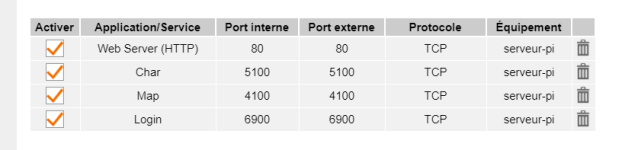
ports 6900 5100 and 4100 are redirected to my local address 192.168.1.10// Login Server IP
// The character server connects to the login server using this IP address.
// NOTE: This is useful when you are running behind a firewall or are on
// a machine with multiple interfaces.
login_ip: "192.168.1.10"
// The character server listens on the interface with this IP address.
// NOTE: This allows you to run multiple servers on multiple interfaces
// while using the same ports for each server.
//bind_ip: "127.0.0.1"
// Login Server Port
login_port: 6900
// Character Server IP
// The IP address which clients will use to connect.
// Set this to what your server's public IP address is.
char_ip: "wan_ip"
// Character Server Port
char_port: 6121
Do you have any idea why it doesn't work?
Thx