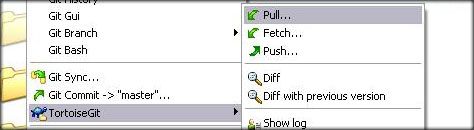
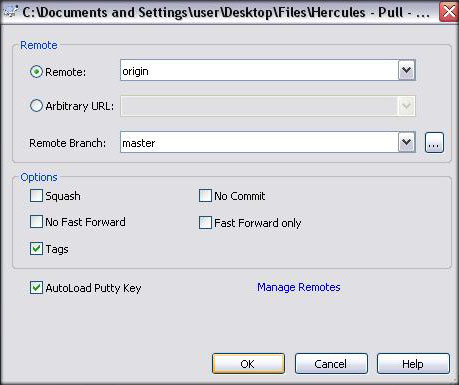
schan New member Messages 60 Points 0 Github xschan Emulator Feb 25, 2014 #3 Ind said: Updating Hercules Right-Click the folder where you downloaded your working copy and within the TortoiseGit menu, select "Pull..." as shown below On the following window just hit 'OK', and your working copy will update. Click to expand... Ind said: Updating a Working-Copy Type the following when inside your working copy Code: git pull Click to expand... http://herc.ws/board/topic/152-obtaining-hercules/ Last edited by a moderator: Feb 25, 2014
Ind said: Updating Hercules Right-Click the folder where you downloaded your working copy and within the TortoiseGit menu, select "Pull..." as shown below On the following window just hit 'OK', and your working copy will update. Click to expand... Ind said: Updating a Working-Copy Type the following when inside your working copy Code: git pull Click to expand... http://herc.ws/board/topic/152-obtaining-hercules/