So i am from rAthena and completely new on Herc. And im having troubles understanding how to properly add a new map. may i request for a step by step guide? ive searched every where on this forums but i cant seem to make it work. i tried using `make tools` but ./mapcache is not found in my directory.

You are using an out of date browser. It may not display this or other websites correctly.
You should upgrade or use an alternative browser.
You should upgrade or use an alternative browser.
New guide for adding custom map
- Thread starter iubantot
- Start date

bWolfie
I'm the man
Check this out:
Check this out:
So im encountering this error here
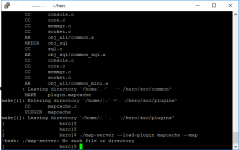
what i did is .
herc/src/plugins/makefile.in
################ PLUGIN CONFIGURATION ##############################
# #
# When you add a plugin, add its name here: #
# Example: if you have a plugin named my_cool_plugin.c and another #
# one named my_second_plugin.c, add them to the list like this: #
# #
# MYPLUGINS = my_cool_plugin my_second_plugin #
# #
# This is only needed if you want to build your plugin through #
# 'make plugins' or 'make all'. If you don't add it to this list, #
# you will still be able to build your plugin through #
# 'make plugin.my_plugin' #
# #
# Note: DO NOT include the .c extension!!! #
MYPLUGINS = ExtendedVending mapcache
herc/conf/plugins.conf
plugins_list: [
/* Enable HPMHooking when plugins in use rely on Hooking */
"HPMHooking",
//"db2sql",
//"sample",
"ExtendedVending",
"mapcache",
]
I also added a data folder on my herc folder.
` herc/data/ ` which contains the maps as said on the guide.
Last edited by a moderator:
bWolfie
I'm the man
You should run the commands from your root folder, not inside the plugins folder.
E.g. /Hercules/ <- Correct
/Hercules/src/plugins/ <- Incorrect
E.g. /Hercules/ <- Correct
/Hercules/src/plugins/ <- Incorrect
that is what im doingYou should run the commands from your root folder, not inside the plugins folder.
E.g. /Hercules/ <- Correct
/Hercules/src/plugins/ <- Incorrect
bWolfie
I'm the man
Sorry misread your console log. It seems you haven't compiled your map server, therefore it does not exist and you can't run it. You need to make sql to do this.


banhelba2019
New member
- Messages
- 200
- Points
- 0
- Emulator
you need to go to you vcproj folder , im using vcproj-14... you will see something called plugin.sample, make a copy of that in the same folder, and rename the copy mapcache.... go into your visual studio and right click on your hercules solution and add existing, go to the mapcache u just made and then you will now see it, ok right click hercules solution and rebuild... should have 0 error if i remember, then go WIN+R cmd , go "cd desktop\hercules" then do "map-server.exe - -help" 2 dash no space hard to see then do "map-server.exe - -map (mapname)" 2 dash no brackets or perenteses

luizragna
New member
@iubantot Follow this tutorial to create your mapcache: http://herc.ws/wiki/Building_HPM_Plugin_for_MSVC>> ./configure
>> make clean
>> make plugin.mapcache
>> make sql
I used this commands on my herc folder. but still i get this error.
View attachment 4697
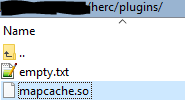
This is the contents of my plugins
View attachment 4698
Where he talk YourPlugin rename to mapcache
im using linux machine this is guide is for windows machine@iubantot Follow this tutorial to create your mapcache: http://herc.ws/wiki/Building_HPM_Plugin_for_MSVC
Where he talk YourPlugin rename to mapcache
bWolfie
I'm the man
that error comes because you didn't make plugins either lol my bad. if you are using a plugin, you need to make plugins as well. so actually the order should be like this.
Code:
make clean
./configure
make sql plugins
make plugin.mapcacheSo I think the mapcache has successfully compiled but now im getting this error. and i think it because the other maps are not included in the `herc/data` that i made earlier.that error comes because you didn't make plugins either lol my bad. if you are using a plugin, you need to make plugins as well. so actually the order should be like this.
Code:make clean ./configure make sql plugins make plugin.mapcache
Do i need to put all maps on it? or do i need to import my grf file on my vm just to compile mapcache?

bWolfie
I'm the man
what the hell is going on here? Is it just me or are posts not being order by date...
yep, it seems your grf must be missing that map.
yep, it seems your grf must be missing that map.
Thank you so much for the time and information! /thxwhat the hell is going on here? Is it just me or are posts not being order by date...
yep, it seems your grf must be missing that map.

Chatterboy
New member
Centos 7 how? but i did in in windows mode. Thanks anyway and to annieruru guide ^_^ ROK!!@iubantot Follow this tutorial to create your mapcache: http://herc.ws/wiki/Building_HPM_Plugin_for_MSVC
Where he talk YourPlugin rename to mapcache
Last edited by a moderator: