Obtaining Hercules

Ind

Development Administrator
Staff member
Messages
1,655
Points
113
Obtaining Hercules

Hercules is available through GitHub, a web-based hosting service for software development projects that use the Git revision control system.

Support
Looking for assistance on getting Git to work? Post here

Alternatively...
GitHub also provides a SVN Mirror. We won't officially work to support many branches or repository-features in SVN, but it should remain in-sync with the latest stable release, based on master branch in git.

Windows

http://github.com/HerculesWS/Hercules


Linux

  • Typing the following creates a working copy of hercules at your home directory
Code:
svn checkout [URL="http://github.com/HerculesWS/Hercules"]http://github.com/HerculesWS/Hercules[/URL] ~/Hercules
 
Last edited by a moderator:
Obtaining Hercules through Git on Windows

Downloads

Installation
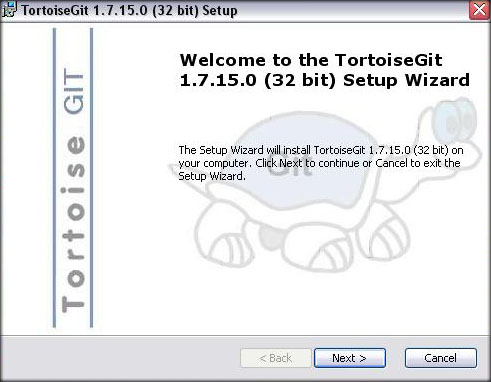
Alright, first go through MSysGit installer and just set it up (its used as a base for TortoiseGit). then once you install MSysGit, launch the installer you just downloaded for TortoiseGit, you'll be prompted by a window similar to the following

tgit-1.jpg

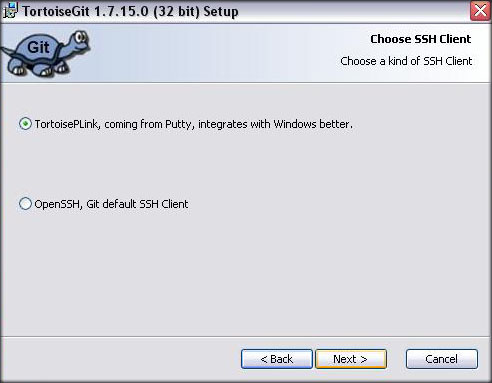
The next window is "Choose SSH Client", select "TortoisePLink", hit Next.

tgit-2.jpg

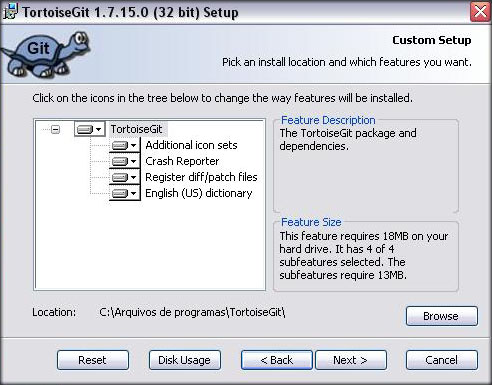
The next window is "Custom Setup", do not change anything unless you know what you're doing, hit Next.

tgit-3.jpg

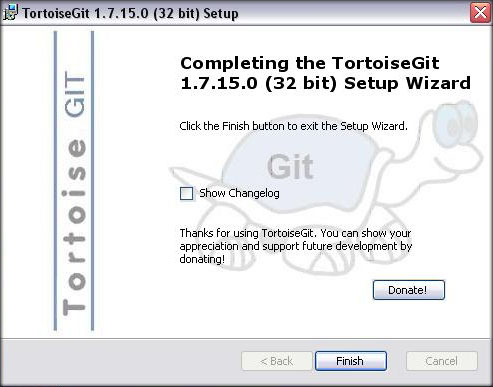
We're done with the installation, that was easy, wasn't it?

tgit-4.jpg

Obtaining Hercules
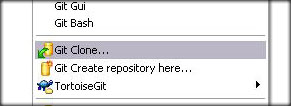
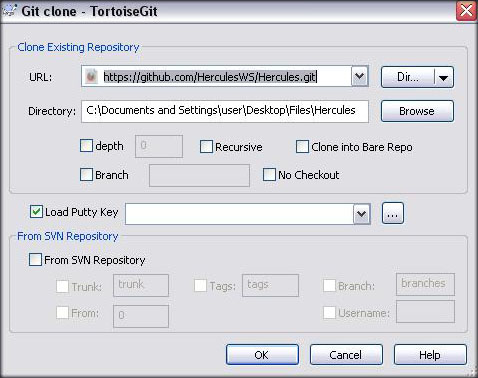
Go to the folder where you want Hercules to be placed, right click and select "Git Clone..."

tgit-5.jpg

in the URL field, type the following:

https://github.com/HerculesWS/Hercules.git


ensure the 'Directory' field is as desired, and hit 'OK'

tgit-6.jpg

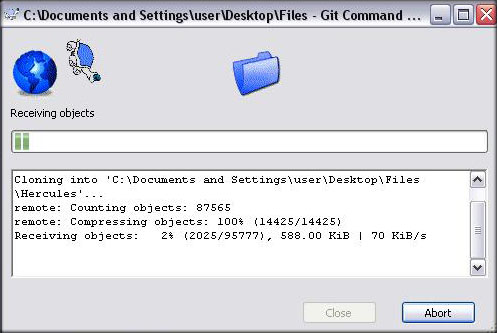
Now Hercules is being downloaded

tgit-7.jpg

Just wait for it to complete the download of your working copy and you'll be good to go.

Updating Hercules
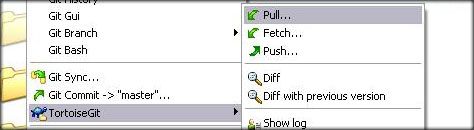
Right-Click the folder where you downloaded your working copy and within the TortoiseGit menu, select "Pull..." as shown below

tgit-8.jpg

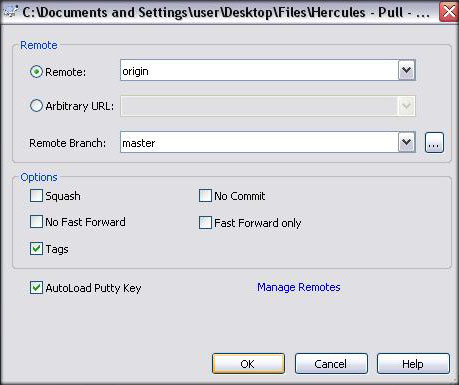
On the following window just hit 'OK', and your working copy will update.

tgit-9.jpg
 
Last edited by a moderator:
Obtaining Hercules through Git on Linux

CentOS

  • Step 1:
rpm -Uvh http://repo.webtatic.com/yum/centos/5/latest.rpm

  • Step 2:
Code:
yum install --enablerepo=webtatic git-all
  • Step 3:
Code:
yum install --enablerepo=webtatic --disableexcludes=main git-all

Debian/Others

  • Step 1:
apt-get install git


Obtaining a Working-Copy
Type the following to create a Hercules working copy in your home (~) directory

git clone https://github.com/HerculesWS/Hercules.git ~/Hercules


Updating a Working-Copy
Type the following when inside your working copy

Code:
git pull
 
Last edited by a moderator:
Git Troubleshooting
Code:
Please, commit your changes or stash them before you can merge.Aborting.
Git doesn't update modified files even if they don't conflict unless they're properly "committed" in your local working copy, to do so is simple and advantageous (it will keep a log of your changes for yourself; so you can always go back and check what was changed and when)
- On Unix
Code:
git commit -am "your log message, anything at all"
- On Windows
1. Right click your folder -> Git Commit -> "master"
2. (optional) type the log message
3. Hit 'OK'
 
For most purposes, if not all, you should use the master branch the other branches are meant for development purposes except the rAthena branch, that is what we use for merging commits by its staff (if ever needed)

 
Hello.

It's my first time here at Hercules and I have a problem, Git isn't working. I always get this error.
30vzm02.png


Anyway, I've downloaded it using TortoiseSVN. But, I can't open Hercules-9, Hercules-10 or Hercules-12.

I have MS Visual Studio C++ 2010 and 2008 installed in my computer.

 
Hello.

It's my first time here at Hercules and I have a problem, Git isn't working. I always get this error.
30vzm02.png


Anyway, I've downloaded it using TortoiseSVN. But, I can't open Hercules-9, Hercules-10 or Hercules-12.

I have MS Visual Studio C++ 2010 and 2008 installed in my computer.
Just download msysGit. click Open msysGit WebSite.

and to open Hercules-10

Right Click and Open With > MSC++2010

 
Last edited by a moderator:
when updating this one appears

Code:
git.exe pull -v --progress	   "origin"From [URL="https://github.com/HerculesWS/Hercules="]https://github.com/HerculesWS/Hercules=[/URL] [up to date]	  master	 -> origin/master= [up to date]	  rathena    -> origin/rathena= [up to date]	  zones	  -> origin/zonesUpdating 88da261..8a127e1error: Your local changes to the following files would be overwritten by merge:src/map/battle.cPlease, commit your changes or stash them before you can merge.Abortinggit did not exit cleanly (exit code 1) (8594 ms @ 7/6/2013 12:32:43 PM)
 
@xienne15, please see post #4 on this topic. Your issue is solved in the Git Troubleshooting section of this guide by Ind.

 
I dun know why the svn address not working with windows TortoiseSVN client,but it was working fine with linux svn checkout

erro msg:

Code:
Checkout from [URL="http://svn.github.com/HerculesWS/Hercules.git,"]http://svn.github.com/HerculesWS/Hercules.git,[/URL] revision HEAD, Fully recursive, Externals includedThe PROPFIND response did not include the requested properties
 
Last edited by a moderator:
I dun know why the svn address not working with windows TortoiseSVN client,but it was working fine with linux svtcheckout

erro msg:

Checkout from http://svn.github.com/HerculesWS/Hercules.git, revision HEAD, Fully recursive, Externals includedThe PROPFIND response did not include the requested properties
Dont use TortoiseSVN just use the Git follow #2

But if your using Linux its better to use svn checkout instead of using git, because its easier to merge your svn with the current changes even you have custom modifications in it rather using git.

 
Last edited by a moderator:
I dun know why the svn address not working with windows TortoiseSVN client,but it was working fine with linux svtcheckout

erro msg:

Checkout from http://svn.github.com/HerculesWS/Hercules.git, revision HEAD, Fully recursive, Externals includedThe PROPFIND response did not include the requested properties
Dont use TortoiseSVN just use the Git follow #2

But if your using Linux its better to use svn checkout instead of using git, because its easier to merge your svn with the current changes even you have custom modifications in it rather using git.
I found the issues caused by updating TortoiseSVN to rev 1.8  ,When I use older  rev TortoiseSVN client  ,everything work fine

 
Back
Top