ROChargenPHP - Free PHP Character Viewer

KeyWorld

New member
Messages
95
Points
0
Age
36
Location
Paris, France
Github
vthibault
ROChargenPHP
 
 
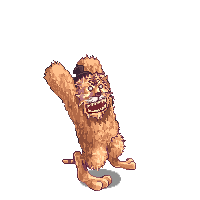
ROChargenPHP is a PHP tool made for Ragnarok Online private server to help them to solved a big problem : how to display game characters on the website ? So this tool comes at the rescue, parsing game data to render as an image the character/monster of your choice, base on your database or direct informations.

It required PHP5 with the PDO and GD drivers installed. And atleast your game data uploaded to the server (data or/and GRF).


Features

Core
  • Support for .spr, .act, .pal, .grf, ...
  • .act file completed support (transparency, scale, color, rotate, ...)
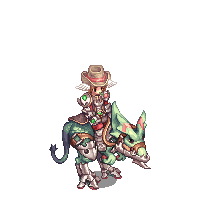
  • Characters fully implemented ( body, head, hats, weapon, shield, robe, mount) with palettes support.
  • Can modify action, animation and direction.
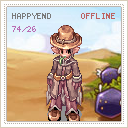
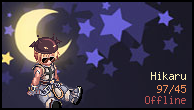
  • Class to generate : Full Character / Character Head only / Monster-NPC-Homunculus / Avatar / Signature.
  • Cache system available (and can be set off) with configurable time to cache.
  • Emblem Loader available.
Client

  • Data.ini file support (to list your GRFs)
  • Support GRF (0x200 version only without DES encryption - repack before uploading) - the data folder is always read first.
  • Auto-Extract files from GRF if needed (optimize performance)
  • Updater script available to convert some lua files to PHP.
How to use

Really url-friendly:

myserver.com/chargen/<controller>/<data> // with url-rewritingmyserver.com/chargen/index.php/<controller>/<data> // without url-rewriting Example for my character called "KeyWorld":
Code:
myserver.com/chargen/avatar/KeyWorld // avatarmyserver.com/chargen/signature/KeyWorld // signaturemyserver.com/chargen/character/KeyWorld // full Charactermyserver.com/chargen/characterhead/KeyWorld // Character's head 
 

You can change the default link by modify the array $routes in the index.php file:
Code:
// $routes['url'] = controller$routes['/avatar/(.*)'] = 'Avatar';$routes['/character/(.*)'] = 'Character';$routes['/characterhead/(.*)'] = 'CharacterHead';$routes['/monster/(d+)'] = 'Monster';$routes['/signature/(.*)'] = 'Signature'; 
Custom display

At least, the tool is really easy to use, here an example on how to display a static character:
 
Code:
$chargen = new CharacterRender();
$chargen->action = CharacterRender::ACTION_READYFIGHT;
$chargen->direction = CharacterRender::DIRECTION_SOUTHEAST;
$chargen->body_animation = 0;
$chargen->doridori = 0;

// Custom data:
$chargen->sex    = "M";
$chargen->class = 4002;
$chargen->clothes_color = 0;
$chargen->hair = 5;
$chargen->hair_color = 12;
// ... head_top, head_mid, head_bottom, robe, weapon, shield, ...

// Generate Image
$img = $chargen->render();
imagepng($img);


Examples / Demos
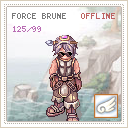
avatar1.png
avatar2.png
signature.png


body-keyworld.png
head-keyworld.png


1115.png
1002.png


Sources


Get the source

(Thanks to report all bugs)


License


Instead of selling it, I give a try to "Open Source project with Donation".
So if you think, you would have buy it if i was selling it, think to give a donation ?


Notes
  • A directory "client" is in the project, it will be a good idea to move it to a directory not accessible by the user (for example /home/client/).
  • If you use generate images from GRFs you have to know it's a little slower, i recommend you in this case to allow the "AutoExtract" option to gain performance.
  • GRFs have to be save as 0x200 version without any encryption (even the official DES), good idea is to remove unused folders ( textures, wav, models)..
  • If you use the options Cache and AutoExtract, don't forget the script need to have a write access to the
client and cache folder.
[*]Thanks to Khazou for the acces to his server to fully testing the tool

 
Happy to see you like it !
default_smile.png


where can i put the custom display can someone teach me
 Without using the core files and controllers, you have to do this (good to build a char simulator as ratemyserver has) :

Code:
<?php
 
define('__ROOT__', dirname(__FILE__) . '/'); 
 
 
// Loading CORE files
require_once( __ROOT__ . 'core/class.Controller.php');
require_once( __ROOT__ . 'core/class.Cache.php');
require_once( __ROOT__ . 'core/class.Client.php');
require_once( __ROOT__ . 'core/class.DB.php');
 
 
// Initialize the client (load GRF, load DB, etc.)
Client::init();
 
 
// What do you want to display ?
// Full Character ?
// So include the render needed
require_once(  __ROOT__ . 'render/class.CharacterRender.php' );
 
 
// Set up the header
header('Content-type:image/png');
 
// Since you use class.CharacterRender, use it :
$chargen                 = new CharacterRender();
 
// Set your datas here
$chargen->action         = CharacterRender::ACTION_READYFIGHT;   // You can see constants in
$chargen->direction      = CharacterRender::DIRECTION_SOUTHEAST; // render/class.RORender.php
$chargen->body_animation = 0;
$chargen->doridori       = 0;
$chargen->sex            = "M";
$chargen->class          = 4002;
$chargen->clothes_color  = 0;
$chargen->hair           = 5;
$chargen->hair_color     = 12;
$chargen->head_top       = 0;
$chargen->head_mid       = 0;
$chargen->head_bottom    = 0;
$chargen->weapon         = 0;
$chargen->shield         = 0;
$chargen->robe           = 0;
$chargen->option         = 0;
 
 
// Generate the image and display it
$img = $chargen->render();
imagepng($img);
 
?>
 
Last edited by a moderator:
why i cant see the avatar of my character?
Maybe it can't connect to your DB, or you don't have any files set in the client folder ?

Try using the debug mode, uncomment the two lines in index.php to know if there is an error:

Code:
ini_set('display_errors', 1);
error_reporting(E_ALL);
 
Last edited by a moderator:
Ok so it's a problem of data.

You have to put a data folder with all your sprites and palette on client/data/.

Or add your GRFs in client/ and modify data.ini with your grf files to load.

If you don't have data, it can't render anything.

 
i add it already and paste also my grf but still not showing, gm account supported or not?

 
even monster not showing also, btw i dl the zip file in your github, later i will try the git

 
GMs accounts are supported but don't render the GM skin (just the basic job).

Try to remove the cache (index.php) during the test:

Code:
Cache::$time = 15 * 60 ; // cache for 15 mins (set to 0 if you want to disable cache).
Set it to 0, so if there is a change, you will see it in an instant instead of waiting 15 minutes.

Try to check that your data files are in the proper location.

You can also add a little check on core/class.Client.php to see if some files are not properly loaded:

Replace:

Code:
 return "data://application/octet-stream;base64," . base64_encode($content);
}
}

return false;
}
By

Code:
 return "data://application/octet-stream;base64," . base64_encode($content);
}
}
header('Content-type:text/plain');
exit("Exiting. File not found {$local_path}.");
return false;
}
 
Back
Top