

Patskie
Community Contributors
There is an existing server installation guide made by Diconfrost VaNz on this topic but this is outdated. So let me give ample time to share my experience on how to install Hercules SVN on your local machine.
1. To obtain hercules, refer to Ind's topic
2. Go to conf/char-server.conf and look for the code below :
// Server Communication username and password.userid: s1passwd: p1
Set s1 and p1 to anything you want but take note of them as you will use them later on when you move to SQL portion of this installation.
In my case, i will use patskie since it is my screen name.
// Server Communication username and password.userid: patskiepasswd: patskie
3. Set your server name? Find this line also on your conf/char-server.conf. Change it to whatever you want :
// Server name, use alternative character such as ASCII 160 for spaces.// NOTE: Do not use spaces or any of these characters which are not allowed in // Windows filenames /:*?"<>|// ... or else guild emblems won't work client-side!server_name: Hercules
4. Remove // on the following code :
//login_ip: 127.0.0.1
Note : 127.0.0.1 means localhost, local machine.
5. Save and exit
6. Now go to conf/map-server.conf
7. Same to what you have did in conf/char-server.conf :
//--------------------------------------------------------------// Configuration Info//--------------------------------------------------------------// Interserver communication passwords, set in account.txt (or equiv.)userid: patskiepasswd: patskie
8. Remove // on the following code :
//char_ip: 127.0.0.1
9. Once you're done. Save and exit.
10. Now go to conf/inter-server.conf
11. Set the following code :
// Global SQL settings// overriden by local settings when the hostname is defined there// (currently only the login-server reads/obeys these settings)sql.db_hostname: 127.0.0.1sql.db_port: 3306sql.db_username: rootsql.db_password: ragnaroksql.db_database: herculessql.codepage:// MySQL Character SQL serverchar_server_ip: 127.0.0.1char_server_port: 3306char_server_id: rootchar_server_pw: ragnarokchar_server_db: hercules// MySQL Map SQL Servermap_server_ip: 127.0.0.1map_server_port: 3306map_server_id: rootmap_server_pw: ragnarokmap_server_db: hercules// MySQL Log SQL Databaselog_db_ip: 127.0.0.1log_db_port: 3306log_db_id: rootlog_db_pw: ragnaroklog_db_db: loglog_codepage:log_login_db: loginlog
Note : Use 127.0.0.1 as ip because you will run these server on your local machine. Use root as the database id because by default MySQL workbench uses root as username. And finally ragnarok as database password which is configurable by users. Set map, char an sql database to hercules and set log database to loginlog
12. Once done, Save and exit
13. Now go to src/common/mmo.h and find the following code :
#ifndef PACKETVER #define PACKETVER 20120418#endif
Change to :
#ifndef PACKETVER #define PACKETVER 20100730#endif
Note : You can change 20120418 (2012-04-18) to whatever client-date you want. In my case i will use 2010-07-30 client (20100730).
14. Save and exit.
15. Now let's go to mysql part.
16. Download MySQL workbench here. Why workbench? More convenient to use.
17. Once you are finished downloading and installing. Download WAMP server here because workbench will not start functioning if you do not have WAMP server
18. Once you are finished downloading and installing wampserver. Run it
19. Open mysql workbench
20. Add user and password into it. Follow this guide. Make sure you set username as root and password as ragnarok because this is the credentials located on your conf/inter-server.conf
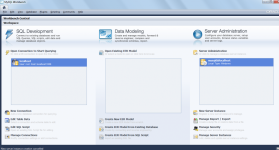
21. Create a server instance and connection. Just click New Connection for creating connection and click New Server Instance for creating a new server instance everything there are self explanatory
22. More likely you must have the following : ( Check image below )
23. At the left portion of the application. You can see schemas. Right click on one of them (test schema) and click on create schema
24. Set the name of the schema to hercules because that is the credential we put in our inter-server
25. Create also a schema log
26. Double click hercules schema
27. Under file located at the bottom of the home button ( upper left to be exact ) click Open SQL Script and locate sql script on sql-files/main.sql, open it and execute ( you can find execute button at the upper portion of the text editor of mysql workbench it looks like a thunder xD )
28. Double click log schema
29. Under file located at the bottom of the home button ( upper left to be exact ) click Open SQL Script and locate sql script on sql-files/logs.sql, open it and execute ( you can find execute button at the upper portion of the text editor of mysql workbench it looks like a thunder xD )
30. Once everything is set double click again hercules schema
31. Execute the following code
SELECT * FROM login;
32. Change userid, user_pass to the credentials you have put on both char-server and map-server.conf
33. Click apply.
34. Once done, go back to your server files and compile everything using Microsoft Visual Studio 2009 or 2010 or 2012
Note :
Microsoft Visual Studio 2009 = Hercules-9
Microsoft Visual Studio 2010 = Hercules-10
Microsoft Visual Studio 2012 = Hercules-12
35. Open it via C++
36. In my case i am using MVS 2010, Highlight char-server, login-server, map-server, mapcache at the left portion of the application. Right click on it and click Build Selection
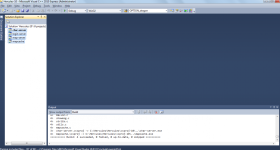
37. Check image for successful compilation, Once done exit the application
38. Now you're done! Run run-server.bat on main folder
I hope this guide help other people who find it difficult to install hercules svn on your local machine. Actually this guide is not hard. I just divided the guide into small chunks so that people will understand more. If you think that any portion of installation is not included in my guide or maybe in some way not good or not correct then feel free to post it.
Additional Notes :
- If you want other people to connect then you must port forward your router, or you can use other application like hamachi
- If any error occur feel free to post it here. Make sure you will post it in a detailed manner. Post screenshot if possible
- I include a diff client for 2010-07-30 since i use it in this guide
2010-07-30-DIFF.rar
1. To obtain hercules, refer to Ind's topic
2. Go to conf/char-server.conf and look for the code below :
// Server Communication username and password.userid: s1passwd: p1
Set s1 and p1 to anything you want but take note of them as you will use them later on when you move to SQL portion of this installation.
In my case, i will use patskie since it is my screen name.
// Server Communication username and password.userid: patskiepasswd: patskie
3. Set your server name? Find this line also on your conf/char-server.conf. Change it to whatever you want :
// Server name, use alternative character such as ASCII 160 for spaces.// NOTE: Do not use spaces or any of these characters which are not allowed in // Windows filenames /:*?"<>|// ... or else guild emblems won't work client-side!server_name: Hercules
4. Remove // on the following code :
//login_ip: 127.0.0.1
Code:
//char_ip: 127.0.0.15. Save and exit
6. Now go to conf/map-server.conf
7. Same to what you have did in conf/char-server.conf :
//--------------------------------------------------------------// Configuration Info//--------------------------------------------------------------// Interserver communication passwords, set in account.txt (or equiv.)userid: patskiepasswd: patskie
8. Remove // on the following code :
//char_ip: 127.0.0.1
Code:
//map_ip: 127.0.0.110. Now go to conf/inter-server.conf
11. Set the following code :
// Global SQL settings// overriden by local settings when the hostname is defined there// (currently only the login-server reads/obeys these settings)sql.db_hostname: 127.0.0.1sql.db_port: 3306sql.db_username: rootsql.db_password: ragnaroksql.db_database: herculessql.codepage:// MySQL Character SQL serverchar_server_ip: 127.0.0.1char_server_port: 3306char_server_id: rootchar_server_pw: ragnarokchar_server_db: hercules// MySQL Map SQL Servermap_server_ip: 127.0.0.1map_server_port: 3306map_server_id: rootmap_server_pw: ragnarokmap_server_db: hercules// MySQL Log SQL Databaselog_db_ip: 127.0.0.1log_db_port: 3306log_db_id: rootlog_db_pw: ragnaroklog_db_db: loglog_codepage:log_login_db: loginlog
Note : Use 127.0.0.1 as ip because you will run these server on your local machine. Use root as the database id because by default MySQL workbench uses root as username. And finally ragnarok as database password which is configurable by users. Set map, char an sql database to hercules and set log database to loginlog
12. Once done, Save and exit
13. Now go to src/common/mmo.h and find the following code :
#ifndef PACKETVER #define PACKETVER 20120418#endif
Change to :
#ifndef PACKETVER #define PACKETVER 20100730#endif
Note : You can change 20120418 (2012-04-18) to whatever client-date you want. In my case i will use 2010-07-30 client (20100730).
14. Save and exit.
15. Now let's go to mysql part.
16. Download MySQL workbench here. Why workbench? More convenient to use.
17. Once you are finished downloading and installing. Download WAMP server here because workbench will not start functioning if you do not have WAMP server
18. Once you are finished downloading and installing wampserver. Run it
19. Open mysql workbench
20. Add user and password into it. Follow this guide. Make sure you set username as root and password as ragnarok because this is the credentials located on your conf/inter-server.conf
21. Create a server instance and connection. Just click New Connection for creating connection and click New Server Instance for creating a new server instance everything there are self explanatory
22. More likely you must have the following : ( Check image below )
23. At the left portion of the application. You can see schemas. Right click on one of them (test schema) and click on create schema
24. Set the name of the schema to hercules because that is the credential we put in our inter-server
25. Create also a schema log
26. Double click hercules schema
27. Under file located at the bottom of the home button ( upper left to be exact ) click Open SQL Script and locate sql script on sql-files/main.sql, open it and execute ( you can find execute button at the upper portion of the text editor of mysql workbench it looks like a thunder xD )
28. Double click log schema
29. Under file located at the bottom of the home button ( upper left to be exact ) click Open SQL Script and locate sql script on sql-files/logs.sql, open it and execute ( you can find execute button at the upper portion of the text editor of mysql workbench it looks like a thunder xD )
30. Once everything is set double click again hercules schema
31. Execute the following code
SELECT * FROM login;
32. Change userid, user_pass to the credentials you have put on both char-server and map-server.conf
33. Click apply.
34. Once done, go back to your server files and compile everything using Microsoft Visual Studio 2009 or 2010 or 2012
Note :
Microsoft Visual Studio 2009 = Hercules-9
Microsoft Visual Studio 2010 = Hercules-10
Microsoft Visual Studio 2012 = Hercules-12
35. Open it via C++
36. In my case i am using MVS 2010, Highlight char-server, login-server, map-server, mapcache at the left portion of the application. Right click on it and click Build Selection
37. Check image for successful compilation, Once done exit the application
38. Now you're done! Run run-server.bat on main folder
I hope this guide help other people who find it difficult to install hercules svn on your local machine. Actually this guide is not hard. I just divided the guide into small chunks so that people will understand more. If you think that any portion of installation is not included in my guide or maybe in some way not good or not correct then feel free to post it.
Additional Notes :
- If you want other people to connect then you must port forward your router, or you can use other application like hamachi
- If any error occur feel free to post it here. Make sure you will post it in a detailed manner. Post screenshot if possible
- I include a diff client for 2010-07-30 since i use it in this guide
2010-07-30-DIFF.rar
Attachments
Last edited by a moderator:


