N > help on status icon

Ragnar Lothbrok

New member
Messages
317
Points
0
Age
40
Location
In the Desert or Morocc
Emulator
Just wanna ask about this, im really confuse on how to do it, SC_ARMOR_ELEMENT and ITEM_ENCHANTARMS

there are multipel items using SC_ARMOR_ELEMENT like:

12114,Elemental_Fire,Elemental Converter,11,2,,10,,,,,0xFFFFFFFF,7,2,,,,,,{ itemskill "ITEM_ENCHANTARMS",4; },{},{}12115,Elemental_Water,Elemental Converter,11,2,,10,,,,,0xFFFFFFFF,7,2,,,,,,{ itemskill "ITEM_ENCHANTARMS",2; },{},{}12116,Elemental_Earth,Elemental Converter,11,2,,10,,,,,0xFFFFFFFF,7,2,,,,,,{ itemskill "ITEM_ENCHANTARMS",3; },{},{}12117,Elemental_Wind,Elemental Converter,11,2,,10,,,,,0xFFFFFFFF,7,2,,,,,,{ itemskill "ITEM_ENCHANTARMS",5; },{},{} 
resist.png

and ITEM_ENCHANTARMS like :

12118,Resist_Fire,Fireproof Potion,2,2,,10,,,,,0xFFFFFFFF,7,2,,,,,,{ sc_start4 SC_ARMOR_ELEMENT,1200000,-15,0,20,0; },{},{}12119,Resist_Water,Coldproof Potion,2,2,,10,,,,,0xFFFFFFFF,7,2,,,,,,{ sc_start4 SC_ARMOR_ELEMENT,1200000,20,0,0,-15; },{},{}12120,Resist_Earth,Earthproof Potion,2,2,,10,,,,,0xFFFFFFFF,7,2,,,,,,{ sc_start4 SC_ARMOR_ELEMENT,1200000,0,20,-15,0; },{},{}12121,Resist_Wind,Thunderproof Potion,2,2,,10,,,,,0xFFFFFFFF,7,2,,,,,,{ sc_start4 SC_ARMOR_ELEMENT,1200000,0,-15,0,20; },{},{} 
Endow Icon for those item...

How to make each item has their own Statusicon when using?

 
I'm not a source expert but it seems this is related to somewhere inside src/map/status.c inside the initChangeTables function. I myself don't know what you have to change but I hope you'll get better help on the Source Support forums. Moving there
default_wink.png


status.c, find:

StatusIconChangeTable[SC_MONSTER_TRANSFORM] = SI_MONSTER_TRANSFORM;
Add below:

StatusIconChangeTable[SC_ARMOR_ELEMENT] = SI_ARMOR_ELEMENT;

Now set an icon to SI_ARMOR_ELEMENT.

In status.h find:

SI_ARMOR_PROPERTY = 302,
Add below:

SI_ARMOR_ELEMENT = 302,
This way SC_ARMOR_ELEMENT will use the same icon as SC_ARMORPROPERTY. If you want to set a custom icon read this: http://www.eathena.ws/board/index.php?showtopic=278904

Note: You'll can also personalize the icon info in-game with the client lua files / statusicon folder

Note2: Hercules changed SC_ARMOR_ELEMENT to SC_ARMORPROPERTY, maybe an outdated revision?

 
Last edited by a moderator:
status.c, find:

StatusIconChangeTable[SC_MONSTER_TRANSFORM] = SI_MONSTER_TRANSFORM;
Add below:

StatusIconChangeTable[SC_ARMOR_ELEMENT] = SI_ARMOR_ELEMENT;

Now set an icon to SI_ARMOR_ELEMENT.

In status.h find:

SI_ARMOR_PROPERTY = 302,
Add below:

SI_ARMOR_ELEMENT = 302,
This way SC_ARMOR_ELEMENT will use the same icon as SC_ARMORPROPERTY. If you want to set a custom icon read this: http://www.eathena.ws/board/index.php?showtopic=278904

Note: You'll can also personalize the icon info in-game with the client lua files / statusicon folder

Note2: Hercules changed SC_ARMOR_ELEMENT to SC_ARMORPROPERTY, maybe an outdated revision?
I know how to add status icon, my problem is how can put 4 icons in 1 SC_?

Like this items : 

12114,Elemental_Fire,Elemental Converter,11,2,,10,,,,,0xFFFFFFFF,7,2,,,,,,{ itemskill "ITEM_ENCHANTARMS",4; },{},{}12115,Elemental_Water,Elemental Converter,11,2,,10,,,,,0xFFFFFFFF,7,2,,,,,,{ itemskill "ITEM_ENCHANTARMS",2; },{},{}12116,Elemental_Earth,Elemental Converter,11,2,,10,,,,,0xFFFFFFFF,7,2,,,,,,{ itemskill "ITEM_ENCHANTARMS",3; },{},{}12117,Elemental_Wind,Elemental Converter,11,2,,10,,,,,0xFFFFFFFF,7,2,,,,,,{ itemskill "ITEM_ENCHANTARMS",5; },{},{}
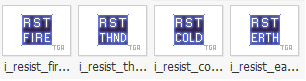
all items using ITEM_ENCHANTARMS, i want to make each item have their own icons like :

Fire Converter = Endow Blaze Status Icon

Water Converter = Endow Tsunami Status Icon

Earth Converter = Endow Quake Status Icon

Wind Converter = Endow Tornado Status Icon

 
I really doubt you can make separate icons for those. Unless you add a separate SC for each item.

 
i think its possible like this item srolls :

14602,TaogunkaS,Tao Gunka Scroll,2,0,,10,,,,,0xFFFFFFFF,7,2,,,,,,{ sc_start SC_ITEMSCRIPT,180000,4302; },{},{}14603,MistressS,Mistress Scroll,2,0,,10,,,,,0xFFFFFFFF,7,2,,,,,,{ sc_start SC_ITEMSCRIPT,180000,4132; },{},{}14604,Orc_HeroS,Orc Hero Scroll,2,0,,10,,,,,0xFFFFFFFF,7,2,,,,,,{ sc_start SC_ITEMSCRIPT,60000,4143; },{},{}14605,Orc_LoadS,Orc Lord Scroll,2,0,,10,,,,,0xFFFFFFFF,7,2,,,,,,{ sc_start SC_ITEMSCRIPT,180000,4135; },{},{}
this scrolls have their own icons when using but their just using 1 SC...

 
You can do something similar as SC_ITEMSCRIPT does.

Under status_change_start search for SC_PROPERTYELEMENT and paste below:

if( sd ) { if (val1 > 0) clif->status_change(bl,SI_PROPERTY_WATER,1,tick,0,0,0); else clif->sc_end(&sd->bl, sd->bl.id, SELF, SI_PROPERTY_WATER); if (val2 > 0) clif->status_change(bl,SI_PROPERTY_EARTH,1,tick,0,0,0); else clif->sc_end(&sd->bl, sd->bl.id, SELF, SI_PROPERTY_EARTH); if (val3 > 0) clif->status_change(bl,SI_PROPERTY_FIRE,1,tick,0,0,0); else clif->sc_end(&sd->bl, sd->bl.id, SELF, SI_PROPERTY_FIRE); if (val4 > 0) clif->status_change(bl,SI_PROPERTY_WIND,1,tick,0,0,0); else clif->sc_end(&sd->bl, sd->bl.id, SELF, SI_PROPERTY_WIND);}
Then, in status.h define each SI_PROPERTY_****

But it needs a bit of work, as needs to check when SC_ARMORPROPERTY ends too.

 
Last edited by a moderator:
Yes it is. Remember:

Status.h:

Find and change this

SI_MAX,};
To this

// Custom property icons SI_PROPERTY_FIRE = 0, SI_PROPERTY_WATER = 0, SI_PROPERTY_EARTH = 0, SI_PROPERTY_WIND = 0, SI_MAX,};
Change each one to suit your desired icon ID.

status.c

Find and change this

case SC_ARMORPROPERTY: case SC_ARMOR_RESIST: break;
to this

case SC_ARMORPROPERTY: // val1 = water | val2 = earth | val3 = fire | val4 = wind if( sd ) { if (val1 > 0) clif->status_change(bl,SI_PROPERTY_WATER,1,tick,0,0,0); else clif->sc_end(&sd->bl, sd->bl.id, SELF, SI_PROPERTY_WATER); if (val2 > 0) clif->status_change(bl,SI_PROPERTY_EARTH,1,tick,0,0,0); else clif->sc_end(&sd->bl, sd->bl.id, SELF, SI_PROPERTY_EARTH); if (val3 > 0) clif->status_change(bl,SI_PROPERTY_FIRE,1,tick,0,0,0); else clif->sc_end(&sd->bl, sd->bl.id, SELF, SI_PROPERTY_FIRE); if (val4 > 0) clif->status_change(bl,SI_PROPERTY_WIND,1,tick,0,0,0); else clif->sc_end(&sd->bl, sd->bl.id, SELF, SI_PROPERTY_WIND); } case SC_ARMOR_RESIST: break;

Find and change this (I've got to copy this entire block so you don't get lost, remember this is when status icons for SC_ITEMSCRIPT actually ENDS)

case SC_ITEMSCRIPT: if( sd ) { switch( sce->val1 ) { //case 4121://Phree //case 4047://Ghostring case 4302://Gunka clif->sc_end(&sd->bl, sd->bl.id, SELF, SI_MVPCARD_TAOGUNKA);
To this:

case SC_ARMORPROPERTY: if( sd ) { if( sce->val1 ) clif->sc_end(&sd->bl, sd->bl.id, SELF, SI_PROPERTY_WATER); if( sce->val2 ) clif->sc_end(&sd->bl, sd->bl.id, SELF, SI_PROPERTY_EARTH); if( sce->val3 ) clif->sc_end(&sd->bl, sd->bl.id, SELF, SI_PROPERTY_FIRE); if( sce->val4 ) clif->sc_end(&sd->bl, sd->bl.id, SELF, SI_PROPERTY_WIND); } case SC_ITEMSCRIPT: if( sd ) { switch( sce->val1 ) { //case 4121://Phree //case 4047://Ghostring case 4302://Gunka clif->sc_end(&sd->bl, sd->bl.id, SELF, SI_MVPCARD_TAOGUNKA);

And I think that will do the trick.

 
Last edited by a moderator:
Great it works perfectly!

just alittle fix, when clicking the item on 1st attemp the icon will not show but when you click again the item icon will show..

how to fix when clicking on 1st attemp icon will show...

 
Yeah, it's a bit random so I can't figure why does it work that way.

Edit: Move the status_change_start block code of SC_ARMORPROPERTY next to the block of SC_ITEMSCRIPT. That will fix it.

 
Last edited by a moderator:
Not showing for me. I cannot reproduce this.

Note: I forgot to add a "break;" before the block of SC_ARMORPROPERTY ends. Check that.

 
Last edited by a moderator:
status.c, find:

StatusIconChangeTable[SC_MONSTER_TRANSFORM] = SI_MONSTER_TRANSFORM;
Add below:

StatusIconChangeTable[SC_ARMOR_ELEMENT] = SI_ARMOR_ELEMENT;

Now set an icon to SI_ARMOR_ELEMENT.

In status.h find:

SI_ARMOR_PROPERTY = 302,
Add below:

SI_ARMOR_ELEMENT = 302,
This way SC_ARMOR_ELEMENT will use the same icon as SC_ARMORPROPERTY. If you want to set a custom icon read this: http://www.eathena.ws/board/index.php?showtopic=278904

Note: You'll can also personalize the icon info in-game with the client lua files / statusicon folder

Note2: Hercules changed SC_ARMOR_ELEMENT to SC_ARMORPROPERTY, maybe an outdated revision?
That version of X Status Icon does not support 2013 clients. Is there any chance that you have a newer version that could support it?

 
Last edited by a moderator:
Back
Top