BIG announce Font

schan

New member
Messages
60
Points
0
Github
xschan
Emulator
Hi,

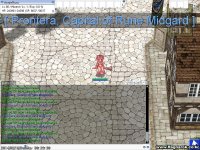
How can we do this BIG font size when broadcasting?

9700860e0d90411090e40a7.png


Source: http://rathena.org/board/topic/74568-r-big-text-announcement/

I know we have this:

announce "<text>",<flag>{,<fontColor>{,<fontType>{,<fontSize>{,<fontAlign>{,<fontY>}}}}}
but it's not working.

I'm requesting for anyone who knows how to do this.
default_biggrin.png


Thanks!

 
Last edited by a moderator:
really ?

Code:
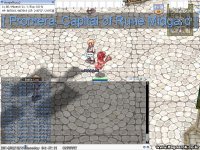
-	script	sdfkjhfkjhsdf	-1,{OnInit:	announce "[ Prontera, Capital of Rune Midgard ]", bc_all, 0x66AAFF, 0x190, 50;}
screenHercules005.jpg
 
really ?

- script sdfkjhfkjhsdf -1,{OnInit: announce "[ Prontera, Capital of Rune Midgard ]", bc_all, 0x66AAFF, 0x190, 50;}
attachicon.gif
screenHercules005.jpg
Does it work in 2012-04-10 clients? I tried your code and it wont work. 
default_excl.png
Hmm, it's working.. If you have opened the server and just logged in you will not see this..
default_smile.png


Just open the server, log in, and then do @unloadnpcfile and @loadnpc if you use annie's script without modifying it,
default_smile.png
because the script is using oninit and not a onpcloadmap event..
default_smile.png


Code:
prontera,155,185,3	script	sdfkjhfkjhsdf	100,{	announce "[ Prontera, Capital of Rune Midgard ]", bc_all, 0x66AAFF, 0x190, .size++;}
OMG ! the more you click, the bigger the font size !
default_tongue.png
 
prontera,155,185,3 script sdfkjhfkjhsdf 100,{ announce "[ Prontera, Capital of Rune Midgard ]", bc_all, 0x66AAFF, 0x190, .size++;}OMG ! the more you click, the bigger the font size !
default_tongue.png
2s1snt5.png
zss61c.png


I think I'm missing something.

What client version should I use for this? I'm using 2012-04-10.

 
ahem ...

2010-07-10

super outdated ... hahaha

parhaps there's something new in the packet for newer client ...

maybe tonight I'll start download latest client and see...

 
ahem ...

2010-07-10

super outdated ... hahaha

parhaps there's something new in the packet for newer client ...

maybe tonight I'll start download latest client and see...
Yeah I think I've read somewhere that this only works with old clients. Maybe that's why it won't work for me.

 
ahem ...

2010-07-10

super outdated ... hahaha

parhaps there's something new in the packet for newer client ...

maybe tonight I'll start download latest client and see...
found anything Annie? will this work with the latest clients?

 
thanks for helping me solve my client side problem

give a few rep in this topic then
default_tongue.png


but ... ahem ...

screenHercules000.jpg

still works for me
default_tongue.png


Last edited by a moderator:
So how can I make it work?
default_tongue.png


will check on this later. 

-- Okay back to sleep. 
default_sleep.png


like in the PM I said

1.

download 2014-01-15Ragexe_Full_Client

http://hercules.endlessro.net/

2.

change PACKETVER 20140115 inside mmo.h, recompile

3.

You have to put these in packet.h:

// 2014-01-15eRagexe - YomRawr#if PACKETVER >= 20140115 packet(0x0369,7,clif->pActionRequest,2,6); //## packet(0x083C,10,clif->pUseSkillToId,2,4,6); //## packet(0x0437,5,clif->pWalkToXY,2); //## packet(0x035F,6,clif->pTickSend,2); //## packet(0x08A7,5,clif->pChangeDir,2,4); //## packet(0x0940,6,clif->pTakeItem,2); //## packet(0x0361,6,clif->pDropItem,2,4); //## packet(0x088E,8,clif->pMoveToKafra,2,4); //## packet(0x0367,8,clif->pMoveFromKafra,2,4); //## packet(0x0438,10,clif->pUseSkillToPos,2,4,6,8); //## packet(0x0366,90,clif->pUseSkillToPosMoreInfo,2,4,6,8,10); //## packet(0x0802,6,clif->pGetCharNameRequest,2); //## packet(0x0368,6,clif->pSolveCharName,2); //## packet(0x0360,12,clif->pSearchStoreInfoListItemClick,2,6,10); packet(0x0817,2,clif->pSearchStoreInfoNextPage,0); packet(0x0815,-1,clif->pSearchStoreInfo,2,4,5,9,13,14,15); packet(0x096A,-1,clif->pReqTradeBuyingStore,2,4,8,12); packet(0x088A,6,clif->pReqClickBuyingStore,2); packet(0x0965,2,clif->pReqCloseBuyingStore,0); packet(0x0815,-1,clif->pReqOpenBuyingStore,2,4,8,9,89);//## packet(0x096A,18,clif->pPartyBookingRegisterReq,2,4);//## // packet(0x088A,8); // CZ_JOIN_BATTLE_FIELD//## packet(0x0965,-1,clif->pItemListWindowSelected,2,4,8);//## packet(0x0966,19,clif->pWantToConnection,2,6,10,14,18);//## packet(0x095D,26,clif->pPartyInvite2,2);//## // packet(0x095B,4); // CZ_GANGSI_RANK//## packet(0x089B,26,clif->pFriendsListAdd,2);//## packet(0x092D,5,clif->pHomMenu,2,4);//## packet(0x0865,36,clif->pStoragePassword,0);//###endif#if PACKETVER >= 20140115 packetKeys(0x63224335,0x0F3A1F27,0x6D217B24);#endif
..

.

4. run YourRO.exe ... this hexed client is already provided when I download it

I don't care how to diff the client, because I'm client noob hahaha

so yeah ... maybe its your hexed client problem

 
Last edited by a moderator:
like in the PM I said

1.

download 2014-01-15Ragexe_Full_Client

http://hercules.endlessro.net/

2.

change PACKETVER 20140115 inside mmo.h, recompile

3.

You have to put these in packet.h:

// 2014-01-15eRagexe - YomRawr#if PACKETVER >= 20140115 packet(0x0369,7,clif->pActionRequest,2,6); //## packet(0x083C,10,clif->pUseSkillToId,2,4,6); //## packet(0x0437,5,clif->pWalkToXY,2); //## packet(0x035F,6,clif->pTickSend,2); //## packet(0x08A7,5,clif->pChangeDir,2,4); //## packet(0x0940,6,clif->pTakeItem,2); //## packet(0x0361,6,clif->pDropItem,2,4); //## packet(0x088E,8,clif->pMoveToKafra,2,4); //## packet(0x0367,8,clif->pMoveFromKafra,2,4); //## packet(0x0438,10,clif->pUseSkillToPos,2,4,6,8); //## packet(0x0366,90,clif->pUseSkillToPosMoreInfo,2,4,6,8,10); //## packet(0x0802,6,clif->pGetCharNameRequest,2); //## packet(0x0368,6,clif->pSolveCharName,2); //## packet(0x0360,12,clif->pSearchStoreInfoListItemClick,2,6,10); packet(0x0817,2,clif->pSearchStoreInfoNextPage,0); packet(0x0815,-1,clif->pSearchStoreInfo,2,4,5,9,13,14,15); packet(0x096A,-1,clif->pReqTradeBuyingStore,2,4,8,12); packet(0x088A,6,clif->pReqClickBuyingStore,2); packet(0x0965,2,clif->pReqCloseBuyingStore,0); packet(0x0815,-1,clif->pReqOpenBuyingStore,2,4,8,9,89);//## packet(0x096A,18,clif->pPartyBookingRegisterReq,2,4);//## // packet(0x088A,8); // CZ_JOIN_BATTLE_FIELD//## packet(0x0965,-1,clif->pItemListWindowSelected,2,4,8);//## packet(0x0966,19,clif->pWantToConnection,2,6,10,14,18);//## packet(0x095D,26,clif->pPartyInvite2,2);//## // packet(0x095B,4); // CZ_GANGSI_RANK//## packet(0x089B,26,clif->pFriendsListAdd,2);//## packet(0x092D,5,clif->pHomMenu,2,4);//## packet(0x0865,36,clif->pStoragePassword,0);//###endif#if PACKETVER >= 20140115 packetKeys(0x63224335,0x0F3A1F27,0x6D217B24);#endif
..

.

4. run YourRO.exe ... this hexed client is already provided when I download it

I don't care how to diff the client, because I'm client noob hahaha

so yeah ... maybe its your hexed client problem

this is why i made this clients Annie
default_smile.png


Back
Top