
Brynner
Community Contributors
anyone have a converter from iteminfo.lua or iteminfo.lub will be converted to . idnum2itemdesctable, idnum2itemdisplaynametable and idnum2itemresnametable.
thank you in advance.
thank you in advance.

7933#Poison Herb Rantana#7997#Spring Stanza20#16627#Brisingamen (Trial Version) box#16883#Refined Mighty Staff Box#17139#RWC Super Scroll#18675#Green Apple Hat#19699##20723##It was first found values till now,I updated it to serialize it by ItemID, try out the new version.thanks it works. but is it normal that the converted iteminfo.lub has shuffled the item order?
just like for idnum2itemdisplaynametable.txt
7933#Poison Herb Rantana#7997#Spring Stanza20#16627#Brisingamen (Trial Version) box#16883#Refined Mighty Staff Box#17139#RWC Super Scroll#18675#Green Apple Hat#19699##20723##
thanks it works fine now.It was first found values till now,I updated it to serialize it by ItemID, try out the new version.thanks it works. but is it normal that the converted iteminfo.lub has shuffled the item order?
just like for idnum2itemdisplaynametable.txt
7933#Poison Herb Rantana#7997#Spring Stanza20#16627#Brisingamen (Trial Version) box#16883#Refined Mighty Staff Box#17139#RWC Super Scroll#18675#Green Apple Hat#19699##20723##
thanks for this... btw how to install lua?It was first found values till now,I updated it to serialize it by ItemID, try out the new version.thanks it works. but is it normal that the converted iteminfo.lub has shuffled the item order?
just like for idnum2itemdisplaynametable.txt
7933#Poison Herb Rantana#7997#Spring Stanza20#16627#Brisingamen (Trial Version) box#16883#Refined Mighty Staff Box#17139#RWC Super Scroll#18675#Green Apple Hat#19699##20723##
just run Seperate.bat, if you don't know what to do..thanks for this... btw how to install lua?It was first found values till now,I updated it to serialize it by ItemID, try out the new version.thanks it works. but is it normal that the converted iteminfo.lub has shuffled the item order?
just like for idnum2itemdisplaynametable.txt
7933#Poison Herb Rantana#7997#Spring Stanza20#16627#Brisingamen (Trial Version) box#16883#Refined Mighty Staff Box#17139#RWC Super Scroll#18675#Green Apple Hat#19699##20723##
i know the step on using cmd prompt but im lazy to type haha.. when i use Seperate.bat nothing happensjust run Seperate.bat, if you don't know what to do..thanks for this... btw how to install lua?It was first found values till now,I updated it to serialize it by ItemID, try out the new version.thanks it works. but is it normal that the converted iteminfo.lub has shuffled the item order?
just like for idnum2itemdisplaynametable.txt
7933#Poison Herb Rantana#7997#Spring Stanza20#16627#Brisingamen (Trial Version) box#16883#Refined Mighty Staff Box#17139#RWC Super Scroll#18675#Green Apple Hat#19699##20723##
like i said nothing happend when i run lua.exei know the step on using cmd prompt but im lazy to type haha.. when i use Seperate.bat nothing happens
I cannot come and type it for you....
you should have itemInfo.lub in the same folder as tool, and it will make new folder named "idnum" and files will be stored there.. (Please do the kindness of reading Readme, and problem should have been fixed)
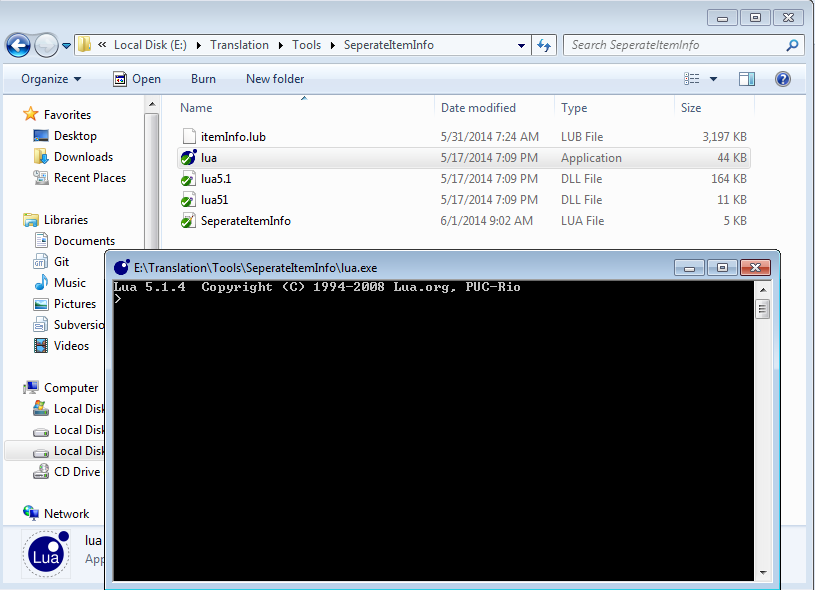
The new guide :updated 7 hours before, says it all different.like i said nothing happend when i run lua.exei know the step on using cmd prompt but im lazy to type haha.. when i use Seperate.bat nothing happens
I cannot come and type it for you....
you should have itemInfo.lub in the same folder as tool, and it will make new folder named "idnum" and files will be stored there.. (Please do the kindness of reading Readme, and problem should have been fixed)
that's why im asking about this step:
2)If you have lua installed, just double-click "SeperateItemInfo.lua" and it will do the work.
and im doing this step to make it work
3)If you don't have lua installed, open command prompt, go to "SeperateItemInfo" Folder, and type the following command "lua SeperateItemInfo.lua"
Thanks Dastgir!The new guide :updated 7 hours before, says it all different.like i said nothing happend when i run lua.exei know the step on using cmd prompt but im lazy to type haha.. when i use Seperate.bat nothing happens
I cannot come and type it for you....
you should have itemInfo.lub in the same folder as tool, and it will make new folder named "idnum" and files will be stored there.. (Please do the kindness of reading Readme, and problem should have been fixed)
that's why im asking about this step:
2)If you have lua installed, just double-click "SeperateItemInfo.lua" and it will do the work.
and im doing this step to make it work
3)If you don't have lua installed, open command prompt, go to "SeperateItemInfo" Folder, and type the following command "lua SeperateItemInfo.lua"
Make idnum tables from itemInfo:1)Copy itemInfo.lub to "SeperateItemInfo" Folder, If you have .lua, just change the extension to .lub2)If you have lua installed, just double-click "SeperateItemInfo.lua" and it will do the work.3)If you don't have lua installed, just run Seperate.bat4)The files will be stored in "idnum" folder.Note: This can even convert the compiled .lub file to idnum table
and lua installed means this package: https://code.google.com/p/luaforwindows/downloads/list
501#빨간허브를 잘 갈아 만든 체력회복제 ^000088HP 를 45 가량 회복^000000 시켜 준다.
^ffffff_^000000
무게 : ^7777777^000000
#
There might be tool around the forum(dont remember well, but yah, there should be a tool for it) and I am anyways making it (but not assuring to releasing it soon)but how to make all idnum into iteminfo.lub again.
You need two tools:but how to make all idnum into iteminfo.lub again.
Thanks Thuan, it's work with my PS.You need two tools:but how to make all idnum into iteminfo.lub again.
1) Item Converter (idnum<....>.txt ---> itemInfo.lua)
http://rathena.org/board/topic/66795-itemconverter/
2) A tool to convert itemInfo.lua to itemInfo.lub
https://github.com/ROClientSide/Translation/tree/master/Tools
Not sure why, but my client didn't read from RO-FolderSystemitemInfo.lub but from RO-Folderdatacskroption.lub, so I had to rename the itemInfo.lub to cskroption.lub. Keep that in mind if things don't work out.
We use essential cookies to make this site work, and optional cookies to enhance your experience.
