NEMO - Client Patcher

anyone can help please? about making custom job,
after done follow the tutorial, i got problem with walk action of the custom job, i tried to use swordsman sprite (just for test) but the body direction when walking is not normal, it's like mobs walk action which the body face to 1,3,5,7 (like npc direction) not 1~8 (which it should be).
does anyone ever got the same problem?

sorry if i posted this at the wrong place

ty

 
Last edited by a moderator:
I think the Resize Font patch needs some tweaking. According to a test ive done, without using the Resize Font and Use Custom Font ive decided to take a screenshot of the client running in langtype 0 and 1. The results shows the font for letters text changes, but numbers appear exactly the same with no look or size changes (maybe they use the same font for numbers. dont know if fonts in general affects numbers.) To have langtype 1's style in langtype 0 you would need custom font set to Ariel and font size to 12. But with this comes the problem of the font resizing affecting the numbers as well which causes them to appear too big and push themselves off of the display by a pixel or more (they should remain at size 10). So langtype 1 uses Ariel with letter text size 12 and number size 10.

Is it possible to get a resize font fix to not affect number size or could we get a separate patch for that?

 
Last edited by a moderator:
20141022 can't DIFF help~~~help~~~~~~~~~~~`
Hi, do you have a 2014-10-22ragexe unpacked version client? Could you please tell me where to download it?

 
Last edited by a moderator:
20141022 can't DIFF help~~~help~~~~~~~~~~~`
Hi, do you have a 2014-10-22ragexe unpacked version client? Could you please tell me where to download it?
http://herc.ws/board/topic/7573-20141022b/#entry45660
It seems not a unpacked one, also thanks very much.
default_tongue.png


Last edited by a moderator:
Please add to NEMO diff option:

[unlimited Loading Screen]

why hexeds 2014 charge only 5 pictures, and I wanted to upload more images loadings

sorry my bad english i´m using google translate

 
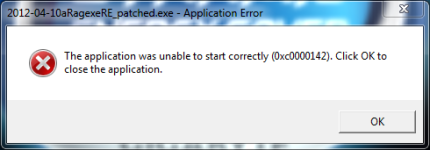
Hello I got this error when I started to run the encrypted client.

error.png

2 Chat Flood Allow6 Force Send Client Hash Packet (Experimental)8 Custom Window Title9 Disable 1rag1 type parameters (Recommended)13 Disable Ragexe Filename Check (Recommended)15 Disable HShield (Recommended)20 Extend Chat Box21 Extend Chat Room Box22 Extend PM Box24 Fix Camera Angles (Recommended)28 Increase Headgear ViewID30 Increase Zoom Out 50%33 Always Call SelectKoreaClientInfo() (Recommended)34 Enable /showname (Recommended)36 Read msgstringtable.txt (Recommended)37 Read questid2display.txt (Recommended)38 Remove Gravity Ads (Recommended)39 Remove Gravity Logo (Recommended)40 Restore Login Window (Recommended)41 Disable Nagle Algorithm (Recommended)44 Translate Client (Recommended)48 Use Plain Text Descriptions (Recommended)50 Skip License Screen53 Use Ascii on All Langtypes (Recommended)61 Disable Packet Encryption (Recommended)63 Use Official Cloth Palettes64 @ Bug Fix (Recommended)69 Extend Npc Dialog Box200 Enable Multiple GRFs - Embedded71 Ignore Missing File Error72 Ignore Missing Palette Error73 Remove Hourly Announce (Recommended)74 Increase Screenshot Quality75 Enable Flag Emoticons84 Remove Serial Display (Recommended)86 Only First Login Background88 Allow space in guild name90 Enable DNS Support (Recommended)97 Cancel to Login Window (Recommended)100 Disable Multiple Windows
But if the client is not encrypted there will be a skill problem.

screenWeDevGames000.jpg

 
Last edited by a moderator:
Bro, please check this bug:
I am using 20120410 and adding a custom headgear

2 Chat Flood Allow8 Custom Window Title9 Disable 1rag1 type parameters (Recommended)13 Disable Ragexe Filename Check (Recommended)15 Disable HShield (Recommended)17 Enable Official Custom Fonts19 Enable Title Bar Menu20 Extend Chat Box21 Extend Chat Room Box22 Extend PM Box24 Fix Camera Angles (Recommended)28 Increase Headgear ViewID32 Increase Zoom Out Max33 Always Call SelectKoreaClientInfo() (Recommended)34 Enable /showname (Recommended)35 Read Data Folder First36 Read msgstringtable.txt (Recommended)37 Read questid2display.txt (Recommended)38 Remove Gravity Ads (Recommended)39 Remove Gravity Logo (Recommended)40 Restore Login Window (Recommended)41 Disable Nagle Algorithm (Recommended)44 Translate Client (Recommended)46 Use Normal Guild Brackets48 Use Plain Text Descriptions (Recommended)49 Enable Multiple GRFs (Recommended)50 Skip License Screen63 Use Official Cloth Palettes64 @ Bug Fix (Recommended)68 Enable 64k Hairstyle69 Extend Npc Dialog Box73 Remove Hourly Announce (Recommended)74 Increase Screenshot Quality205 Enable Monster tables75 Enable Flag Emoticons76 Enforce Official Login Background86 Only First Login Background90 Enable DNS Support (Recommended)97 Cancel to Login Window (Recommended)102 Fix Tetra Vortex
Using Nemo Patcher makes my client close suddenly

But using Shin's Diff Patcher with WeeDiffGenerator makes the addition successful

I am not sure where is the problem.

The problem with ShinDP is even if you tick read data folder first, it seems to be not reading the clientinfo.xml inside the data folder (bad for local dev`ing)

Hope you can look on it. /thx

UPDATE. Actually, I also learned that diffing with NEMO on 20120410 client will make the shields not showing: http://herc.ws/board/topic/7369-client-is-not-showing-shield-sprite/

UPDATE. Also I learned that another issue from my client is also due to diffing with Nemo, http://herc.ws/board/topic/7378-lua-cannot-automatically-allocate-skill-points-on-some-skills/

Hope Nemo can solve problem with 20120410 client.
default_sad.png


Last edited by a moderator:
It seems that when i tried to change the font its stuck on the Verdana font. I am using 2013 08 07 ragexe client.

Please Add Enable Aura above 150 ~ thnks!

 
Last edited by a moderator:
I want to bump the problem regarding custom font not working properly. I just downloaded the newest version of the patcher and tried to diffed a 2013-12-23 client. I applied the patch to support custom font (Arial), and it still uses the font that looks like Comic Sans MS in-game.

After trying to patch the said client on an older version of the patcher, the Arial font worked after selecting the option [use Arial on langtype], which is not present on the newest version of the patcher.

 
Last edited by a moderator:
Nemo please repl my question
default_sad.png
i need your info
default_sad.png
"i use client 2012-04-10aragexe.exe "Increase Headgear ViewID" its not work, when i tried to using new headgear, (ViewID up to 1000++), my client crash, and then when i use WeeDiffPatcher, its work. can you help me? :("
I am having this same problem, really need to fix it if possible...

Thanks

 
Just curious,

is it possible to patch client to make client read/use 44k Sound rate

i read somewhere in japan blog, that was possible trough hex edit

 
When I diff a december 2013 client and set in client info lang type 17 the second login screen became black. Any clue?

 
Hi,

I would like to ask for some support.
Im using 20120410RagexeRE
after patching with N.E.M.O
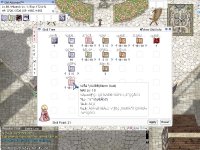
i got dislocated head /omg
9943t0.jpg


Thank you in advance


EDIT:

This only happen when checking "Remove GM Sprite"
Also there is a bug in "Increase attack Display" 
When i apply that patch. i got crash when attacking.

 
Last edited by a moderator:
Back
Top