how to enable grav error

It's default enabled in newer client's unless you have used a plain diff.. And that's for older clients

If your client crash suddenly then there is something bad at your diffing, try adding one by one.. And use a Clean Data Folder

 
thanks for the tips, ill post again here after i tried what you said.

It's default enabled in newer client's unless you have used a plain diff.. And that's for older clients

If your client crash suddenly then there is something bad at your diffing, try adding one by one.. And use a Clean Data Folder
 EDIT : my client is 2012-04-10a and im using clean data folder...and tried what you said...

here it is..

[UI] Allow Chat Flood[Fix] Always Call SelectKoreaClientInfo()[Fix] Chat @-Bug[Color] Chat Color GM[UI] Custom Window Title[Fix] Disable 1rag1 & 1sak1[Fix] Disable 4 Letter User Character Limit[Fix] Disable 4 Letter User ID Limit[Fix] Disable 4 Letter User Password Limit[Fix] Disable Hallucination Wavy Screen[Fix] Disable HShield[Add] Disable Nagle Algorithm[Fix] Disable RagexeRE Filename Check[UI] Enable 64k hairstyle[UI] Enable ASCII in Text[UI] Enable Aura Over level 99 and Level 150[Add] Enable DNS Support[Data] Enable Multiple GRFs[UI] Enable Title Bar Menu[UI] Enforce Official Login Background[UI] Extended Chat Box[UI] Extended Chat Room Box[UI] Extended PM Box[UI] Fix Camera Angles Medium[Fix] Force Send Client Hash Packet[UI] ignore Missing File Errors[UI] Ignore Missing Palette Errors[Data] Increase Headgear View ID[UI] Increase Zoom Out 50%.[Data] Load LUA Before LUB[UI] Only First Login Background[Data] Read Data Folder First[Data] Read msgstringable.txt[Data] Read questid2display.txt[UI] Remove Gravity Ads[UI] Remove Gravity Logo[UI] Remove Hourly Game Grade Banner[UI] Remove Hourly Playtime-Minder[FIx] Remove Login Auto Close[UI] Remove Login Error Code[UI] Remove Quake Skill Effect[UI] Remove Serial Display[Fix] Restore Login Window[Packet] Skip Header Obfuscation[Fix] Skip Header Obfuscation[UI] Skip Service Select[UI] Translate Client Into English[UI] Use Arial On All Langtypes[Data] Use Custom Aura Sprites[UI] Use Normal Guild Brackets[Data] Use Plain Text Descriptions[UI] Use Ragnarok Icon i tried the following..
Uncheck Load LUA Before Lub - and run - still no grav error

Uncheck Read Data Folder first - and run - still no grav error

Uncheck Both Load Lua before lub & Read Data Folder - and run - still no grav error

Uncheck Ignore Missing Files Errors - and run - still no grav error

Uncheck Ignore Missing Pallete Errors - and run - still no grav error

Uncheck Both Ignore Missing Files and Palette Errors - and run - still no grav error

 any more tips for diffing?

 
Last edited by a moderator:
Increase View ID only up to 15000

One of the Shared Palletes(Head/Body) is failling.

Doesn't use the ignore missing file errors

Also the Proxy Diff gives error

 
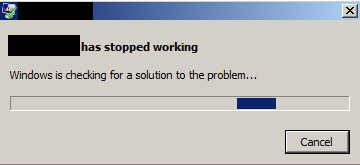
my goal is im trying to get back the GRAVITY ERROR MSG BOX.

i can't know what is the reason for the error when there are no box of code for the error

because everytime i have an error it's not showing. like what i said it's

"2012-04-10 blah blah is stopped working

close program"

only , please help
default_sad.png


Increase ViewID to 15000? Or did you mean 1500? Otherwise I can see that client sucking up a lot of memory, unless the overall implementation was changed.. which I doubt.

Always try to stick to the minimum-workable number when setting the max possible value for something (Applies to every single thing you do)

 
Code:
[UI] Allow Chat Flood[Fix] Always Call SelectKoreaClientInfo()[Fix] Chat @-Bug[UI] Custom Window Title[Fix] Disable 1rag1 & 1sak1[Fix] Disable Hallucination Wavy Screen[Fix] Disable HShield[Add] Disable Nagle Algorithm[Fix] Disable RagexeRE Filename Check[UI] Enable 64k hairstyle[UI] Enable ASCII in Text[UI] Enable Aura Over level 99 and Level 150(Only if your MAX_LEVEL is more than 150)[Add] Enable DNS Support(Disable Proxy Support if you have this Plugin)[Data] Enable Multiple GRFs[UI] Enable Title Bar Menu[UI] Enforce Official Login Background[UI] Extended Chat Box[UI] Extended Chat Room Box[UI] Extended PM Box[UI] Fix Camera Angles Medium[Fix] Force Send Client Hash Packet[UI] Ignore Missing Palette Errors[Data] Increase Headgear View ID[UI] Increase Zoom Out 50%.[Data] Load LUA Before LUB(Not necesary, depends on what are you using)[UI] Only First Login Background[Data] Read Data Folder First[Data] Read msgstringable.txt[Data] Read questid2display.txt[UI] Remove Gravity Ads[UI] Remove Gravity Logo[UI] Remove Hourly Game Grade Banner[UI] Remove Hourly Playtime-Minder[Fix] Remove Login Auto Close[UI] Remove Login Error Code[UI] Remove Serial Display[Fix] Restore Login Window[Packet] Skip Header Obfuscation(If you're using Ragexe, not RE.exe use the Ai4rei patch and disable the Shinryo patch else use the shinryo and not the Ai4rei)[Fix] Skip Header Obfuscation[UI] Skip Service Select[UI] Translate Client Into English[UI] Use Arial On All Langtypes[Data] Use Custom Aura Sprites(Only if you have them)[UI] Use Normal Guild Brackets[UI] Use Ragnarok Icon(Not needed)
 
Sometimes the msgstringtable is related.. Try to enable 1 by one the patches starting with Disable HShield and Rag filename check

Try using the Judas package that is on Client Releases

 
Back
Top