Server Database Editor

@@Tokeiburu any chance to fix special characters display in the program? it loads and saves fine by now, but editing is still showing weird symbols:

MM4OpNh.png


I changed the setting to default encoding (that is ANSI I suppose) and my file is in ANSI as well, and as I said everything is fine except the program display.

A SUGGESTION
default_biggrin.png


what about making a tool/option to set value from X field to Y value, for example: I want to change the Defense value in item_db.conf to 1 to all equips that have a Defense value greater than 0, maybe even able to change in other files as well, like mob_db etc

 
Last edited by a moderator:
@@Tokeiburu any chance to fix special characters display in the program? it loads and saves fine by now, but editing is still showing weird symbols:

MM4OpNh.png


I changed the setting to default encoding (that is ANSI I suppose) and my file is in ANSI as well, and as I said everything is fine except the program display.

A SUGGESTION
default_biggrin.png


what about making a tool/option to set value from X field to Y value, for example: I want to change the Defense value in item_db.conf to 1 to all equips that have a Defense value greater than 0, maybe even able to change in other files as well, like mob_db etc
The encoding display is entirely up to you and is currently working as intended. Change the server encoding to match the one you're looking for or please provide me with more information regarding the issue.

As for the suggestion, it would require a language interpreter or compiler to understand your conditions : basically a scripting tool. I could add those but it wouldn't be easy to use at all so I'd rather not. That said, you can select multiple items and change all values at once if you go in "Tools > Settings > Apply modifications to all settings".

Updated to 1.2.5.3

[*]Custom cps.dll compression now loads on application start up.

[*]Using the "switch item types 4 and 5" option no longer disables the view ID management system. The option has also been disabled by default.

 
Hi,

Very very awesome tool : I use it everyday ! Ty a lot, you did it great!

Manage view IDs automatically (suggested by UltraCat)

This feature allows you to completely ignore the view IDs for headgears and costumes. Only the identified resource's field is taken into account when synchronizing with the client databases, so make sure you set at least this field! You must also set up the lua paths; go in any item table and click on the wheel next to the "View ID" field.

CErEQ7w.png


This will bring up a dialog to setup the paths (preferably, the files should be located in your data folder to avoid saving the GRF all the time). They will be automatically decompiled if necessary.

AtRJ9TU.png
Just one question about it : 

Why not showing the view id it corresponds on the top right corner (like in the mob tab) ? It would be awesome to see the display of a view id IG directly when setting it.

You can either improve this system by adding a little novice job sprite or a head to fit with the view id (the view id is something only visible when attacking, i think about shield/weapon stuff)

 
Last edited by a moderator:
@@Tokeiburu

okay, so I tried another way: opened re item_db and tried to import the Def field from pre-re item_db, but when saving it didn't worked, exception: http://pastebin.com/Qj5Tv699
The error comes from null buy prices, which is a not null field. Anyway, it's "fixed" in 1.1.5.4.

Hi,

Just one question about it : 

Why not showing the view id it corresponds on the top right corner (like in the mob tab) ? It would be awesome to see the display of a view id IG directly when setting it.

You can either improve this system by adding a little novice job sprite or a head to fit with the view id (the view id is something only visible when attacking, i think about shield/weapon stuff)

The feature is still in development, but it works fine for headgears (updated in 1.1.5.4).

 
Thanks for the anwser, the viewer is cool (what about adding the option of anchoring it directly to main window?)

Btw You are really so fucking awesome (That + Act Editor + Grf Editor).

Hercules staff should promote you as community contributor or anything else because, with a map editor program more and you'll be the most amazing tool developper of the community. xD

 
Thanks for the anwser, the viewer is cool (what about adding the option of anchoring it directly to main window?)

Btw You are really so fucking awesome (That + Act Editor + Grf Editor).

Hercules staff should promote you as community contributor or anything else because, with a map editor program more and you'll be the most amazing tool developper of the community. xD
Heya,

There's not enough space to anchor it unfortunately. Having it as a floating window should be good enough xD. Anyway, I've finished the preview tool, let me know if you have any issues with it.

Updated to 1.1.5.6; the view ID preview can now show shields, weapons, garments/robes and headgears. The frame anchors have been reversed, so the animations will look better. You can also select the jobs you want to preview with (dependant of your applicable_job attribute). It also shows errors if any and it updates automatically if you change fields to the current item_db item.

sSxJrqu.png


Last edited by a moderator:
I've this bug with the version 1.1.5.5 :

391811bug.png


Sometimes, clicking ok is not enough to close the popup (it reappears).

It's a bit boring, maybe removing this warning could be a good solution

 
I've this bug with the version 1.1.5.5 :

Sometimes, clicking ok is not enough to close the popup (it reappears).

It's a bit boring, maybe removing this warning could be a good solution
This was already fixed in 1.1.5.6, errors are shown below the sprite when the dialog is opened instead.

 
Last edited by a moderator:
Thank you for a great tool .
 
have a question .
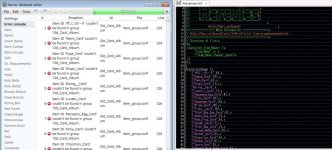
Please tell me the reason for the error in the image...
 
sde_error.jpg

 
Thank you for a great tool .
 
have a question .
Please tell me the reason for the error in the image...
Go in Edit > Reload database; see if that helped. Otherwise, this issue shows up when the item name (AegisName) is not found in your item_db.conf or item_db2.conf. Verify that both of them are properly loaded and that your items ("Fabre_Card", "Pupa_Card", etc) are all found in your tables. Also, let me know what version you're using (File > About > Product version : ?).

 
Thank you for a great tool .
 
have a question .
Please tell me the reason for the error in the image...
Go in Edit > Reload database; see if that helped. Otherwise, this issue shows up when the item name (AegisName) is not found in your item_db.conf or item_db2.conf. Verify that both of them are properly loaded and that your items ("Fabre_Card", "Pupa_Card", etc) are all found in your tables. Also, let me know what version you're using (File > About > Product version : ?).

Thank you for your reply .
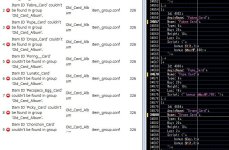
Aegis Name was not match....
Version I'm using is 1.1.4 . 

2.jpg

 
Thank you for your reply .

Aegis Name was not match....

Version I'm using is 1.1.4 .

Hmm, can you show me a screenshot of your Item tab (not the file)? It looks in your Item or Item2 tables directly, for instance : 

gPrjx1F.png


If those aren't loaded for any reason, then the item_group will have a bunch of errors like you had above. You can look at the file loaded by hovering your mouse on top of the tab (is it correct?) :

InGl15C.png


As a last ressort, you could always upload your item_db + item_group files to me via a private message. You may also want to update your version up to 1.1.5.11, there hasn't been an update for item_group, but it couldn't hurt!

 
@@Tokeiburu Good morning sir, how to fix this ? 

PZTiOFu.png


I have all my grf. but this error still happen, also the official item.

Is my mistake or ? can you tell me how to fix this ? 

I want to see the view ID working

 
@@Tokeiburu Good morning sir, how to fix this ? 

I have all my grf. but this error still happen, also the official item.

Is my mistake or ? can you tell me how to fix this ? 

I want to see the view ID working
Updated to 1.1.5.16

  • View ID preview dialog fixed (broken from a version somewhere near ~1.1.5.13)
  • Updated the item_group.conf, item_db.conf and itemInfo.lua parsers.
  • Fixed an error with the data resource folder not being able to find some files.
  • When changing the project file twice, some data wasn't being cleared and it caused errors.
  • Changing project files now releases the non-used GRFs from the previous project.
  • Invalid scripts (brackets wise) will be read correctly and an error will be returned.
  • Upon resaving your client files, tabs and quotes will be repaired.
  • Encodings are, yet again, better handled.
  • Other minor fixes.


Color picker

Well, this feature doesn't need much explaining. Select your text and change the color. The first color cell is the currently selected color, the others can be modified to any color you want by right-clicking on them.

wmtpegf.png


@@Tokeiburu hi tokei. Im using your latest 1.1.5.16.

 why I got error. I went to item, item db, reload database, all error happen.

Code:
--------------          Message          --------------Object reference not set to an instance of an object.--------------        Stack trace        --------------   at GrfToWpfBridge.Application.DefaultErrorHandler._reportAnyManagedExceptions(String message, Exception exception, ErrorLevel errorLevel)   at GrfToWpfBridge.Application.DefaultErrorHandler.Handle(Exception exception, ErrorLevel errorLevel)   at SDE.Tools.DatabaseEditor.SdeEditor._reloadDatabase(Boolean alreadyAsync)   at SDE.Tools.DatabaseEditor.SdeEditor.<ReloadDatabase>b__2()   at GRF.Threading.GrfThread.<Start>b__3()   at System.Threading.ThreadHelper.ThreadStart_Context(Object state)   at System.Threading.ExecutionContext.RunInternal(ExecutionContext executionContext, ContextCallback callback, Object state, Boolean preserveSyncCtx)   at System.Threading.ExecutionContext.Run(ExecutionContext executionContext, ContextCallback callback, Object state, Boolean preserveSyncCtx)   at System.Threading.ExecutionContext.Run(ExecutionContext executionContext, ContextCallback callback, Object state)   at System.Threading.ThreadHelper.ThreadStart()--------------         Exception         --------------System.NullReferenceException: Object reference not set to an instance of an object.   at Utilities.TkPath.op_Implicit(TkPath path)   at SDE.Tools.DatabaseEditor.Generic.DbLoaders.DbLoaderMethods.LoadItemDataLua(AbstractDb`1 db, String file)   at SDE.Tools.DatabaseEditor.Generic.DbLoaders.DbLoaderMethods.DbClientLoader(DbDebugItem`1 debug, AbstractDb`1 db)   at SDE.Tools.DatabaseEditor.Generic.Core.DbClientItems._loadDb()   at SDE.Tools.DatabaseEditor.Generic.Core.AbstractDb`1.LoadDb()   at SDE.Tools.DatabaseEditor.Engines.DatabaseEngine.SdeDatabase.Reload(IProgress progress)   at SDE.Tools.DatabaseEditor.SdeEditor._reloadDatabase(Boolean alreadyAsync)
 
Back
Top