Death Knight Sprite Ripping

dreinor

New member
Messages
54
Points
0
Github
dreinor
Can someone help me extract the sprite of death knight from nintendo DS ROM? i tried following the instructions found in this thread but i can't seem to make it work.. here is the thread..

https://gbatemp.net/threads/ragnarok-ds-sprite-ripping-request.304302/

can someone help me extract the sprite sheet? both male and female death knight.. thanks.. if i can get my hands on the sprite sheet, i will try to convert it to .spr format.. thanks..

 
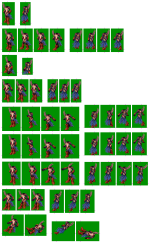
I'm not a spriter... but I thought these were sprite sheets?

attachicon.gif
body_10.png
attachicon.gif
body_21.png
Yup, they are sprite sheets, there's many tool online to separate each image from it.Separate it, merge it from any spr editor.

But you would need to make act file yourself.

 
@@Mysterious, @@Dastgir : In case you didnt notice there are no front or back frames (all are at an angle), which is needed if you are planning to make it into a job sprite.

So maybe he wants to rip those? Not sure if the game has them.

 
@@Mysterious, @@Dastgir : In case you didnt notice there are no front or back frames (all are at an angle), which is needed if you are planning to make it into a job sprite.

So maybe he wants to rip those? Not sure if the game has them.
I can see one whole back side set, just mirroring would give other 2 sets of images
 
hi.. thanks for the reply.. the one from the link is not complete i think.. because when i watched the dark knight character in youtube, i saw the character walk sideways.. that means there are frames of that character walking sideways.. the frames that are missing are looting i think.. anyways, someone willing to help on giving me the complete sprite sheet?
default_biggrin.png
i am willing to share the .spr and .act after i'm done..
default_biggrin.png


https://gbatemp.net/threads/ragnarok-ds-sprite-ripping-request.304302/

I tried following the intructions in that thread.. I already extracted the files, decompressed it.. The problem is, i can't seem to view the file with oilofvitriol.. I know that the sprite sheet from that link is incomplete because i saw a video of dark knight character and it has 1. Walking front view, 2. Walking back view 3. Walking Sideview.. Those 3 are missing in the spirte sheet from above.. The only ones that are non-existent are the looting frames and the sitting with sideview which is the ones that i am going to recreate.. But recreating the front, back and sideview walking frames are too much for me.. Can someone help me on this? Thanks..
default_smile.png


Btw, this is the dark knight i saw on youtube..

To view this content we will need your consent to set third party cookies.
For more detailed information, see our cookies page.
 
Last edited by a moderator:
wow, thanks a lot..
default_biggrin.png
you even recreated the front, back and sideview..
default_biggrin.png
i'll try to recreate the picking up sprite when i have a free time.. thanks a lot..
default_biggrin.png


wow, thanks a lot..
default_biggrin.png
you even recreated the front, back and sideview..
default_biggrin.png
i'll try to recreate the picking up sprite when i have a free time.. thanks a lot..
default_biggrin.png
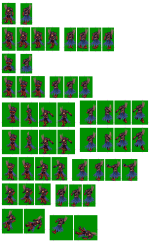
I recreated Only Sit Front, side and Back (When I finish the looting sprites I'll post the update) these sprites are ripped from NDS ROM (Using the desmume emulator, with a openGL capturer to take 3d rendered sprites)

 
RbbNw0D.png


since you created the sitting sprites, i'll try to recreate the DK sprite in mount with attack animation..
default_biggrin.png
5 frames down, 55 more frames to go..T_T

 
RbbNw0D.png


since you created the sitting sprites, i'll try to recreate the DK sprite in mount with attack animation..
default_biggrin.png
5 frames down, 55 more frames to go..T_T
45 Frames done because walking sprites use Same DK position o.O

Just need pick item, attack, use skill and hurt/die = 32 frames haha

 
Last edited by a moderator:
DK%20mount%20sprite%20sheet_zpsdrq8nydj.png


already completed the mounted frames.. there is another problem..T_T i can't seem to create a .spr.. whenever i try to create an .spr using spr_conview an error always appear.. can someone convert this to a sprite sheet to .spr so that i can create and polish the 2nd version of the DK mount sprite.. just message me and i'll send the copy of the sprite sheet..

 
Last edited by a moderator:
DK%20mount%20sprite%20sheet_zpsdrq8nydj.png


already completed the mounted frames.. there is another problem..T_T i can't seem to create a .spr.. whenever i try to create an .spr using spr_conview an error always appear.. can someone convert this to a sprite sheet to .spr so that i can create and polish the 2nd version of the DK mount sprite.. just message me and i'll send the copy of the sprite sheet..
You need using the same palette of colors for all images. Then you will convert this on SPR correctly ~

 
To make a SPR just use the ACT Editor, and drag & drop the frame (you need to separate each frame and save as bmp) and convert the palette (do not convert before add all frames)

Very well done, you're awesome.

 
Last edited by a moderator:
Back
Top