
You are using an out of date browser. It may not display this or other websites correctly.
You should upgrade or use an alternative browser.
You should upgrade or use an alternative browser.
What if I want host my server on my own pc?
- Thread starter Aurora
- Start date

Mystery
Community Contributors
You better have one hell of a computer and an internet company. Then you'll need to keep your computer on 24/7.What do I need? What are the things I need to change?
TIA!
Last edited by a moderator:

mrlongshen
Noobies


Vy Low
New member
- Messages
- 178
- Points
- 0
use thisBut changing the IP to my leased IP on the server config and clientinfo will do the trick? or no?

also be sure to open the port used in your map char and login server
Last edited by a moderator:
I'd not advice you to host a server on your own PC, unless it's a test server.
But if you really want it so you'll need to have a compiler ready, depending on your OS (gcc, MSVC and so on), as well as set up a SQL server. Usually people go with WAMP/LAMP setup to get all they need in one go (MySQL is included, it also has PHP/Apache, but those are not needed for server to run).
Further, you'll preferrably need white IP so your IP won't change on PC/router/whatever reload. Otherwise you can use www.noip.com as stated above.
Also, you'll need to check in with your router settings to approve all incoming/outgoing connections on specific ports you set up for your server, you can find a handful of sites that can do that check by simply searching on google.
Otherwise from that the setup/configurations doesn't change much from doing all of this on a VPS.
But if you really want it so you'll need to have a compiler ready, depending on your OS (gcc, MSVC and so on), as well as set up a SQL server. Usually people go with WAMP/LAMP setup to get all they need in one go (MySQL is included, it also has PHP/Apache, but those are not needed for server to run).
Further, you'll preferrably need white IP so your IP won't change on PC/router/whatever reload. Otherwise you can use www.noip.com as stated above.
Also, you'll need to check in with your router settings to approve all incoming/outgoing connections on specific ports you set up for your server, you can find a handful of sites that can do that check by simply searching on google.
Otherwise from that the setup/configurations doesn't change much from doing all of this on a VPS.
Thank you guys for your response. And yes, it is only a test server. I'm using XAMPP for my SQL server. I'm gonna try www.noip.com. I'll keep you guys postedI'd not advice you to host a server on your own PC, unless it's a test server.
But if you really want it so you'll need to have a compiler ready, depending on your OS (gcc, MSVC and so on), as well as set up a SQL server. Usually people go with WAMP/LAMP setup to get all they need in one go (MySQL is included, it also has PHP/Apache, but those are not needed for server to run).
Further, you'll preferrably need white IP so your IP won't change on PC/router/whatever reload. Otherwise you can use www.noip.com as stated above.
Also, you'll need to check in with your router settings to approve all incoming/outgoing connections on specific ports you set up for your server, you can find a handful of sites that can do that check by simply searching on google.
Otherwise from that the setup/configurations doesn't change much from doing all of this on a VPS.
Can you tell me more about this? I'm kinda lost in the port forwarding part. I already registered a DNS and I'm stucked. TIA! <3use thisBut changing the IP to my leased IP on the server config and clientinfo will do the trick? or no?http://www.noip.com/
also be sure to open the port used in your map char and login server

Last edited by a moderator:
So after downloading DUC from no-ip.com, i'll just changethe ip on my clientinfo.xml and the corresponding areas in the server side?regarding port forwarding, you will only do this if you want to open the server to public. But since you will only use it as a test server.. No need for that
Vy Low
New member
- Messages
- 178
- Points
- 0
actually you wont be needing that anymore since you wont be opening it as public. 127.0.0.1 will work just fineSo after downloading DUC from no-ip.com, i'll just changethe ip on my clientinfo.xml and the corresponding areas in the server side?regarding port forwarding, you will only do this if you want to open the server to public. But since you will only use it as a test server.. No need for that
Well, I want some of my friends login to the server as well. D:actually you wont be needing that anymore since you wont be opening it as public. 127.0.0.1 will work just fineSo after downloading DUC from no-ip.com, i'll just changethe ip on my clientinfo.xml and the corresponding areas in the server side?regarding port forwarding, you will only do this if you want to open the server to public. But since you will only use it as a test server.. No need for that
Vy Low
New member
- Messages
- 178
- Points
- 0
so best way is to use noip and open the ports of map login and char serverWell, I want some of my friends login to the server as well. D:actually you wont be needing that anymore since you wont be opening it as public. 127.0.0.1 will work just fineSo after downloading DUC from no-ip.com, i'll just changethe ip on my clientinfo.xml and the corresponding areas in the server side?regarding port forwarding, you will only do this if you want to open the server to public. But since you will only use it as a test server.. No need for that
So I got my dns at noip. How do I open the ports? ;oso best way is to use noip and open the ports of map login and char serverWell, I want some of my friends login to the server as well. D:actually you wont be needing that anymore since you wont be opening it as public. 127.0.0.1 will work just fineSo after downloading DUC from no-ip.com, i'll just changethe ip on my clientinfo.xml and the corresponding areas in the server side?regarding port forwarding, you will only do this if you want to open the server to public. But since you will only use it as a test server.. No need for that
iCORE
New member
hamachi is another choice
Can you tell me how to use this? Please? D;hamachi is another choice
iCORE
New member
its only easy ill make it step by step.Can you tell me how to use this? Please? D;hamachi is another choice
Step 1 Download hamachi (search on google)
Step 2 Click unmanage then hit download (install it after done)
Step 3 you ill see the Ipv4 of the hamachi then you need to copy it (that's will be your main IP)
Step 4 Start editing your (.conf) files
Step 5 on hamachi you will see (network) at the top then click it and you'll see (create a network)
Step 6 Put your desire password and username (that will be 1/5 slot per username including your hamachi account)
Step 7 Player should have hamachi too to connect to your server give them the password and username you created so that they can join the network
hope this will help you! Just tell us if you have any question and we will try to answer it as soon as we can

Usually there's a DMZ option on router (DeMilitarize Zone), which automatically port forwards every port to one internal IP. I think it
might be easier to use that for you.
Using this screenshot as a reference, you need to check "Enable DMZ", choose WAN network that will serve the outer connection (usually there's only one) and input your PC LOCAL IP address. I repeat, LOCAL. Usually they look something like 192.168.x.x or 10.0.x.x. To find what's your PC internal IP use:
win+R -> cmd -> ipconfig /all
Under one of interfaces you'll see something like this:
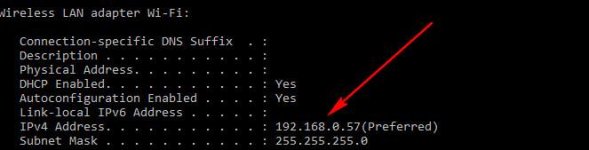
That's your internal IP address. It's an added bonus if you'll make it static.
I think this guide will be useful if you'll try with port forwarding anyway.
might be easier to use that for you.
Using this screenshot as a reference, you need to check "Enable DMZ", choose WAN network that will serve the outer connection (usually there's only one) and input your PC LOCAL IP address. I repeat, LOCAL. Usually they look something like 192.168.x.x or 10.0.x.x. To find what's your PC internal IP use:
win+R -> cmd -> ipconfig /all
Under one of interfaces you'll see something like this:
That's your internal IP address. It's an added bonus if you'll make it static.
I think this guide will be useful if you'll try with port forwarding anyway.
Last edited by a moderator:
I'll keep you guys posted about this one. Thank you @its only easy ill make it step by step.Can you tell me how to use this? Please? D;hamachi is another choice
Step 1 Download hamachi (search on google)
Step 2 Click unmanage then hit download (install it after done)
Step 3 you ill see the Ipv4 of the hamachi then you need to copy it (that's will be your main IP)
Step 4 Start editing your (.conf) files
Step 5 on hamachi you will see (network) at the top then click it and you'll see (create a network)
Step 6 Put your desire password and username (that will be 1/5 slot per username including your hamachi account)
Step 7 Player should have hamachi too to connect to your server give them the password and username you created so that they can join the network
hope this will help you! Just tell us if you have any question and we will try to answer it as soon as we can

Last edited by a moderator: