
You are using an out of date browser. It may not display this or other websites correctly.
You should upgrade or use an alternative browser.
You should upgrade or use an alternative browser.
R> How to squash commits on GitHub?
- Thread starter Ragno
- Start date


Ridley
Community Administrator
- Messages
- 1,157
- Points
- 0
- Age
- 38
- Location
- Germany
- Discord
- Ridley#5102
- IRC Nickname
- Ridley
- Github
- ridley8819
- Emulator
- Client Version
- 2019-03-22
git rebase --interactive HEAD~3
here the 3 means the last 3 commits
Then you change the ones you want to sqash (most of the time you want to fixup e.g in a pull request
Afterwards you need to git push -f
here the 3 means the last 3 commits
Then you change the ones you want to sqash (most of the time you want to fixup e.g in a pull request
Afterwards you need to git push -f
Last edited by a moderator:

Ragno
Retired Staff
- Messages
- 133
- Points
- 0
- Github
- AtlantisRO
- Emulator
After so many tries I still can't do it
 Please help me, this is what I'm doing.
I'm using SourceTree Terminal for this:
1. Clic on Terminal button. Opens a new console window with this:
Ragno@Samsung MINGW64 ~/Desktop/Repositorios/Fork/Hercules (barricade_woe_se_fix|REBASE-i)
$
2. Then, as Ridley said, I put this and hit Enter.
Ragno@Samsung MINGW64 ~/Desktop/Repositorios/Fork/Hercules (barricade_woe_se_fix|REBASE-i)
$ git rebase --interactive HEAD~2
3. Changes screen to a text editor with this:
pick 285e1fc Adds a protection to 1st Barricade line on WoE SE maps to avoid splash damage without destroying Guardian Stones previously.
pick 9450be2 Arrays improvement. Thanks Emistry!
# Rebase 9fba7e8..9450be2 onto 9fba7e8 (2 command(s))
#
# Commands:
# p, pick = use commit
# r, reword = use commit, but edit the commit message
# e, edit = use commit, but stop for amending
# s, squash = use commit, but meld into previous commit
# f, fixup = like "squash", but discard this commit's log message
# x, exec = run command (the rest of the line) using shell
# d, drop = remove commit
#
# These lines can be re-ordered; they are executed from top to bottom.
#
# If you remove a line here THAT COMMIT WILL BE LOST.
#
# However, if you remove everything, the rebase will be aborted.
#
# Note that empty commits are commented out
4. I changed first line to this:
fixup 285e1fc Adds a protection to 1st Barricade line on WoE SE maps to avoid splash damage without destroying Guardian Stones previously.
pick 9450be2 Arrays improvement. Thanks Emistry!
# Rebase 9fba7e8..9450be2 onto 9fba7e8 (2 command(s))
#
# Commands:
# p, pick = use commit
# r, reword = use commit, but edit the commit message
# e, edit = use commit, but stop for amending
# s, squash = use commit, but meld into previous commit
# f, fixup = like "squash", but discard this commit's log message
# x, exec = run command (the rest of the line) using shell
# d, drop = remove commit
#
# These lines can be re-ordered; they are executed from top to bottom.
#
# If you remove a line here THAT COMMIT WILL BE LOST.
#
# However, if you remove everything, the rebase will be aborted.
#
# Note that empty commits are commented out
5. Then, since I don't know how to close that screen and return to terminal, I hit Ctrl+Z and it returns to terminal. Now terminal looks like this:
Ragno@Samsung MINGW64 ~/Desktop/Repositorios/Fork/Hercules (barricade_wo e_se_fix)
$ git rebase --interactive HEAD~2
Stopped
Ragno@Samsung MINGW64 ~/Desktop/Repositorios/Fork/Hercules (barricade_woe_se_fix|REBASE-i)
$
6. Then I add new command:
Ragno@Samsung MINGW64 ~/Desktop/Repositorios/Fork/Hercules (barricade_wo e_se_fix)
$ git rebase --interactive HEAD~2
Stopped
Ragno@Samsung MINGW64 ~/Desktop/Repositorios/Fork/Hercules (barricade_woe_se_fix|REBASE-i)
$ git rebase --continue
7. After hiting Enter it starts to process the command and then happens this:
Ragno@Samsung MINGW64 ~/Desktop/Repositorios/Fork/Hercules (barricade_wo e_se_fix)
$ git rebase --interactive HEAD~2
Stopped
Ragno@Samsung MINGW64 ~/Desktop/Repositorios/Fork/Hercules (barricade_woe_se_fix|REBASE-i)
$ git rebase --continue
error: could not apply 285e1fc... Adds a protection to 1st Barricade line on WoE SE maps to avoid splash damage without destroying Guardian Stones previously.
When you have resolved this problem, run "git rebase --continue".
If you prefer to skip this patch, run "git rebase --skip" instead.
To check out the original branch and stop rebasing, run "git rebase --abort".
Could not apply 285e1fc... Adds a protection to 1st Barricade line on WoE SE maps to avoid splash damage without destroying Guardian Stones previously.
Ragno@Samsung MINGW64 ~/Desktop/Repositorios/Fork/Hercules (barricade_woe_se_fix|REBASE-i 1/2)
$
8. To finish all the process I put git rebase --abort
Sorry to keep bothering but I have tried this really hard a lot of times (I even discovered Ctrl+Z by accident while pressing a lot of key shortcuts). I need help and would be trully grateful with this.
I'm using SourceTree Terminal for this:
1. Clic on Terminal button. Opens a new console window with this:
Ragno@Samsung MINGW64 ~/Desktop/Repositorios/Fork/Hercules (barricade_woe_se_fix|REBASE-i)
$
2. Then, as Ridley said, I put this and hit Enter.
Ragno@Samsung MINGW64 ~/Desktop/Repositorios/Fork/Hercules (barricade_woe_se_fix|REBASE-i)
$ git rebase --interactive HEAD~2
3. Changes screen to a text editor with this:
pick 285e1fc Adds a protection to 1st Barricade line on WoE SE maps to avoid splash damage without destroying Guardian Stones previously.
pick 9450be2 Arrays improvement. Thanks Emistry!
# Rebase 9fba7e8..9450be2 onto 9fba7e8 (2 command(s))
#
# Commands:
# p, pick = use commit
# r, reword = use commit, but edit the commit message
# e, edit = use commit, but stop for amending
# s, squash = use commit, but meld into previous commit
# f, fixup = like "squash", but discard this commit's log message
# x, exec = run command (the rest of the line) using shell
# d, drop = remove commit
#
# These lines can be re-ordered; they are executed from top to bottom.
#
# If you remove a line here THAT COMMIT WILL BE LOST.
#
# However, if you remove everything, the rebase will be aborted.
#
# Note that empty commits are commented out
4. I changed first line to this:
fixup 285e1fc Adds a protection to 1st Barricade line on WoE SE maps to avoid splash damage without destroying Guardian Stones previously.
pick 9450be2 Arrays improvement. Thanks Emistry!
# Rebase 9fba7e8..9450be2 onto 9fba7e8 (2 command(s))
#
# Commands:
# p, pick = use commit
# r, reword = use commit, but edit the commit message
# e, edit = use commit, but stop for amending
# s, squash = use commit, but meld into previous commit
# f, fixup = like "squash", but discard this commit's log message
# x, exec = run command (the rest of the line) using shell
# d, drop = remove commit
#
# These lines can be re-ordered; they are executed from top to bottom.
#
# If you remove a line here THAT COMMIT WILL BE LOST.
#
# However, if you remove everything, the rebase will be aborted.
#
# Note that empty commits are commented out
5. Then, since I don't know how to close that screen and return to terminal, I hit Ctrl+Z and it returns to terminal. Now terminal looks like this:
Ragno@Samsung MINGW64 ~/Desktop/Repositorios/Fork/Hercules (barricade_wo e_se_fix)
$ git rebase --interactive HEAD~2
Stopped
Ragno@Samsung MINGW64 ~/Desktop/Repositorios/Fork/Hercules (barricade_woe_se_fix|REBASE-i)
$
6. Then I add new command:
Ragno@Samsung MINGW64 ~/Desktop/Repositorios/Fork/Hercules (barricade_wo e_se_fix)
$ git rebase --interactive HEAD~2
Stopped
Ragno@Samsung MINGW64 ~/Desktop/Repositorios/Fork/Hercules (barricade_woe_se_fix|REBASE-i)
$ git rebase --continue
7. After hiting Enter it starts to process the command and then happens this:
Ragno@Samsung MINGW64 ~/Desktop/Repositorios/Fork/Hercules (barricade_wo e_se_fix)
$ git rebase --interactive HEAD~2
Stopped
Ragno@Samsung MINGW64 ~/Desktop/Repositorios/Fork/Hercules (barricade_woe_se_fix|REBASE-i)
$ git rebase --continue
error: could not apply 285e1fc... Adds a protection to 1st Barricade line on WoE SE maps to avoid splash damage without destroying Guardian Stones previously.
When you have resolved this problem, run "git rebase --continue".
If you prefer to skip this patch, run "git rebase --skip" instead.
To check out the original branch and stop rebasing, run "git rebase --abort".
Could not apply 285e1fc... Adds a protection to 1st Barricade line on WoE SE maps to avoid splash damage without destroying Guardian Stones previously.
Ragno@Samsung MINGW64 ~/Desktop/Repositorios/Fork/Hercules (barricade_woe_se_fix|REBASE-i 1/2)
$
8. To finish all the process I put git rebase --abort
Sorry to keep bothering but I have tried this really hard a lot of times (I even discovered Ctrl+Z by accident while pressing a lot of key shortcuts). I need help and would be trully grateful with this.
Last edited by a moderator:

Protos
Core Developers
- Messages
- 236
- Points
- 0
- Age
- 35
- IRC Nickname
- smoke
- Github
- smokexyz
- Emulator
pick 285e1fc Adds a protection to 1st Barricade line on WoE SE maps to avoid splash damage without destroying Guardian Stones previously.
pick 9450be2 Arrays improvement. Thanks Emistry!
If you want to squash 9450be2 into 285e1fc, when you're given the output in your step 3, press i (which means insertion mode). navigate to the line of 9450be2 and change pick or 's' or 'squash' like so -
s 9450be2 Arrays improvement. Thanks Emistry!
then press esc
then type :wq
and hit enter.
You'd have rebased your revisions unless some conflicts occur.
pick 9450be2 Arrays improvement. Thanks Emistry!
If you want to squash 9450be2 into 285e1fc, when you're given the output in your step 3, press i (which means insertion mode). navigate to the line of 9450be2 and change pick or 's' or 'squash' like so -
s 9450be2 Arrays improvement. Thanks Emistry!
then press esc
then type :wq
and hit enter.
You'd have rebased your revisions unless some conflicts occur.
Last edited by a moderator:
Ragno
Retired Staff
- Messages
- 133
- Points
- 0
- Github
- AtlantisRO
- Emulator
Thanks a lot Smoke! I didn't know about :wq. You are my hero!pick 285e1fc Adds a protection to 1st Barricade line on WoE SE maps to avoid splash damage without destroying Guardian Stones previously.
pick 9450be2 Arrays improvement. Thanks Emistry!
If you want to squash 9450be2 into 285e1fc, when you're given the output in your step 3, press i (which means insertion mode). navigate to the line of 9450be2 and change pick or 's' or 'squash' like so -then press escthen type :wqCode:s 9450be2 Arrays improvement. Thanks Emistry!
and hit enter.
You'd have rebased your revisions unless some conflicts occur.
I follow steps and ended with this:
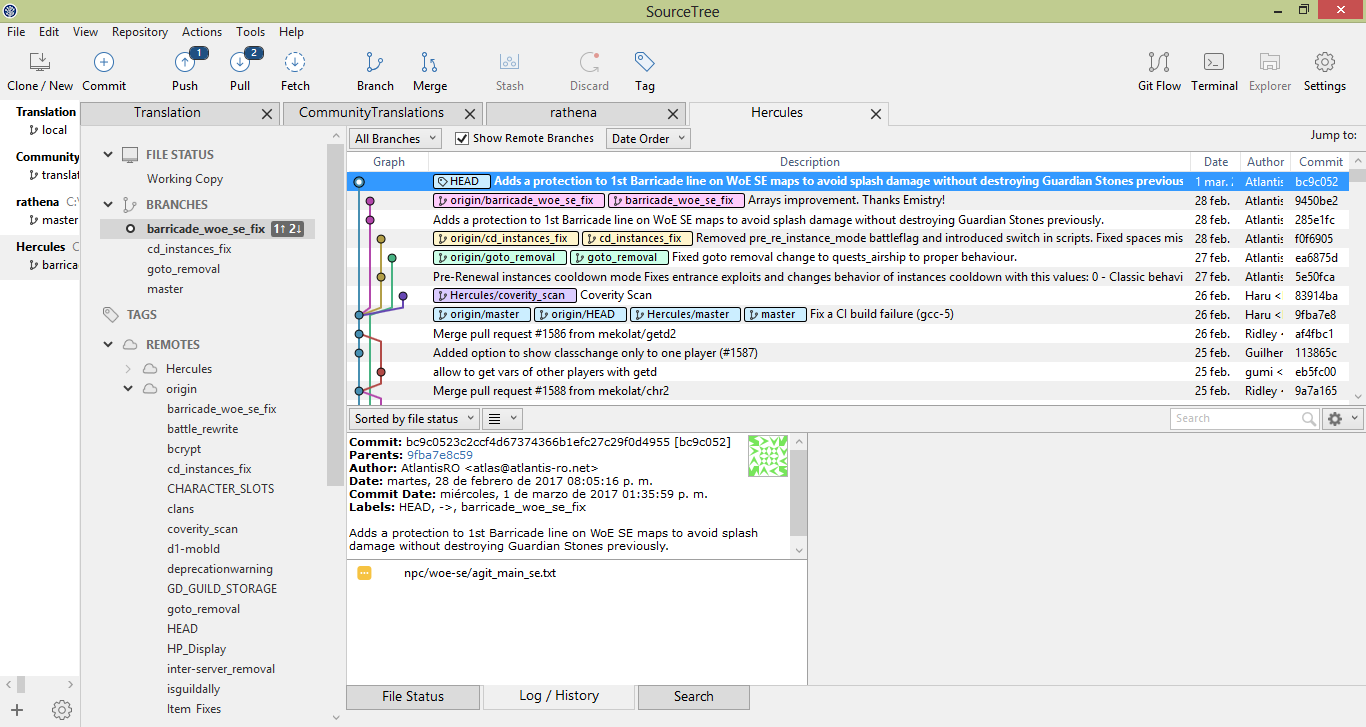
But now, I try to push it and gives me this error:
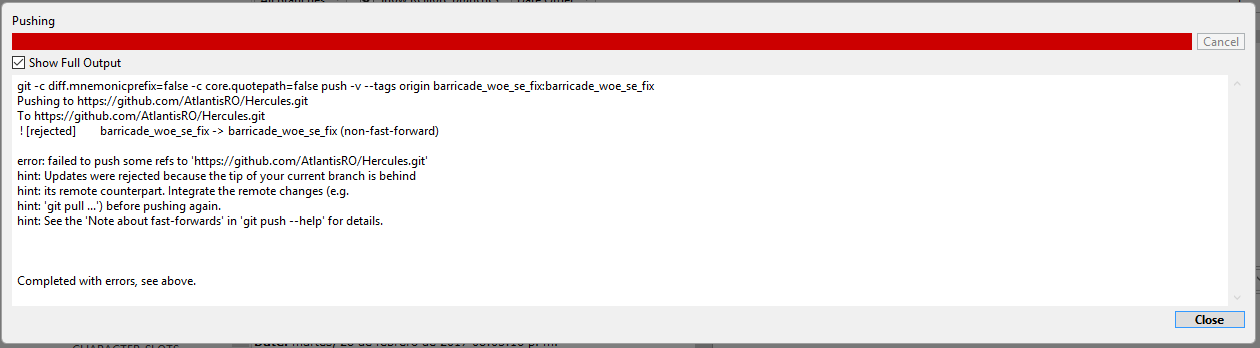
What am I doing wrong?
Ragno
Retired Staff
- Messages
- 133
- Points
- 0
- Github
- AtlantisRO
- Emulator
Thank you a lot, I finally did it. I tried it over 3 months ago and finally did it.You have to force push
git push origin <your branch> --force
Thank you all guys for help with this.
Ridley
Community Administrator
- Messages
- 1,157
- Points
- 0
- Age
- 38
- Location
- Germany
- Discord
- Ridley#5102
- IRC Nickname
- Ridley
- Github
- ridley8819
- Emulator
- Client Version
- 2019-03-22
another issue was here
fixup 285e1fc Adds a protection to 1st Barricade line on WoE SE maps to avoid splash damage without destroying Guardian Stones previously.
pick 9450be2 Arrays improvement. Thanks Emistry!
where it should be
pick 285e1fc Adds a protection to 1st Barricade line on WoE SE maps to avoid splash damage without destroying Guardian Stones previously.
fixup 9450be2 Arrays improvement. Thanks Emistry!
fixup = squash without message
and yes, thhen :wq and git push -f
fixup 285e1fc Adds a protection to 1st Barricade line on WoE SE maps to avoid splash damage without destroying Guardian Stones previously.
pick 9450be2 Arrays improvement. Thanks Emistry!
where it should be
pick 285e1fc Adds a protection to 1st Barricade line on WoE SE maps to avoid splash damage without destroying Guardian Stones previously.
fixup 9450be2 Arrays improvement. Thanks Emistry!
fixup = squash without message
and yes, thhen :wq and git push -f