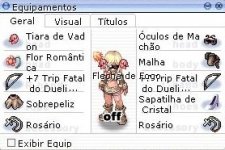
don't open the equipment window for a certain time

DeesT

New member
Messages
25
Points
0
Equipment.jpg

Hello everyone, I have been facing a somewhat strange problem.

My equipment window works and always worked correctly and I don't face any equipment sprite problems.

Our project is in terminal and right now we have discovered a Bug a little uncomfortable ...

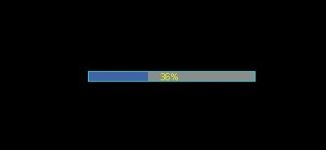
My equipment window closes my client with "Gravity Error" only if I try to open it while we are on a map loading screen.

I have tried at "Source" to block this in all ways, and I believe that it is beyond my power to resolve this, as I have definitely tried everything and nothing interferes with the action of "warping.state".

So I came to beg for the help of some of you professionals,

Is there a "maybe one script" way of not allowing the player to do any action while in the action of changing maps? "Load"

any action = Include not using Shortcuts.

I appreciate any help.

Obs = My client is 20200108
This error has already been tested on older customers, and it started to happen on (2019+) clients.
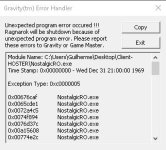
Alt+q when loadingmap.jpg

 
Last edited by a moderator:
I also have the same problem! everything has already been done and nothing fixes the bug :(

 
what you mean map loading screen?

 
what you mean map loading screen?
At this moment:

Load Screen.jpg

if i cross a warp and press Alt + Q (Equip. Window)
or press Alt + X (Costume Window) the client gonna crash.

If i press any other shortkey nothing happens.

thanks for replying

(EDIT)
Video reporting.
 

To view this content we will need your consent to set third party cookies.
For more detailed information, see our cookies page.


Last edited by a moderator:
I already tried to change the shortcut, but the bug continues. I note that in client 2018 this bug does not happen.

tested on clients 2019 through 2020,  aRagexeRE and bRagexeRE

Diffs 

258 Enable Shortcut All Item
261 Set Replay Button
8 Custom Window Title
9 Disable 1rag1 type parameters (Recommended)
13 Disable Ragexe Filename Check (Recommended)
17 Enable Official Custom Fonts
18 Skip Service Selection Screen
19 Enable Title Bar Menu
23 Enable /who command (Recommended)
24 Fix Camera Angles (Recommended)
30 Increase Zoom Out 50%
289 Fix Homunculus attack AI
290 Hide build info in client (Recommended)
34 Enable /showname (Recommended)
291 Hide packets from peek (Recommended)
35 Read Data Folder First
36 Read msgstringtable.txt (Recommended)
38 Remove Gravity Ads (Recommended)
39 Remove Gravity Logo (Recommended)
41 Disable Nagle Algorithm (Recommended)
44 Translate Client (Recommended)
46 Use Normal Guild Brackets (Recommended)
49 Enable Multiple GRFs (Recommended)
50 Skip License Screen
316 Remove Equipment Swap Button
317 Ignore Quest Errors
64 @ Bug Fix (Recommended)
65 Load Custom lua file instead of iteminfo*.lub (Recommended)
325 Remove Equipment Title UI
71 Ignore Resource Errors
72 Ignore Missing Palette Error
73 Remove Hourly Announce (Recommended)
84 Remove Serial Display (Recommended)
86 Only First Login Background
90 Enable DNS Support (Recommended)
95 Use SSO Login Packet
208 Restore Cash Shop Icon
230 Always load Korea ExternalSettings lua file
231 Remove hardcoded address/port (Recommended)
234 Ignore Lua Errors

 
Last edited by a moderator:
Back
Top