Create Crash Dump

Kuroyama

New member
Messages
128
Points
0
Hello everyone, it's me again /sob

Need a little help bout creating a crash dump.

I did follow this guides:

https://herc.ws/board/topic/2930-emergency-map-server-crash/

https://herc.ws/board/topic/7566-map-server-crash-how-to-get-dump-or-error-log/#comment-45609

https://herc.ws/wiki/GDB

https://herc.ws/board/topic/14678-linux-map-server-crash-on-autotrade/#comment-82120

./configure --enable-debug=gdb

Code:
ulimit -c unlimited

or even this

make clean
./configure --enable-sanitize --enable-debug=gdb --enable-manager=nomake


still no dump file. Looked already in var/crash and even on the trunk.

Please help.

 
you show only configure command. what about make? you run it after configure?

you used sanitize flags, if your compiler support them?

if compiler not support it, then it will be skipped.

but if sanitize flags supported by compiler, you don't need crash dump. on issue server will show message where it crashed by self.

 
you show only configure command. what about make? you run it after configure?
gdb map-server

run

you mean sir @4144?

I'm not sure if i'm doing right but I just did follow everything, from wiki to reference thread.

I just badly needed the crash dump file like the dbghelp plugin for windows.

 
make clean
./configure --enable-sanitize --enable-debug=gdb --enable-manager=no
make


i this commands

 
make clean
./configure --enable-sanitize --enable-debug=gdb --enable-manager=no
make

make clean
./configure --enable-sanitize --enable-debug=gdb --enable-manager=no
make


i this commands
yes sir I did. it compiles smooth and no errors or something.

is there anything that I left out?

my map-server crash twice but I still can't find the dump file,

I usually close putty so can't monitor it real time that's why I need the dump file.

 
i hope you using screen or tmux?

because if not and you close your ssh connection, this is wrong. you cant see how your server working and cant control it.

at first check is your compiler support sanitizers. run this command and show output from it:

Code:
./configure --enable-sanitize --enable-debug=gdb --enable-manager=no|grep sanitize
 
i hope you using screen or tmux?

because if not and you close your ssh connection, this is wrong. you cant see how your server working and cant control it.

at first check is your compiler support sanitizers. run this command and show output from it:

./configure --enable-sanitize --enable-debug=gdb --enable-manager=no|grep sanitize

./configure --enable-sanitize --enable-debug=gdb --enable-manager=no|grep sanitize

image.png

 
oh here your configure failed, this mean anything what you add to configure is not used

try configure like this:

./configure --enable-debug=gdb


and show output of it, at least some last lines

 
oh here your configure failed, this mean anything what you add to configure is not used

try configure like this:

./configure --enable-debug=gdb

./configure --enable-debug=gdb


and show output of it, at least some last lines
checking whether make sets $(MAKE)... yes
checking for gcc... (cached) gcc
checking whether we are using the GNU C compiler... (cached) yes
checking whether gcc accepts -g... (cached) yes
checking for gcc option to accept ISO C89... (cached) none needed
checking how to run the C preprocessor... gcc -E
checking for ar... /usr/bin/ar
checking whether gcc supports -std=c11... yes
checking whether byte ordering is bigendian... no
checking whether gcc produces 32bit code... no
checking whether gcc supports __thread specifier (TLS)... yes
checking whether gcc accepts -rdynamic... yes
checking whether gcc supports -fsigned-char... yes
checking whether gcc supports -Wno-unused-parameter... yes
checking whether gcc can actually use -Wno-unused-parameter... yes
checking whether gcc supports -Wno-clobbered... yes
checking whether gcc supports -Wempty-body... yes
checking whether gcc supports -Wnewline-eof... no
checking whether gcc supports -Wint-conversion... no
checking whether gcc supports -Winit-self... yes
checking whether gcc supports -Wpointer-arith... yes
checking whether gcc supports -Wswitch-bool... no
checking whether gcc supports -Wenum-conversion... no
checking whether gcc supports -Wshorten-64-to-32... no
checking whether gcc supports -Wconstant-conversion... no
checking whether gcc supports -Wbool-conversion... no
checking whether gcc supports -Wformat-security... yes
checking whether gcc supports -Wformat... yes
checking whether gcc supports -Wformat-signedness... no
checking whether gcc supports -Wformat-y2k... yes
checking whether gcc supports -Wmissing-include-dirs... no
checking whether gcc supports -Wsuggest-attribute=noreturn... yes
checking whether gcc supports -Wundef... yes
checking whether gcc supports -Wnested-externs... yes
checking whether gcc supports -Wold-style-definition... yes
checking whether gcc supports -Woverlength-strings... yes
checking whether gcc supports -Wredundant-decls... yes
checking whether gcc supports -Wcast-qual... yes
checking whether gcc supports -Wmisleading-indentation... no
checking whether gcc supports -Wnull-dereference... no
checking whether gcc supports -Wvla... yes
checking whether gcc supports -Wno-format-nonliteral... yes
checking whether gcc supports -Wno-switch... yes
checking whether gcc supports -Wno-missing-field-initializers... yes
checking whether gcc supports -Wno-suggest-attribute=format... yes
checking whether gcc supports -Wshadow... yes
checking whether gcc can efficiently use -Wshadow... yes
checking whether gcc supports -fPIC... yes
checking how to make shared objects... -shared yes
checking whether gcc needs -Wl,--no-undefined to check for undefined references in shared objects... yes
checking whether gcc supports -fno-strict-aliasing... yes
checking for setrlimit... yes
checking for strnlen... yes
checking for uselocale... yes
checking for newlocale... yes
checking for freelocale... yes
checking xlocale.h usability... yes
checking xlocale.h presence... yes
checking for xlocale.h... yes
checking whether gcc supports -fno-omit-frame-pointer... yes
checking whether gcc supports -funwind-tables... yes
checking for gawk... gawk
checking unwind.h usability... yes
checking unwind.h presence... yes
checking for unwind.h... yes
checking for _Unwind_Backtrace... yes
checking __sync extensions... yes
checking __atomic extensions... yes
checking output filetype... elf64
checking for mmap... yes
checking for dl_iterate_phdr... yes
checking for fcntl... yes
checking whether strnlen is declared... yes
checking for lstat... yes
checking for readlink... yes
checking for getexecname... no
checking whether gcc supports -fno-var-tracking... yes
checking for MinGW... no
checking for library containing inflateEnd... -lz
checking zlib.h usability... yes
checking zlib.h presence... yes
checking for zlib.h... yes
checking for library containing sqrt... -lm
checking for library containing clock_gettime... none required
checking whether CLOCK_MONOTONIC is supported and works... yes
checking for library containing pthread_create... -lpthread
checking for library containing pthread_sigmask... none required
checking for library containing pthread_attr_init... none required
checking for library containing pthread_attr_setstacksize... none required
checking for library containing pthread_attr_destroy... none required
checking for library containing pthread_cancel... none required
checking for library containing pthread_join... none required
checking execinfo.h usability... yes
checking execinfo.h presence... yes
checking for execinfo.h... yes
checking for library containing backtrace... none required
checking for mysql_config... /usr/bin/mysql_config
checking for mysql_init... yes
checking mysql.h usability... yes
checking mysql.h presence... yes
checking for mysql.h... yes
checking whether my_bool is supported (MySQL)... yes
checking MySQL library (required)... yes (5.5.65)
checking PCRE library... checking pcre.h usability... yes
checking pcre.h presence... yes
checking for pcre.h... yes
checking for library containing pcre_study... -lpcre
checking for doxygen... no
checking for perl... yes
configure: creating ./config.status
config.status: creating Makefile
config.status: creating src/common/Makefile
config.status: creating 3rdparty/mt19937ar/Makefile
config.status: creating 3rdparty/libconfig/Makefile
config.status: creating 3rdparty/libbacktrace/Makefile
config.status: creating 3rdparty/libbacktrace/backtrace-supported.h
config.status: creating src/char/Makefile
config.status: creating src/login/Makefile
config.status: creating src/map/Makefile
config.status: creating src/plugins/Makefile
config.status: creating src/test/Makefile
config.status: creating tools/HPMHookGen/Makefile
config.status: creating tools/doxygen/Makefile


Here it is sir @4144.

 
Last edited by a moderator:
ok, by default configure works. but sanitizers is not.

then if you want build your server need run this commands:

make clean
./configure --enable-debug=gdb
make


if you have issues with crash dump creation,

run map server from gdb like this:

gdb ./map-server


and run command

run


inside gdb

if you using screen you can reconnect after and see how your server crashed.

after crash in gdb run

bt


or

Code:
bt all
 
ok, by default configure works. but sanitizers is not.

then if you want build your server need run this commands:

make clean
./configure --enable-debug=gdb
make

make clean
./configure --enable-debug=gdb
make


if you have issues with crash dump creation,

run map server from gdb like this:

gdb ./map-server

gdb ./map-server


and run command

run

run


inside gdb

if you using screen you can reconnect after and see how your server crashed.

after crash in gdb run

bt

bt


or

bt all

bt all

Will update you sir very soon after I encounter the crash again.

 
ok, by default configure works. but sanitizers is not.

then if you want build your server need run this commands:

make clean
./configure --enable-debug=gdb
make

make clean
./configure --enable-debug=gdb
make


if you have issues with crash dump creation,

run map server from gdb like this:

gdb ./map-server

gdb ./map-server


and run command

run

run


inside gdb

if you using screen you can reconnect after and see how your server crashed.

after crash in gdb run

bt

bt


or

bt all

bt all

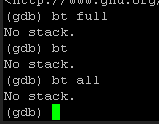
image.png

image.png

Still no crash dump at all. @4144

 
you can show on your screenshot more info?

from lines what you show server not crashed at all.

 
Back
Top