Follow along with the video below to see how to install our site as a web app on your home screen.
Note: This feature may not be available in some browsers.
Due to recent spam attacks that heavily used compormised accounts we did reset all user passwords, AGAIN, if it happens and your account got compromised again due to re-used passwords your account will be perma-banned.
Fixed bug with plugin service which initialized the plugin twice (slowed the app launch, now it's much better)
Updated plugin interface - the Initialize() method must take a string parameter (SelectionQuery)
Sample "Hello World" sample plugin (VS2012 C# .NET) now comes shipped with each new release - check "Plugins" folder
The NSE will now remember your last window position, size and monitor number (Resets with each new release)
Now you can open npc script file by dragging & dropping them into editor
NPC Script Command Bible Plugin will load custom "script_commands.txt" file (if it's found in "Plugins" dir) - otherwise it defaults to built-in resource file on the DLL.
Ctrl + W = Close Current Tab
Ctrl + Tab = Next Tab (Cycle Forward)
Ctrl + Shift + Tab = Prev Tab (Cycle Back)
Ctrl + N (1 ~ 9) = Opens Nth Opened Tab (e.g. Ctrl + 2 will open 2nd open tab)
Ctrl + Space = Show auto-suggest/complete for the script command you are typing
F1 = Select text in editor and press F1 to open NPC Script Command Bible plugin
F2 = Select text in editor and press F2 to open Text Translator plugin
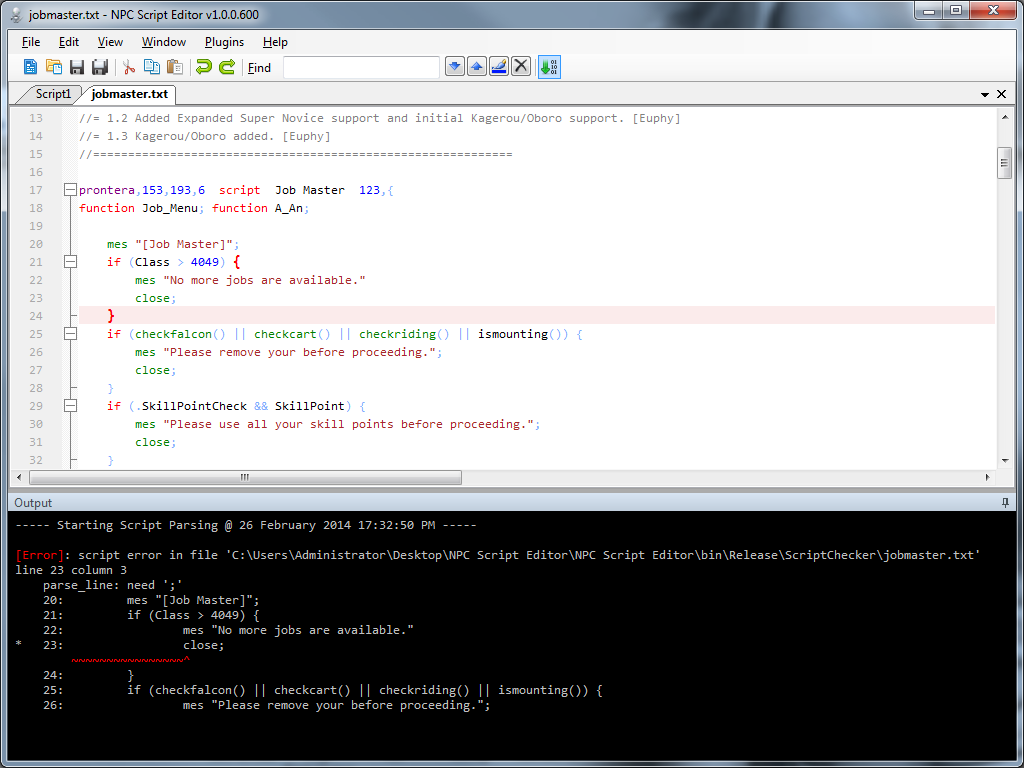
Implemented F6 Hotkey = Parse Current NPC Script To Output Window and shows any syntax / coding errors
OutputWindow cannot be closed, and it starts hidden now
Improved OutputWindow handling code
OutputWindow now launches in hidden mode, and reveals itself on F6 keypress (if hidden)
Fixed Tab Order/Stop in Core Plugins
NPCScriptCommandsBible Plugin no longer uses internal script_commands.txt
script_commands.txt is converted to Windows EOL automatically before parsing - no need to manually convert it now
Fixed bug with plugin service which initialized the plugin twice (slowed the app launch, now it's much better)
Updated plugin interface - the Initialize() method must take a string parameter (SelectionQuery)
Sample "Hello World" sample plugin (VS2012 C# .NET) now comes shipped with each new release - check "Plugins" folder
The NSE will now remember your last window position, size and monitor number (Resets with each new release)
Now you can open npc script file by dragging & dropping them into editor
NPC Script Command Bible Plugin will load custom "script_commands.txt" file (if it's found in "Plugins" dir) - otherwise it defaults to built-in resource file on the DLL.
Ctrl + W = Close Current Tab
Ctrl + Tab = Next Tab (Cycle Forward)
Ctrl + Shift + Tab = Prev Tab (Cycle Back)
Ctrl + N (1 ~ 9) = Opens Nth Opened Tab (e.g. Ctrl + 2 will open 2nd open tab)
Ctrl + Space = Show auto-suggest/complete for the script command you are typing
F1 = Select text in editor and press F1 to open NPC Script Command Bible plugin
F2 = Select text in editor and press F2 to open Text Translator plugin
Implemented F6 Hotkey = Parse Current NPC Script To Output Window and shows any syntax / coding errors
OutputWindow cannot be closed, and it starts hidden now
Improved OutputWindow handling code
OutputWindow now launches in hidden mode, and reveals itself on F6 keypress (if hidden)
Fixed Tab Order/Stop in Core Plugins
NPCScriptCommandsBible Plugin no longer uses internal script_commands.txt
script_commands.txt is converted to Windows EOL automatically before parsing - no need to manually convert it now