
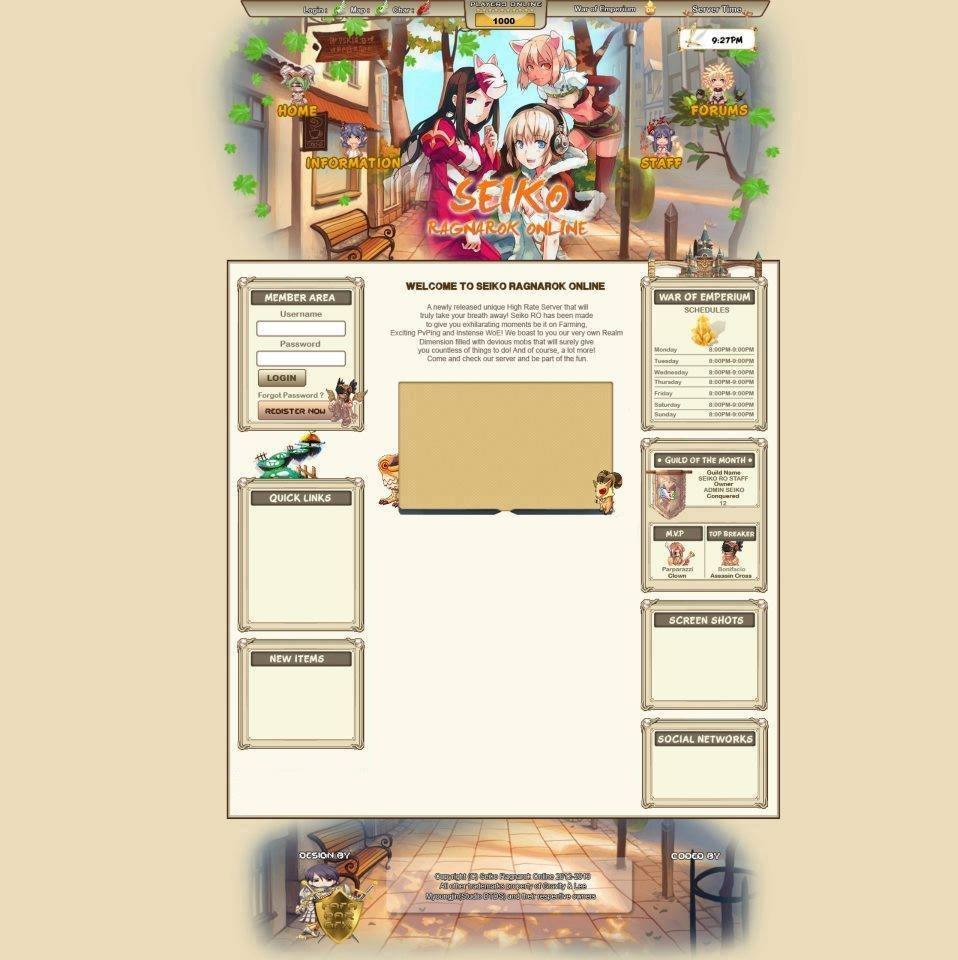
- Content Author
- ParGFX

IMPORTANT !
1) Do not change the Designer
2) You must download Content Management System
3) If you have CMS now ( if you are admin, Log in to your site then click News , then Add a News, after that Look at the Home Page)
If you want more unique and more exclusive design
contact me on my facebook
Email : [email protected]
Facebook Fanpage
CLICK ME
GUIDE :
<--- Hall of Fame --->
Go to main folder then edit the HOF
for the images
Player : (img/potm/M/4016.gif) <--- Just change it 4016 - Assassin Cross 4013 - Champion
M - Male | F - Female
Guild : Get the emblem of the guild that will be Guild of the month
<--- SlideShow --->
Just change the picture at img folder
<--- New Item --->
Copy a image from your data folder or GRF
Don't change the size but change the file name
Example : bunnyhood.bmp make it 1.bmp up to 9.bmp only
then to make the new item auto slide
Go to js folder
edit jquery.jcarousel.min.js
find : auto:0 <--- change the number only
0 = Not Automatic 1 = Automatic
<--- For the links --->
Link for Ratemyserver, Forums, Facebook Fanpage , Twitter, Youtube , Download , Rules
1) Go to Main Folder and Edit ParGFXConfig.php
2) Change the Link now
For QuickLinks
1) Go to Main Folder and Edit QuickLink.php
<--- For the WoE --->
1) Go to main folder then edit WoE.php
2) Just Change the Time only
IMPORTANT !
Do not add schedule
3 Box only
Everyday
Saturday
Sunday
For the Logo
1) Open the PSD File in the folder
2) After you open the PSD
3) At the Right Side ( Layers )
4) Click the BG Group
5) Select All then Cut
6) Click File then Open
7) Go to the default folder that what you download
8) Then Go to Img Folder Click bg.jpg to open it
9) Then paste then click Selection Tool then erase the upper side ( Use Common Sense

10) then click again the PSD go to ( Layers again ) Find the Logo then change it then Merge the logo then copy then paste it on the bg.jpg then place the logo where you want
// ================================================== //
// ======== PAR DESIGN FREE FLUX CP THEME ============= //
// ================================================== //
// = Author: ParGFX ===== //
// = Compatible: CalciumKid's, Xantara's Flux ===== //
// = Do not redistribute this theme without my permission ===== //
// = Do not sell this theme. ===== //
// = pargraphicstudio.netii.nett ===== //
// ================================================== //
1) Download FluxCP from Xantara and Install it.
http://rathena.org/b...cp/#entry182149
2) Download Flux CMS from CalciumKId and Install it.
http://rathena.org/b...x-cp-cms-addon/
3) Download Vote For Point from JayPee and Install it.
http://rathena.org/b...ote-for-points/
3) Extract the folder in your desktop
4) Copy the default folder then paste in your theme folder
If you want More Exclusive and More Unique Just pm me on my facebook ( [email protected] )