Any Digital Ocean users here?

chichi

New member
Messages
11
Points
0
Github
clutchdevin
I bought Ubuntu VPS on Digital Ocean. Followed different instructions but none of it works! is there any clean guide that could help me? 

Thanks!

EDIT:
Should i use winsCP or putty setting up my server side? 

EDIT:

After i added new user to the root

useradd hercuser

passwd hercuser

I logged in and it gave me this 
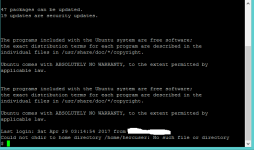
Untitled.png

 
Last edited by a moderator:
Whats your problem?
I've already cloned the emulator which was very easy

But

I have problems with adding new user as said on the instructions that we should not use root as user.

Also, have problem setting up the MYSQL.

 
What problem adding user? What problem with mysql?

There's so much that can happen, you should provide more infos if you want help.

 
What problem adding user? What problem with mysql?

There's so much that can happen, you should provide more infos if you want help.
i typed in useradd and passwd to create new users in the command line but i guess i did not work for me cause it did nothing.

For mysql, everything did not work like creating new database, creating new database username and password, and grant privileges.

one more question:

should i use putty or winscp setting up the server side?

 
What problem adding user? What problem with mysql?

There's so much that can happen, you should provide more infos if you want help.
i typed in useradd and passwd to create new users in the command line but i guess i did not work for me cause it did nothing.

For mysql, everything did not work like creating new database, creating new database username and password, and grant privileges.

one more question:

should i use putty or winscp setting up the server side?
Putty is fine.

About users: Which tutorial are you using? Did you added with "chown"? To check if the user was added type "compgen -u | grep $username_you_chose" - if return the name you typed the user exists.

About mysql: dump the errors here.

 
What problem adding user? What problem with mysql?

There's so much that can happen, you should provide more infos if you want help.
i typed in useradd and passwd to create new users in the command line but i guess i did not work for me cause it did nothing.

For mysql, everything did not work like creating new database, creating new database username and password, and grant privileges.

one more question:

should i use putty or winscp setting up the server side?
Putty is fine.

About users: Which tutorial are you using? Did you added with "chown"? To check if the user was added type "compgen -u | grep $username_you_chose" - if return the name you typed the user exists.

About mysql: dump the errors here.
i was following this one https://medium.com/@Secrett/how-to-create-a-ready-to-play-ragnarok-online-server-for-as-low-as-low-as-5-per-month-in-30-c59595838021

i just typed in all the commands out there from the link i provided

 
try guide in my signature it should be a breeze if you use Debian or ubuntu as operating system...

Just skip the part about Router setup .... Since you rent a VPS at DigiOcean this step already done by them...

 
Last edited by a moderator:
LOL 512 mb of RAM 
default_tongue.png
  

Even on my Raspberry Pi I have 1gb

Anyways, If you have more questions, just ask. We will do our best to answer you!

 
Last edited by a moderator:
I'm currently using digital ocean vps, running ubuntu server 14.04.5 LTS.. i've have no errors running simoultaneously rathena & hercules.. i guess u keyin wrong command perhaps?

 
I'm currently using digital ocean vps, running ubuntu server 14.04.5 LTS.. i've have no errors running simoultaneously rathena & hercules.. i guess u keyin wrong command perhaps?
i probably did, can u help me somehow? cause im new with this thing.

 
you should instead use 'adduser' as it auto creates home directory for user.

or if you are still using useradd, you can do so by having -m parameter:'useradd -m'

I recommend adduser command.

 
you should instead use 'adduser' as it auto creates home directory for user.

or if you are still using useradd, you can do so by having -m parameter:'useradd -m'

I recommend adduser command.
should i do it with sudo or nah? 

EDIT:

Thanks. i did it!

 
Last edited by a moderator:
Back
Top