Browedit 2.0 - a new revision by Borf

Olrox

Community Contributors
Messages
98
Points
0
Emulator
eAthena
brow20_png.png


Revision 279 added. (2014-08-28_browedit_20_rev-279.rar)

Full BrowEdit 2.0 SVN Log: http://svnlog.borf.info/browedit.log

Download Link: https://www.dropbox.com/sh/uy06b3ds5r80gcb/AAAUNcW0YltlirAdan00EZvPa

Edit: config.borf.json with your current RO directories. Input with your keyboard your config name once you open browedit.exe and asks for it. Your graphic card must support OpenGL 2.0+~ to run this software.

Whats new:

[*]Major Update: Mirror or Simmetry at object edit mode: allows to mirror complete maps at the RSW file. Useful for simmetry maps. Experimental for now. (press M to simmetry)

[*]Major Update: Bug reporting: Extension, once you have a crash, a crashlog can be send to borf by mail.

[*]Major Update: Height edit mode: Initial work at this mode. Left click to select an amount of tiles, right click and drag to add height or decrease it. Look for the radial menu (spacebar) to find the "height edit tools option" and disable the smoothness at heights.

[*]General bugs fixed and clean ups.
default_tongue.png


Introduction:

We all know how great and useful is browedit these days, that it has become the unique choice at Ragnarok Mapping. We will always be thankful to @Borf, who has created this tool years ago, and now, since the past year, he has been working with a new version of it.

This project replaces the old one [link] that was the previous and Old Java version of Browedit 2.0 *which is no longer used*. This thread will have regular updates about the project. Any kind of feedbacks and suggestions are always welcome.

Video:

To view this content we will need your consent to set third party cookies.
For more detailed information, see our cookies page.


Features already working:

[*]Faster and more efficient, even at complex camera distances.

[*]Real-Time Rendering of Changes Made

[*]Multi Core support (before, past browedits were only for 1 core)

[*]RSM Animation

[*]Texture Edit mode *partially*

[*]Texture window list (which is optimized and loads fast)

[*]Object Edit Mode *partially* (which now, replaces object group edit mode of past brows)

[*]Rotate, Position, Resizing and multi selection are supported.

[*]Sounds

[*]Effects

Some TODO:

[*]Water rendering

[*]Add Undo Structure (probably Redo aswell)

[*]Config Window

[*]Start Working on More Edit Modes.

[*]Saving.

[*]Add Skybox (a fancy feature that will add sky to maps. Probably it can be linked to fogparametertable.txt)

Possible New Features:

[*]New Lightmaps

[*]Proper Lightmap calculations across models

[*]3D RSM Models editor inside Browedit probably with animation support (/me hopes)

[*]Multi-User Share Mapping (multiple mappers could work on a same map in real time)

We have to be thankful with @Borf that has been working on this project for a long time. If you have programming skills, you can be part of this project, please  don't hesitate to contact me by PM. Please support the project by giving us feedback and nice or useful ideas that would make browedit 2.0 improve. Also, please avoid to report constantly bugs or glitches, one time is enough. Keep in mind this is under progress and not a release version. 

Motivation is always welcome. Share this project and show us your support to make it possible.

 
Last edited by a moderator:
O.M.G. no words to describe its awesomeness

 
wow awesome, a major upgrade =)

 
At the config, if by a reason you are inverting the slash "" with "/" then, you'll have a crash.

Alternatively, if your windows username has a weird character, you'll have an error (like chinese, or spanish accent, something like that). You'd have then, to change your username at the control panel in windows.

 
At the config, if by a reason you are inverting the slash "" with "/" then, you'll have a crash.

Alternatively, if your windows username has a weird character, you'll have an error (like chinese, or spanish accent, something like that). You'd have then, to change your username at the control panel in windows.

Code:
{    "resolution" : [ 1920, 1080 ],    "data" :    {        "ropath" : "C:/# 17 Mei 2014/Ragnarok Online/Server/# 28 Mei 2014/LegendaryRO/Client",        "grfs" :        [            "C:/# 17 Mei 2014/Ragnarok Online/Server/# 28 Mei 2014/Client/ro.grf",            "C:/# 17 Mei 2014/Ragnarok Online/Server/# 28 Mei 2014//Client/mro.grf"            "C:/# 17 Mei 2014/Ragnarok Online/Server/# 28 Mei 2014/Client/data.grf",            "C:/# 17 Mei 2014/Ragnarok Online/Server/# 28 Mei 2014/Client/rdata.grf"        ]    },    "moveconsole" : true,    "defaultmap" : "caspen"} 
 
xeNium I guess "#" counts as weird character... in my case "!" counted.

@edit

Also the "change username at control panel" mentioned was cause my username had a strange character ( í ), so it's for exclusive cases only...

 
Last edited by a moderator:
xeNium I guess "#" counts as weird character... in my case "!" counted.

@edit

Also the "change username at control panel" mentioned was cause my username had a strange character ( í ), so it's for exclusive cases only...
My username at control panel also, xeNium

I also have tested it too on my 2nd computer (I have laptops and unused computer) and I put it on the desktop

NVIDIA GeForce GTX 770m, support 4.4 OpenGL, ah I think somehow it require something that both of my computer and laptops don't have, do you got other BrowEdit version?

 
Last edited by a moderator:
"C:/# 17 Mei 2014/Ragnarok Online/Server/# 28 Mei 2014/Client/ro.grf"

the path should not countain "#" ... Here I even took out the spaces. Look:

Code:
{	"resolution" : [ 1680, 1050 ],	"data" :	{		"ropath" : "C:/Users/Patricia/data",		"grfs" :		[			"C:/Users/Patricia/data.grf"		]	},	"moveconsole" : true,	 "defaultmap" : "prontera"}
 
You know, I honestly wouldn't be surprised if at this point Gravity is using BROW Editor to make official maps.

 
Last edited by a moderator:
You know, I honestly wouldn't be surprised if at this point Gravity is using BROW Editor to make official maps.
I think so. Mostly because I've the feeling that their official editor is not that user friendly. However, seems they have quite a lot of tools.

P.S. Borf did new revisions, soon I'll update the thread.

 
Last edited by a moderator:
You know, I honestly wouldn't be surprised if at this point Gravity is using BROW Editor to make official maps.
I think so. Mostly because I've the feeling that their official editor is not that user friendly. However, seems they have quite a lot of tools.
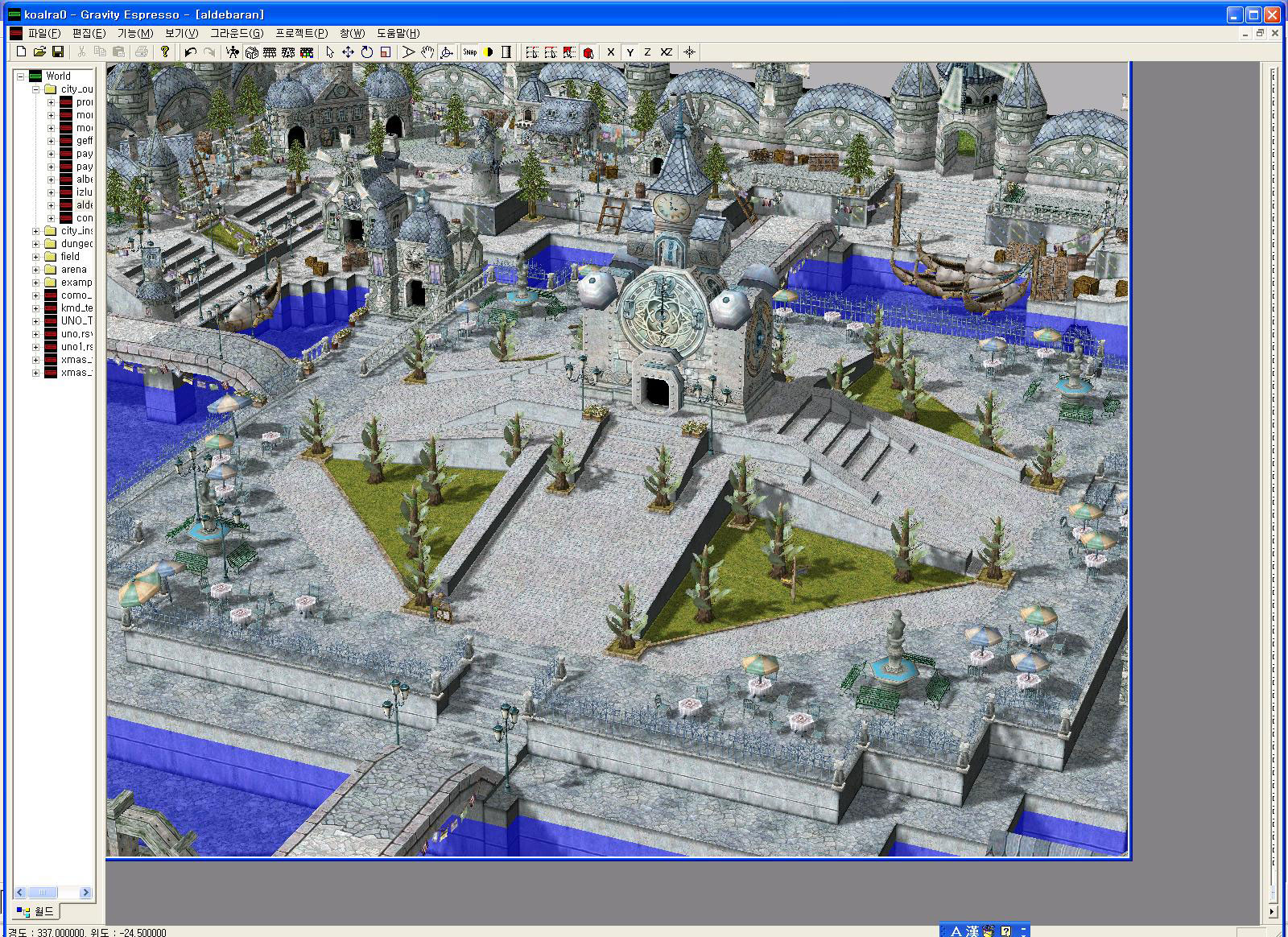
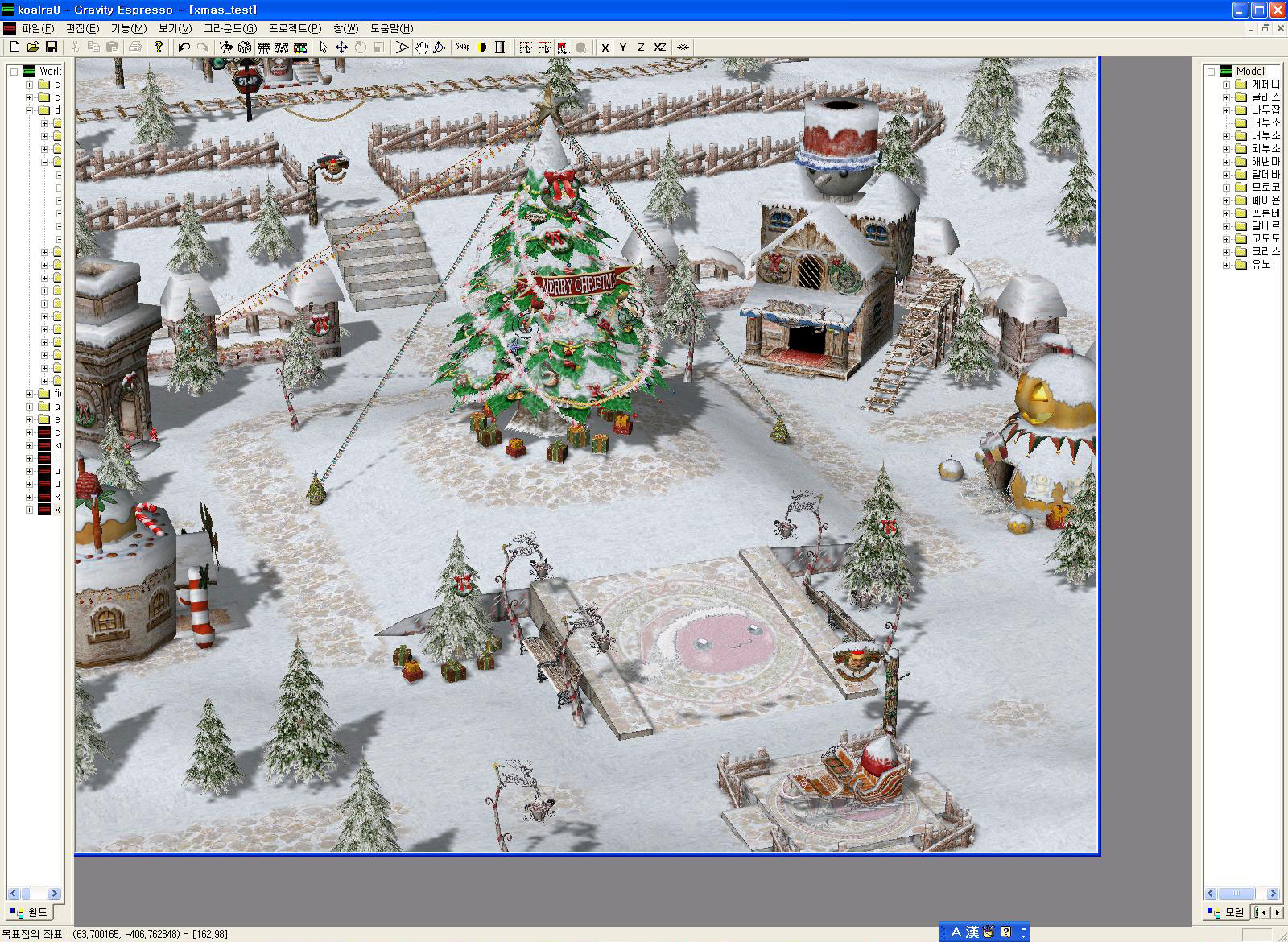
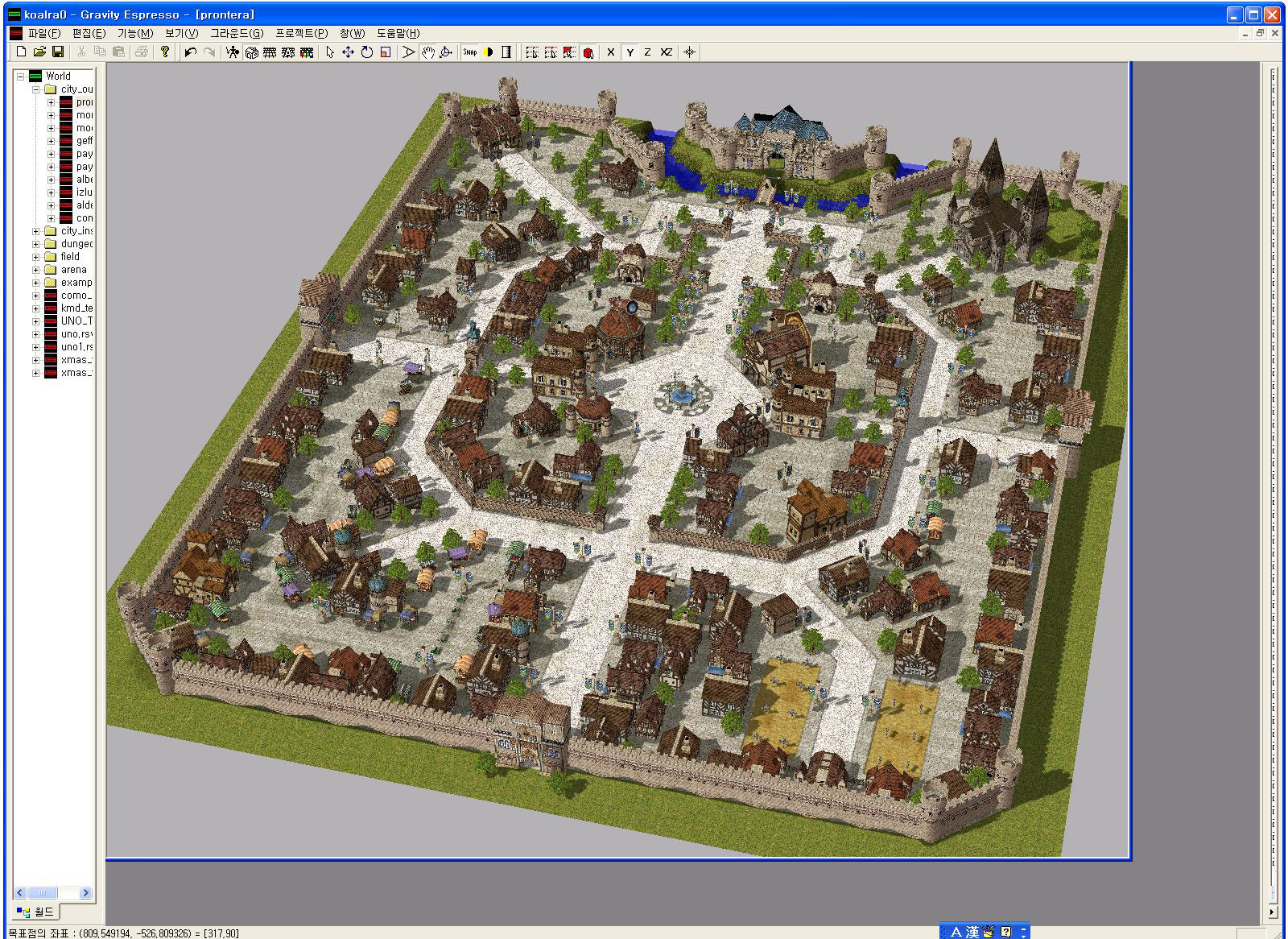
 Leak:

aldebaran.jpg


lutie.jpg


prontera.jpg

Gravity will not use others tools, they are attached to their own outdated ones. (note: It's not the case of official servers).

Awesome work, would be great to have a linux build (since I saw some fix for linux in the commits log).

 
Last edited by a moderator:
You know, I honestly wouldn't be surprised if at this point Gravity is using BROW Editor to make official maps.
I think so. Mostly because I've the feeling that their official editor is not that user friendly. However, seems they have quite a lot of tools.
 Leak:

aldebaran.jpg


lutie.jpg


prontera.jpg

Gravity will not use others tools, they are attached to their own outdated ones. (note: It's not the case of official servers).

Awesome work, would be great to have a linux build (since I saw some fix for linux in the commits log).

Hey thats a nice leak. Once upon a time I saw a SS, but wow this is the first time I see a lot. Oh btw yes there is a linux build already.

Also, borf one day told me that he would be glad to work with someone that is used to the rsw, rsm and that kind of gravity's formats. In case you are interested just let me know, you could have access to the code.

 
LOL Gravity map editor doesn't fully support water, Hahha, but WOW it have many tools.

 
Last edited by a moderator:
Hey thats a nice leak. Once upon a time I saw a SS, but wow this is the first time I see a lot. Oh btw yes there is a linux build already.

Also, borf one day told me that he would be glad to work with someone that is used to the rsw, rsm and that kind of gravity's formats. In case you are interested just let me know, you could have access to the code.
I already post some SS some months ago on IRC, so it's maybe where you saw some of them
default_tongue.png
Not sure if I have much time to really help Borf, but he can always contact me on gtalk (hu Hangouts now) if he wants to talk or grab RO informations
default_tongue.png


LOL Gravity map editor doesn't fully support water, Hahha, but WOW it have many tools.
In fact it does support water better than Browedit does. The wave pitch and intensity is the more interesting part of the water in my opinion. Too bad, nobody has the correct formula to manage water...
 
Last edited by a moderator:
"C:/# 17 Mei 2014/Ragnarok Online/Server/# 28 Mei 2014/Client/ro.grf"

the path should not countain "#" ... Here I even took out the spaces. Look:

{ "resolution" : [ 1680, 1050 ], "data" : { "ropath" : "C:/Users/Patricia/data", "grfs" : [ "C:/Users/Patricia/data.grf" ] }, "moveconsole" : true,  "defaultmap" : "prontera"}
Done, now it does not crash, just black screen O:

{ "data" :

 {

   "ropath" : "c:/games/gravity/ro",

   "grfs" :

   [

     "c:/games/gravity/ro/data.grf",

     "c:/games/gravity/ro/rdata.grf"

   ]

 },

 "defaultmap" : "prontera",

 "threadedrendering" : true,

 "backgroundworkers" : true
}
 
Edit: It works with default .grf but does not work with custom .grf from my servers, hiks!
 
Last edited by a moderator:
lol what happened to your resolution line? it gone?
default_tongue.png


and why this line? "    "backgroundworkers" : true"

 
Last edited by a moderator:
Well, time to buy a new laptop. :'(

My ASUS laptop doesn't have a graphics card.. It's an Intel onboard graphics driver thing. I "updated" my graphics driver, and I guess the furthest it goes is OpenGL 2.1 /fml

Happy to see such wonderful improvements!

 
Back
Top