
Hello, I'm having this problem, I'm using 20140305 and I can't seem to connect to my server. (All ports are open)
-When I login using right credentials I can't even reach the server selection screen that follows it.
-When I type the wrong password it says wrong password.
Usually I could debug it myself but there's really no error message to help me now, I'd appreciate it if someone could help me.
map-server
clientinfo.xml
mmo.h
char-server.conf
login-server.conf
map-server.conf
// Information related to inter-server behavior
inter: {
// Interserver communication passwords, set in the login server database
userid: "s1"
passwd: "p1"
// Character Server IP
// The map server connects to the character server using this IP address.
// NOTE: This is useful when you are running behind a firewall or are on
// a machine with multiple interfaces.
char_ip: "localhost"
// The map server listens on the interface with this IP address.
// NOTE: This allows you to run multiple servers on multiple interfaces
// while using the same ports for each server.
//bind_ip: "127.0.0.1"
// Character Server Port
char_port: 6121
// Map Server IP
// The IP address which clients will use to connect.
// Set this to what your server's public IP address is.
map_ip: "35.240.209.215"
// Map Server Port
map_port: 5121
}
NEMO Diff Log
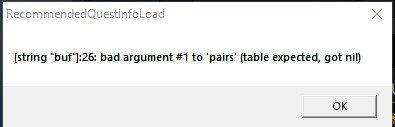
I also get an error when launching my client (See attached file)
-When I login using right credentials I can't even reach the server selection screen that follows it.
-When I type the wrong password it says wrong password.
Usually I could debug it myself but there's really no error message to help me now, I'd appreciate it if someone could help me.
map-server
Code:
[Status]: Request for connection of cassey02 (ip: 130.105.186.113).
[Notice]: Authentication accepted (account: cassey02, id: 2000003, ip: 130.105.186.113)
[Status]: Connection of the account 'cassey02' accepted.
[Info]: Closed connection from '130.105.186.113'.
clientinfo.xml
Code:
<?xml version="1.0" encoding="euc-kr" ?>
<clientinfo>
	<desc>Ragnarok Client Information</desc>
	<servicetype>korea</servicetype>
	<servertype>primary</servertype>
	<connection>
		<display>RelentlessRO</display>
		<desc>Ragnarok Online</desc>
		<balloon>this is a tool tip</balloon>
		<address>35.240.209.215</address>
		<port>6900</port>
		<version>24</version>
		<langtype>0</langtype>
		<registrationweb>http://35.240.209.215</registrationweb>
		<yellow>
			<admin>2000001</admin>
		</yellow>
		<loading>
			<image>loading00.jpg</image>
			<image>loading01.jpg</image>
			<image>loading02.jpg</image>
			<image>loading03.jpg</image>
			<image>loading04.jpg</image>
			<image>loading05.jpg</image>
			<image>loading06.jpg</image>
		</loading>
	</connection>
</clientinfo>
mmo.h
Code:
#ifndef PACKETVER
	#define PACKETVER 20140305
#endif // PACKETVER
Code:
// Information related to inter-server behavior
	inter: {
		// Server Communication username and password.
		userid: "s1"
		passwd: "p1"

		// Login Server IP
		// The character server connects to the login server using this IP address.
		// NOTE: This is useful when you are running behind a firewall or are on
		// a machine with multiple interfaces.
		login_ip: "localhost"

		// The character server listens on the interface with this IP address.
		// NOTE: This allows you to run multiple servers on multiple interfaces
		// while using the same ports for each server.
		//bind_ip: "127.0.0.0"

		// Login Server Port
		login_port: 6900

		// Character Server IP
		// The IP address which clients will use to connect.
		// Set this to what your server's public IP address is.
		char_ip: "35.240.209.215"

		// Character Server Port
		char_port: 6121
	}
login-server.conf
Code:
inter: {
		// The login server listens on the interface with this IP address.
		// NOTE: This allows you to run multiple servers on multiple interfaces
		// while using the same ports for each server.
		//bind_ip: "127.0.0.1"

		// Login Server Port
		login_port: 6900

		// Interval (in minutes) to execute a DNS/IP update. Disabled by default.
		// Enable it if your server uses a dynamic IP which changes with time.
		//ip_sync_interval: 10
	}
map-server.conf
// Information related to inter-server behavior
inter: {
// Interserver communication passwords, set in the login server database
userid: "s1"
passwd: "p1"
// Character Server IP
// The map server connects to the character server using this IP address.
// NOTE: This is useful when you are running behind a firewall or are on
// a machine with multiple interfaces.
char_ip: "localhost"
// The map server listens on the interface with this IP address.
// NOTE: This allows you to run multiple servers on multiple interfaces
// while using the same ports for each server.
//bind_ip: "127.0.0.1"
// Character Server Port
char_port: 6121
// Map Server IP
// The IP address which clients will use to connect.
// Set this to what your server's public IP address is.
map_ip: "35.240.209.215"
// Map Server Port
map_port: 5121
}
NEMO Diff Log
Code:
9 Disable 1rag1 type parameters (Recommended)
23 Enable /who command (Recommended)
24 Fix Camera Angles (Recommended)
33 Always Call SelectKoreaClientInfo() (Recommended)
34 Enable /showname (Recommended)
36 Read msgstringtable.txt (Recommended)
38 Remove Gravity Ads (Recommended)
39 Remove Gravity Logo (Recommended)
40 Restore Login Window (Recommended)
41 Disable Nagle Algorithm (Recommended)
44 Translate Client (Recommended)
46 Use Normal Guild Brackets (Recommended)
47 Use Ragnarok Icon
48 Use Plain Text Descriptions (Recommended)
49 Enable Multiple GRFs (Recommended)
53 Use Ascii on All LangTypes (Recommended)
64 @ Bug Fix (Recommended)
65 Load Custom lua file instead of iteminfo*.lub (Recommended)
68 Enable 64k Hairstyle
84 Remove Serial Display (Recommended)
90 Enable DNS Support (Recommended)
97 Cancel to Login Window (Recommended)
105 Hide Nav Button
106 Hide BG Button
107 Hide Bank Button
108 Hide Booking Button
109 Hide Rodex Button
110 Hide Achievements Button
111 Hide Rec Button
112 Hide Map Button
113 Hide Quest Button
213 Disable Help Message on Login (Recommended)
216 Hide Cash Shop
233 Hide SNS Button

