
salmanshaikh14
New member
- Messages
- 14
- Points
- 0
i am using 2013-08-07aRagexe.. but it shows the item and description in other language.. i have patched it to translate client into english even am using data folder v4... english translated.. and also some problem with me clientinfo
if i use this it get connected
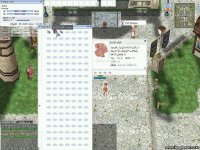
if i use this it get connected
when i used this<?xml version="1.0" encoding="euc-kr" ?>
<clientinfo>
<servicetype>korea</servicetype>
<servertype>sakray</servertype>
<connection>
<display>Ragnarok</display>
<balloon>the balloon</balloon>
<desc>description</desc>
<address>127.0.0.1</address>
<port>6900</port>
<version>26</version>
<langtype>1</langtype>
<registrationweb>flux.domain.com</registrationweb>
<aid>
<admin>2000000</admin>
<admin>2000001</admin>
<admin>2000002</admin>
</aid>
<loading>
<image>loadingscreen01.jpg</image>
</loading>
</connection>
</clientinfo>
it does not work.. i have change the ip and all...to 127.0.0.1.. still it does not work and also the inventory is long can it be small like before<?xml version="1.0" encoding="euc-kr" ?>
<clientinfo>
<desc>Ragnarok Client Information</desc>
<servicetype>korea</servicetype>
<servertype>sakray</servertype>
<hideaccountlist />
<passwordencrypt />
<passwordencrypt2 />
<extendedslot />
<readfolder />
<connection>
<display>SERVER NAME HERE</display>
<desc>Ragnarok Online</desc>
<balloon>this is a tool tip</balloon>
<address>SERVER IP HERE</address>
<port>6900</port>
<version>20</version>
<langtype>1</langtype>
<registrationweb>REGISTRATION URL HERE</registrationweb>
<yellow>
<admin>2000001</admin>
<admin>2000002</admin>
<admin>2000003</admin>
</yellow>
<loading>
<image>loading00.jpg</image>
<image>loading01.jpg</image>
<image>loading02.jpg</image>
<image>loading03.jpg</image>
<image>loading04.jpg</image>
<image>loading05.jpg</image>
<image>loading06.jpg</image>
<image>loading07.jpg</image>
<image>loading08.jpg</image>
<image>loading09.jpg</image>
<image>loading10.jpg</image>
</loading>
</connection>
</clientinfo>
