Closed connection from 'ip address'

Valiente

New member
Messages
90
Points
0
Sorry for the three consecutive topics. I was able to set up my server on a VM and my not so perfect client (2013-08-14aRagexe) just now after continious research but there are still problems that keeps me from finishing my server set-up.

I was able to login using Loki Launcher but upon pressing enter on server selection I get failed to connect to the server. These are the the screenshot: 

First of I get this weird error after logging in with Loki Launcher
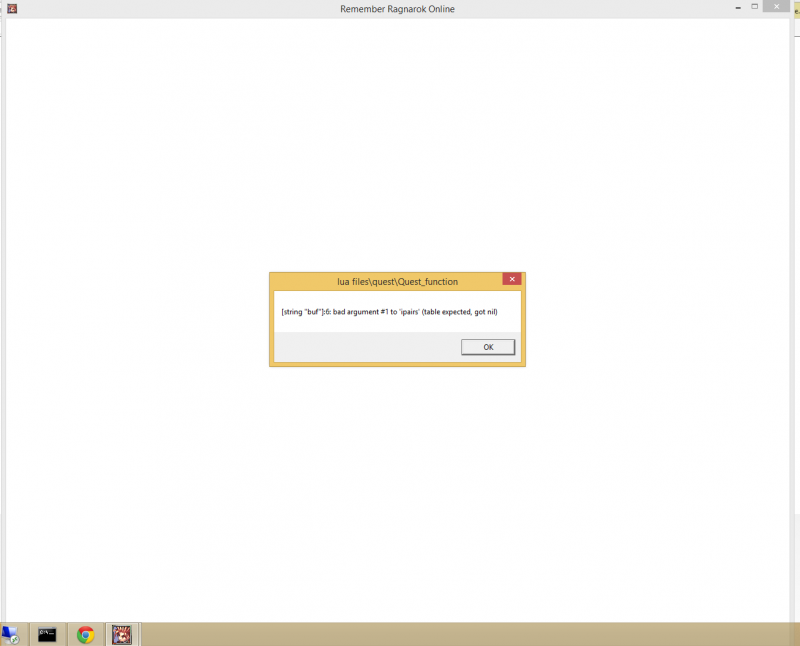
1_zpsd1d00781.png


And this signifies that I have succesfully logged in
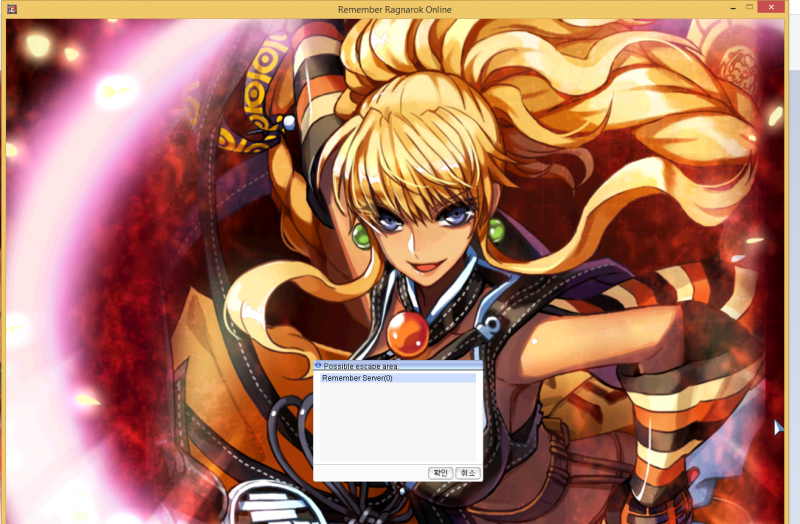
4_zps610b485a.png


But after pressing enter this is what I get:
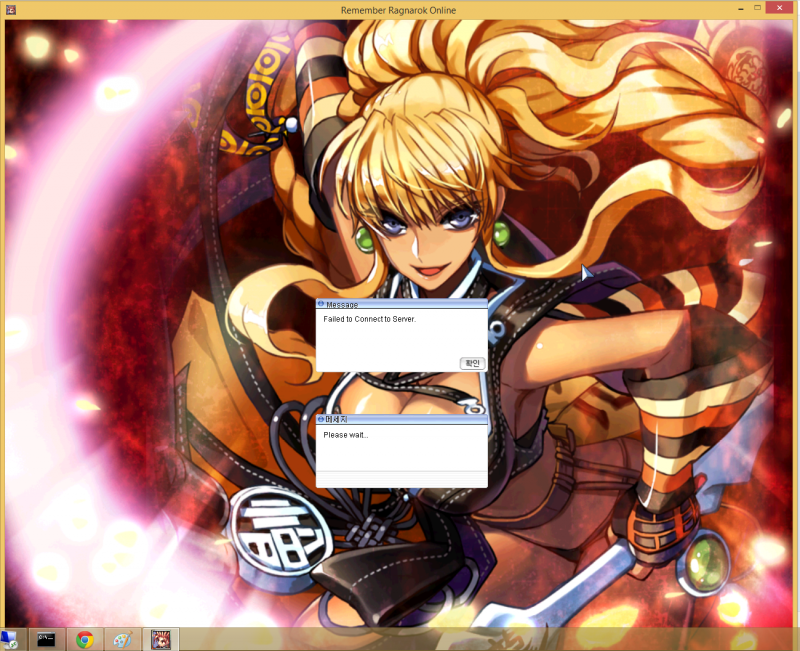
5_zps5d33d231.png


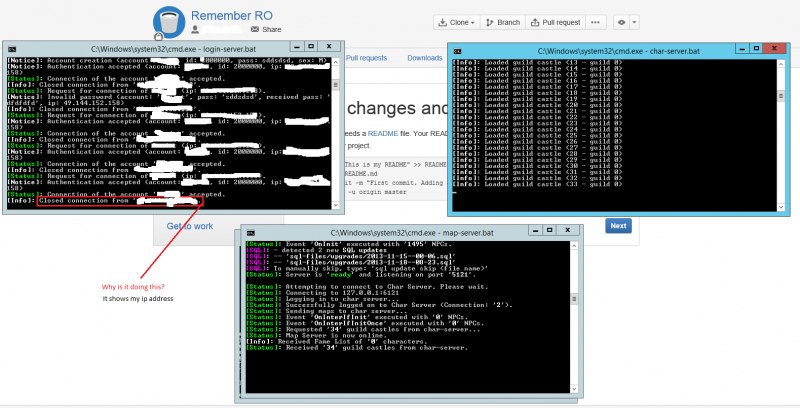
Screenshot for server side:

remember_zps068ff0de.png


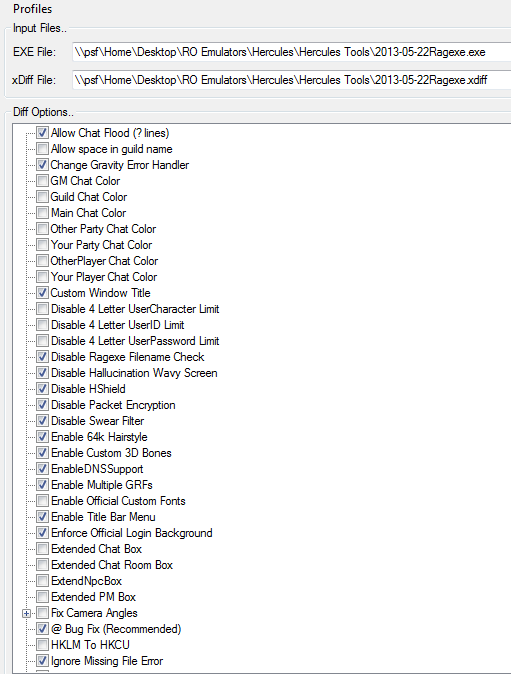
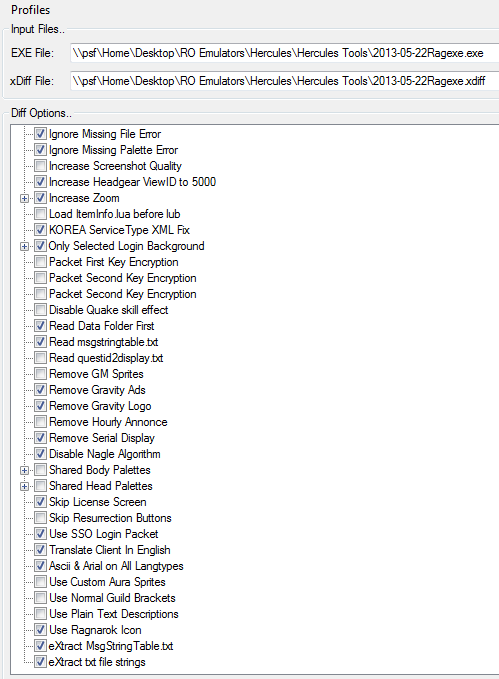
And these are my diff settings:
 

diff1.png


diff2.png


By looking at my screenshots, I think it's also clear that I am getting these weird korean text instead of English. Any help will b very much appreciated!

 
What are your map server and  server IP on conf/map_server.conf  conf/char_server.conf? They should point to your VM IP,  not be commented or point to 127.0.0.1

 
in your Diff, also check Read questid2display.txt

Did you set your mmo.h 

#ifndef PACKETVER #define PACKETVER 20130814#endif// Comment the following line if your client is NOT ragexeRE (required because of conflicting packets in ragexe vs ragexeRE).//#define PACKETVER_RE
then recompile?

remember to disable #define PACKETVER_RE since you are using ragexe. See example above.

 
Last edited by a moderator:
Closed connection from <ip address> message is normal in login server (since the connection is only needed during the initial process once you connect to char server , login server disconnects).

check your character server / map server when the failed to connect message appears. Usually when this happens it is  caused due to packet issues .. if that is the case try switching on/off disable packet encryption.

 
What are your map server and server IP on conf/map_server.conf conf/char_server.conf? They should point to your VM IP, not be commented or point to 127.0.0.1
This one solved the problem (changed 127.0.0.1 to WAN/Public ip) but after character creation and chosing a character. I immediately get the "Disconnected from the server" message box and then logs me out to desktop after pressing enter.This is what I got on server (Not ticking Disable Packed Encryption)

map_zps31cd8821.png


I still have korean symbols on my buttons too.EDIT: Just to clarify things, I already did what sevenzz said

EDIT AGAIN: I followed what Neo said and this is what I got:

The first warning message is when I ticked Disable Packet Encryption

The second warning message is when I left it unticked

The third one is when I ticked it again in order to make sure

map_zpsb1001e52.png


Last edited by a moderator:
@ts yeah try to use 20130807 client it is more stable than 20130814

 
Yes it worked like a charm. The rememaining problem is my buttons are in Korean. I am using the data folder from this revision: https://subversion.assembla.com/svn/client-side-translation/

How do I fix this?

Did you added all of the translation Stuff into a GRF?  or are u using it from the Data Folder ?

be sure to set the Diff Correct if u are using  GRF  = Remove Data Folder First .   if u are using Data Folder = Diff  Read Data Folder First.

and be sure to place all in the  Correct folder names 

YourRoFolderName/data

 
Last edited by a moderator:
Since we are using the original kRO client, they come in Korean by default. They usually get added if we can rip their international counterparts and/or someone in the community translates and releases them.


Item name and description needs translation too

How do I fix this?

Diff your client Read iteminfo.lua before lub located at RO/System/ then check your iteminfo.lua if available
default_smile.png
 if not, kindly pm me and I will share you mine..

I'm pretty sure this will solve your problem
default_ani_meow.gif


Last edited by a moderator:
Yes it worked like a charm. The rememaining problem is my buttons are in Korean. I am using the data folder from this revision: https://subversion.assembla.com/svn/client-side-translation/

How do I fix this?

Did you added all of the translation Stuff into a GRF?  or are u using it from the Data Folder ?

be sure to set the Diff Correct if u are using  GRF  = Remove Data Folder First .   if u are using Data Folder = Diff  Read Data Folder First.

and be sure to place all in the  Correct folder names 

YourRoFolderName/data
I am using Read Data Folder First (Based on my diff settings screenshots above) since I am using Data folder and no GRFs at the moment since I'm still on the development stage and having a GRF compiled every time I make changes is too much of a hassle. 

 
Item name and description needs translation too

How do I fix this?

Diff your client Read iteminfo.lua before lub located at RO/System/ then check your iteminfo.lua if available
default_smile.png
 if not, kindly pm me and I will share you mine..

I'm pretty sure this will solve your problem
default_ani_meow.gif
My xdiff doesn't have that option to be ticked. It's just not there. What should I do?

Since we are using the original kRO client, they come in Korean by default. They usually get added if we can rip their international counterparts and/or someone in the community translates and releases them.
So.. You mean there's no release for translated buttons atm?

 
Either there aren't or nobody released them so that they're available to everybody.

 
Yes it worked like a charm. The rememaining problem is my buttons are in Korean. I am using the data folder from this revision: https://subversion.assembla.com/svn/client-side-translation/

How do I fix this?

Did you added all of the translation Stuff into a GRF?  or are u using it from the Data Folder ?

be sure to set the Diff Correct if u are using  GRF  = Remove Data Folder First .   if u are using Data Folder = Diff  Read Data Folder First.

and be sure to place all in the  Correct folder names 

YourRoFolderName/data
I am using Read Data Folder First (Based on my diff settings screenshots above) since I am using Data folder and no GRFs at the moment since I'm still on the development stage and having a GRF compiled every time I make changes is too much of a hassle. 

> 

 
Item name and description needs translation too

How do I fix this?

Diff your client Read iteminfo.lua before lub located at RO/System/ then check your iteminfo.lua if available
default_smile.png
 if not, kindly pm me and I will share you mine..

I'm pretty sure this will solve your problem
default_ani_meow.gif
My xdiff doesn't have that option to be ticked. It's just not there. What should I do?

Since we are using the original kRO client, they come in Korean by default. They usually get added if we can rip their international counterparts and/or someone in the community translates and releases them.
So.. You mean there's no release for translated buttons atm?

My mistake, it should be Load not Read

are you sure?

You said here that this is your settings.. and I saw that you didn't tick Load iteminfo.lua before lub.

And these are my diff settings:

diff2.png
 
Yes it worked like a charm. The rememaining problem is my buttons are in Korean. I am using the data folder from this revision: https://subversion.assembla.com/svn/client-side-translation/

How do I fix this?

Did you added all of the translation Stuff into a GRF?  or are u using it from the Data Folder ?

be sure to set the Diff Correct if u are using  GRF  = Remove Data Folder First .   if u are using Data Folder = Diff  Read Data Folder First.

and be sure to place all in the  Correct folder names 

YourRoFolderName/data
I am using Read Data Folder First (Based on my diff settings screenshots above) since I am using Data folder and no GRFs at the moment since I'm still on the development stage and having a GRF compiled every time I make changes is too much of a hassle. 

>> 

 
Item name and description needs translation too

How do I fix this?

Diff your client Read iteminfo.lua before lub located at RO/System/ then check your iteminfo.lua if available
default_smile.png
 if not, kindly pm me and I will share you mine..

I'm pretty sure this will solve your problem
default_ani_meow.gif
My xdiff doesn't have that option to be ticked. It's just not there. What should I do?

Since we are using the original kRO client, they come in Korean by default. They usually get added if we can rip their international counterparts and/or someone in the community translates and releases them.
So.. You mean there's no release for translated buttons atm?

My mistake, it should be Load not Read

are you sure?

You said here that this is your settings.. and I saw that you didn't tick Load iteminfo.lua before lub.

And these are my diff settings:

diff2.png
Yeah man. That fixed the problem. The only problem now is the korean buttons. Do we have the translated resources for this?

 
^ hmm, try to change it by using your Option ingame, maybe your client uses default skin which is korean.

Login your account, then in game hit Esc>settings>skin><basic skin>

or download custom skins, search it on google
default_biggrin.png


Fixed the Korean characters in buttons issue by replacing the name of the folder inside the textures folder which was in Korean with these symbols À¯ÀúÀÎÅÍÆäÀ̽º.

Now I see. So my exe can't read actual Korean symbols I suppose.

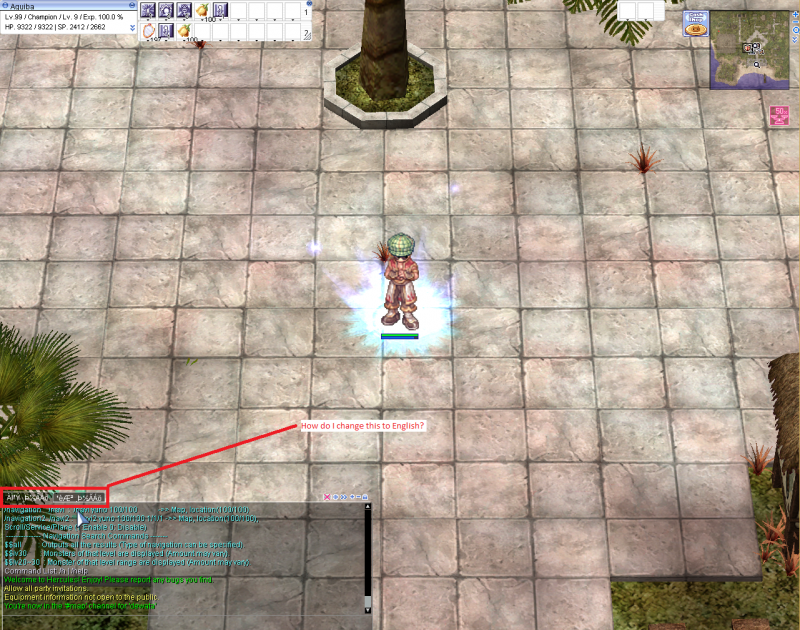
The only remaining problem now is this:

koreanissues_zps4916f5e3.png


For some reason it is still in symbols. How do I fix this?

 
Last edited by a moderator:
Back
Top