Compiling Hercules Fail

REKT

New member
Messages
372
Points
0
Emulator
Other
Hello, i'm new to Hercules Emulator and i have problem regarding compiling this emulator.

This is what i did:

Click Hercules-10 (since i'm using VS 2010)

Right click Hercules-10 

1. Clean Solution

2. Build

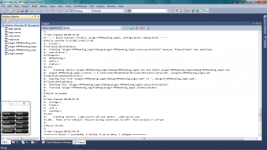
After the recompiling it shows me some errors.

Image:
Untitled.png

How can i solved this. Thank You!
default_smile.png


Project Properties

-> Configuration Properties

-> Linker (General)

-> Enable Incremental Linking -> "No (/INCREMENTAL:NO)"

 
Hello, i'm new to Hercules Emulator and i have problem regarding compiling this emulator.

This is what i did:

Click Hercules-10 (since i'm using VS 2010)

Right click Hercules-10 

1. Clean Solution

2. Build

After the recompiling it shows me some errors.

Image:

attachicon.gif
Untitled.png

How can i solved this. Thank You!
default_smile.png
and use the release too not debug

 
Project Properties

-> Configuration Properties

-> Linker (General)

-> Enable Incremental Linking -> "No (/INCREMENTAL:NO)"
ALT+F7 okay, as i noticed, every char-server map-server login-server map-cache and so on with the plugins?

do i really need to do this:

 Project Properties

-> Configuration Properties

-> Linker (General)

-> Enable Incremental Linking -> "No (/INCREMENTAL:NO)"

what's the purpose on that? when i looked up juda's bible there no like that in the GUIDE.

overall?

Hello, i'm new to Hercules Emulator and i have problem regarding compiling this emulator.

This is what i did:

Click Hercules-10 (since i'm using VS 2010)

Right click Hercules-10

1. Clean Solution

2. Build

After the recompiling it shows me some errors.

Image:

attachicon.gif
Untitled.png

How can i solved this. Thank You!
default_smile.png
and use the release too not debug
can i ask ask, what's the difference between the 'debug' and 'release' can you explain me.

Thank you!

 
Last edited by a moderator:
http://stackoverflow.com/questions/10888391/error-link-fatal-error-lnk1123-failure-during-conversion-to-coff-file-inval
This thread explains it. Either by changing the settings or installing the updates for VS2010. Usually this step isn't required if your application is up to date I guess. Also debug/release shouldn't have anything to do with this. Debug / release are what they mean, debug to include debug information in the build, easier for debugging, you get the pdb files and release you get the optimized version, which can make debugging through the code difficult

 
Back
Top