

Vietlubu
New member
- Messages
- 38
- Points
- 0
- Github
- vietlubu
- Emulator
I trying to write a script with non-English text. currently with Japanese.
My script here. has save as with UTF-8 encode
My clientinfo. used <langtype>2</langtype>
<?xml version="1.0" encoding="euc-kr" ?>
<clientinfo>
<desc>Ragnarok Client Information</desc>
<servicetype>korea</servicetype>
<servertype>primary</servertype>
<connection>
<display>Ragnarok</display>
<address>127.0.0.1</address>
<port>6900</port>
<version>55</version>
<langtype>2</langtype>
<registrationweb>www.ragnarok.com</registrationweb>
<loading>
<image>loading00.jpg</image>
<image>loading01.jpg</image>
<image>loading02.jpg</image>
<image>loading03.jpg</image>
<image>loading04.jpg</image>
<image>loading05.jpg</image>
<image>loading06.jpg</image>
</loading>
</connection>
</clientinfo>
But when I start the client, the text display incorrect like this:
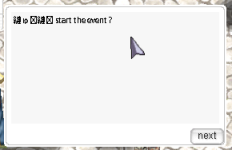
Do I miss anything here?
** Update
My client version it 2017-06-14bRagexeRE.exe
My script here. has save as with UTF-8 encode
Code:
mes "あひひ start the event ?";<?xml version="1.0" encoding="euc-kr" ?>
<clientinfo>
<desc>Ragnarok Client Information</desc>
<servicetype>korea</servicetype>
<servertype>primary</servertype>
<connection>
<display>Ragnarok</display>
<address>127.0.0.1</address>
<port>6900</port>
<version>55</version>
<langtype>2</langtype>
<registrationweb>www.ragnarok.com</registrationweb>
<loading>
<image>loading00.jpg</image>
<image>loading01.jpg</image>
<image>loading02.jpg</image>
<image>loading03.jpg</image>
<image>loading04.jpg</image>
<image>loading05.jpg</image>
<image>loading06.jpg</image>
</loading>
</connection>
</clientinfo>
But when I start the client, the text display incorrect like this:
Do I miss anything here?
** Update
My client version it 2017-06-14bRagexeRE.exe
Last edited by a moderator: