

Wolfeh
New member
- Messages
- 63
- Points
- 0
- Github
- ItsWolfeh
- Emulator
'Hokay, here's another problem I absolutely cannot figure out. XD
I have a handful of maps which are duplicates and every time I @warp to them, the client crashes with no error (just blabla.exe has stopped working). I tried another client with different diffs (not sure which ones, is an old one which I no longer use but it is the same date as the one I am using) and got this message (world NULL error) to pop up if it means anything:
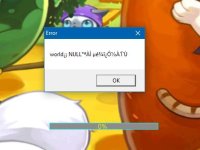
Yes I added them to maps.conf, map_index.txt, resnametable, mapnametable, and cached successfully with Herc's mapcache. It also has the minimap in the proper place (texture\À¯ÀúÀÎÅÍÆäÀ̽º\map). I get no error server-side, so it is a client problem. I tried just doing recommended patches while diffing to see if it was diff related and still crashed... I use NEMO to diff. Client is 2015-05-13aRagexe.
I have a handful of maps which are duplicates and every time I @warp to them, the client crashes with no error (just blabla.exe has stopped working). I tried another client with different diffs (not sure which ones, is an old one which I no longer use but it is the same date as the one I am using) and got this message (world NULL error) to pop up if it means anything:
Yes I added them to maps.conf, map_index.txt, resnametable, mapnametable, and cached successfully with Herc's mapcache. It also has the minimap in the proper place (texture\À¯ÀúÀÎÅÍÆäÀ̽º\map). I get no error server-side, so it is a client problem. I tried just doing recommended patches while diffing to see if it was diff related and still crashed... I use NEMO to diff. Client is 2015-05-13aRagexe.
maps.conf: "berz_03",
map_index.txt: berz_03 1259 (tried with and without ID)
mapnametable: berz_03.rsw#Testing#
resnametable:
berz_03.gnd#force_map3.gnd#
berz_03.gat#force_map3.gat#
berz_03.rsw#force_map3.rsw#
À¯ÀúÀÎÅÍÆäÀ̽º\map\berz_03.bmp#À¯ÀúÀÎÅÍÆäÀ̽º\map\force_map3.bmp#
map_index.txt: berz_03 1259 (tried with and without ID)
mapnametable: berz_03.rsw#Testing#
resnametable:
berz_03.gnd#force_map3.gnd#
berz_03.gat#force_map3.gat#
berz_03.rsw#force_map3.rsw#
À¯ÀúÀÎÅÍÆäÀ̽º\map\berz_03.bmp#À¯ÀúÀÎÅÍÆäÀ̽º\map\force_map3.bmp#
Last edited by a moderator:

