Erro ao deixar Online

emiedson

New member
Messages
5
Points
0
To meio enferrujado mais esse emulador atual do Hercules ta diferente 

E os tutorias que encontrei são meio antigos so gostaria de saber quais arquivos e locais  Por o Ip do meu host pra ficar online!

Em offline ele pega perfeitamente so quero a informação de onde alterar os IP

Ps: meu Ingles e ruim então se auguem por um exemplo agradeceria muito.
EX:     \conf\global
up.+ 

db_hostname: "127.0.0.1"

por

db_hostname: "IP HOSTE"

 
Last edited by a moderator:
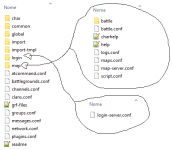
mais no emulador novo ta bem diferente as localizações dos arquivos normais entre outras coisas.

alem desses que coloquei como exemplo tem outros arquivos que dão impressão que tem que ser editados mais ainda não descobri oque e pra deixar 127.0.0.1 e oque e pra por ip do host. tendeu? PS espero não ter feito nada contras a regras de postagem to precisando muito dessa ajuda u.u

esse e o emulador do hercules que to querendo usar> http://github.com/HerculesWS/Hercules

map-server

// Information related to inter-server behavior
    inter: {
        // Interserver communication passwords, set in the login server database
        userid: "s1"
        passwd: "p1"

        // Character Server IP
        // The map server connects to the character server using this IP address.
        // NOTE: This is useful when you are running behind a firewall or are on
        // a machine with multiple interfaces.
        char_ip: "127.0.0.1"

        // The map server listens on the interface with this IP address.
        // NOTE: This allows you to run multiple servers on multiple interfaces
        // while using the same ports for each server.
        //bind_ip: "127.0.0.1"

        // Character Server Port
        char_port: 6121

        // Map Server IP
        // The IP address which clients will use to connect.
        // Set this to what your server's public IP address is.
        //map_ip: "127.0.0.1"

        // Map Server Port
        map_port: 5121
    }
char-server unico local pra alterar IP

login_configuration: {
    // Login-server's console configuration
    @include "conf/global/console.conf"

    inter: {
        // The login server listens on the interface with this IP address.
        // NOTE: This allows you to run multiple servers on multiple interfaces
        // while using the same ports for each server.
        //bind_ip: "127.0.0.1"

        // Login Server Port
        login_port: 6900
ImagenDe dentro como exemplo.png

 
Você precisa configurar esses 4 arquivos

conf\map\map-server.conf
conf\char\char-server.conf
conf\global\sql_connection.conf
conf\network.conf

 
infelizmente tentei varias vezes mais não acertei as linhas corretas para alterar u.u 

to muito enferrujado a 10 anos, ta tudo hospedado em uma vps portas corretas abertas falta so saber qual  ips mudo pro IPHOST

Network.conf
Quais Linhas por IPDOHOST?

e quais não mexer?

Consegui Porem as explicações de Caiba e Jorik não foram muito explicativas, e me fez rodar em circulos ate eu entender que a de Caiba era a correta depois de muito erros ae acerta u.u.

PS: Muito obrigado! porem explicação simples de mais pra quem e leigo o ta enferrujado que nem eu e meio complicado mais vlw RESOLVIDO!

 
Last edited by a moderator:
Infelizmente eu to enferrujado também, comecei a configurar um emulador recentemente depois de alguns anos.

Mas pra deixar claro quais linhas você precisa alterar.

Char-server

// Login Server IP
// The character server connects to the login server using this IP address.
// NOTE: This is useful when you are running behind a firewall or are on
// a machine with multiple interfaces.
login_ip: "127.0.0.1" (IP LAN)

// The character server listens on the interface with this IP address.
// NOTE: This allows you to run multiple servers on multiple interfaces
// while using the same ports for each server.
//bind_ip: "127.0.0.1"

// Login Server Port
login_port: 6900

// Character Server IP
// The IP address which clients will use to connect.
// Set this to what your server's public IP address is.
char_ip: "127.0.0.1" (IP Publico do Host)


Map-server

// Character Server IP
// The map server connects to the character server using this IP address.
// NOTE: This is useful when you are running behind a firewall or are on
// a machine with multiple interfaces.
char_ip: "127.0.0.1" (IP LAN)

// The map server listens on the interface with this IP address.
// NOTE: This allows you to run multiple servers on multiple interfaces
// while using the same ports for each server.
//bind_ip: "127.0.0.1"

// Character Server Port
char_port: 6121

// Map Server IP
// The IP address which clients will use to connect.
// Set this to what your server's public IP address is.
//map_ip: "127.0.0.1" (IP Publico do Host)


@emiedson que bom que conseguiu resolver.

 
Last edited by a moderator:
Back
Top