wabbuwabbu
New member
- Messages
- 20
- Points
- 0
I’m having trouble connecting FluxCP to my server.
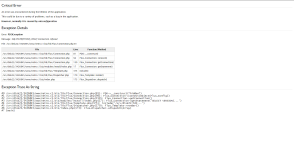
I have an independent host for the website (FluxCP) and then I’m running my ragnarok server through a Raspberry PI, utilizing my Public IP address.
I can’t seem to connect my server.php properly.
This is how I got my server.php setup:
<?php
return array(
// Example server configuration. You may have more arrays like this one to
// specify multiple server groups (however they should share the same login
// server whilst they are allowed to have multiple char/map pairs).
array(
'ServerName' => 'NetRO',
// Global database configuration (excludes logs database configuration).
'DbConfig' => array(
//'Socket' => '/tmp/mysql.sock',
//'Port' => 3306,
//'Encoding' => 'utf8', // Connection encoding -- use whatever here your MySQL tables collation is.
'Convert' => 'utf8',
// -- 'Convert' option only works when 'Encoding' option is specified and iconv (http://php.net/iconv) is available.
// -- It specifies the encoding to convert your MySQL data to on the website (most likely needs to be utf8)
'Hostname' => '192.168.1.38', // Raspberry PI's Local IP
'Username' => 'hercrodbusr',
'Password' => 'Password',
'Database' => 'hercrodb',
'Persistent' => true,
'Timezone' => null // Example: '+0:00' is UTC.
// The possible values of 'Timezone' is as documented from the MySQL website:
// "The value can be given as a string indicating an offset from UTC, such as '+10:00' or '-6:00'."
// "The value can be given as a named time zone, such as 'Europe/Helsinki', 'US/Eastern', or 'MET'." (see below continuation!)
// **"Named time zones can be used only if the time zone information tables in the mysql database have been created and populated."
),
// This is kept separate because many people choose to have their logs
// database accessible under different credentials, and often on a
// different server entirely to ensure the reliability of the log data.
'LogsDbConfig' => array(
//'Socket' => '/tmp/mysql.sock',
//'Port' => 3306,
//'Encoding' => null, // Connection encoding -- use whatever here your MySQL tables collation is.
'Convert' => 'utf8',
// -- 'Convert' option only works when 'Encoding' option is specified and iconv (http://php.net/iconv) is available.
// -- It specifies the encoding to convert your MySQL data to on the website (most likely needs to be utf8)
'Hostname' => '192.168.1.38', // Raspberry PI's Local IP
'Username' => 'hercrodbusr',
'Password' => 'Password',
'Database' => 'hercrodb',
'Persistent' => true,
'Timezone' => null // Possible values is as described in the comment in DbConfig.
),
// Login server configuration.
'LoginServer' => array(
'Address' => 'Public_IP',
'Port' => 6900,
'UseMD5' => true,
'NoCase' => true, // Hercules account case-sensitivity; Default: Case-INsensitive (true).
'GroupID' => 0, // Default account group ID during registration.
//'Database' => 'ragnarok'
),
'CharMapServers' => array(
array(
'ServerName' => 'NetRO',
'Renewal' => true,
'MaxCharSlots' => 9,
'DateTimezone' => null, // Specifies game server's timezone for this char/map pair. (See: http://php.net/timezones)
//'ResetDenyMaps' => 'sec_pri', // Defaults to 'sec_pri'. This value can be an array of map names.
//'Database' => 'ragnarok', // Defaults to DbConfig.Database
'MaxBaseLevel' => 150,
'ExpRates' => array(
'Base' => 100, // Rate at which (base) exp is given
'Job' => 100, // Rate at which job exp is given
'Mvp' => 100 // MVP bonus exp rate
),
'DropRates' => array(
// The rate the common items (in the ETC tab, besides card) are dropped
'Common' => 100,
'CommonBoss' => 100,
// The rate healing items (that restore HP or SP) are dropped
'Heal' => 100,
'HealBoss' => 100,
// The rate usable items (in the item tab other then healing items) are dropped
'Useable' => 100,
'UseableBoss' => 100,
// The rate at which equipment is dropped
'Equip' => 100,
'EquipBoss' => 100,
// The rate at which cards are dropped
'Card' => 100,
'CardBoss' => 100,
// The rate adjustment for the MVP items that the MVP gets directly in their inventory
'MvpItem' => 100
),
'CharServer' => array(
'Address' => 'Public_IP',
'Port' => 6121
),
'MapServer' => array(
'Address' => 'Public_IP',
'Port' => 5121
),
// -- WoE days and times --
// First parameter: Starding day 0=Sunday / 1=Monday / 2=Tuesday / 3=Wednesday / 4=Thursday / 5=Friday / 6=Saturday
// Second parameter: Starting hour in 24-hr format.
// Third paramter: Ending day (possible value is same as starting day).
// Fourth (final) parameter: Ending hour in 24-hr format.
// ** (Note, invalid times are ignored silently.)
'WoeDayTimes' => array(
//array(0, '12:00', 0, '14:00'), // Example: Starts Sunday 12:00 PM and ends Sunday 2:00 PM
//array(3, '14:00', 3, '15:00') // Example: Starts Wednesday 2:00 PM and ends Wednesday 3:00 PM
),
// Modules and/or actions to disallow access to during WoE.
'WoeDisallow' => array(
array('module' => 'character', 'action' => 'online'), // Disallow access to "Who's Online" page during WoE.
array('module' => 'character', 'action' => 'mapstats') // Disallow access to "Map Statistics" page during WoE.
)
)
)
)
);
?>
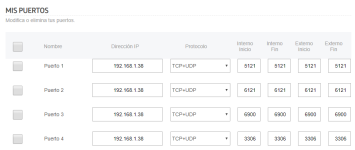
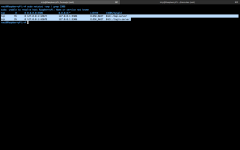
I’ve enabled the ports 6900, 5121, 6121 and 3306 (MySQL) from my rooter and also applied them to the firewall exception in the raspberry pi. Following this method, I managed to run all the ports except 3303.
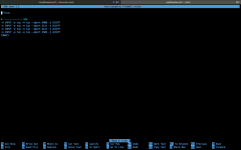

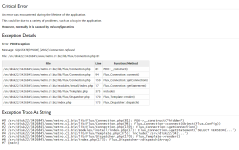
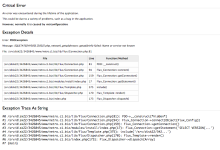
Also, I would like to point out that I activated the DMZ on my Raspberry PI, but I still get the same error error SQLSTATE[HY000] [2002] Connection refused.
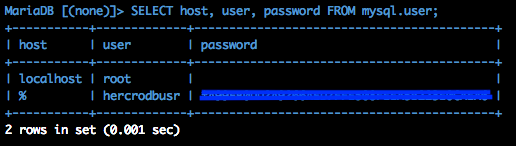
Edit: This is how I created the Mysql data base in the Raspberry PI:
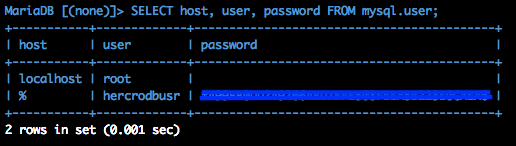
Same names, only thing I changed was the password.
I tried changing the hostname to 'RaspberryPi'
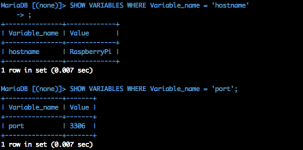
But the error changes to: SQLSTATE[HY000] [2002] php_network_getaddresses: getaddrinfo failed: Name or service not known
I have an independent host for the website (FluxCP) and then I’m running my ragnarok server through a Raspberry PI, utilizing my Public IP address.
I can’t seem to connect my server.php properly.
This is how I got my server.php setup:
<?php
return array(
// Example server configuration. You may have more arrays like this one to
// specify multiple server groups (however they should share the same login
// server whilst they are allowed to have multiple char/map pairs).
array(
'ServerName' => 'NetRO',
// Global database configuration (excludes logs database configuration).
'DbConfig' => array(
//'Socket' => '/tmp/mysql.sock',
//'Port' => 3306,
//'Encoding' => 'utf8', // Connection encoding -- use whatever here your MySQL tables collation is.
'Convert' => 'utf8',
// -- 'Convert' option only works when 'Encoding' option is specified and iconv (http://php.net/iconv) is available.
// -- It specifies the encoding to convert your MySQL data to on the website (most likely needs to be utf8)
'Hostname' => '192.168.1.38', // Raspberry PI's Local IP
'Username' => 'hercrodbusr',
'Password' => 'Password',
'Database' => 'hercrodb',
'Persistent' => true,
'Timezone' => null // Example: '+0:00' is UTC.
// The possible values of 'Timezone' is as documented from the MySQL website:
// "The value can be given as a string indicating an offset from UTC, such as '+10:00' or '-6:00'."
// "The value can be given as a named time zone, such as 'Europe/Helsinki', 'US/Eastern', or 'MET'." (see below continuation!)
// **"Named time zones can be used only if the time zone information tables in the mysql database have been created and populated."
),
// This is kept separate because many people choose to have their logs
// database accessible under different credentials, and often on a
// different server entirely to ensure the reliability of the log data.
'LogsDbConfig' => array(
//'Socket' => '/tmp/mysql.sock',
//'Port' => 3306,
//'Encoding' => null, // Connection encoding -- use whatever here your MySQL tables collation is.
'Convert' => 'utf8',
// -- 'Convert' option only works when 'Encoding' option is specified and iconv (http://php.net/iconv) is available.
// -- It specifies the encoding to convert your MySQL data to on the website (most likely needs to be utf8)
'Hostname' => '192.168.1.38', // Raspberry PI's Local IP
'Username' => 'hercrodbusr',
'Password' => 'Password',
'Database' => 'hercrodb',
'Persistent' => true,
'Timezone' => null // Possible values is as described in the comment in DbConfig.
),
// Login server configuration.
'LoginServer' => array(
'Address' => 'Public_IP',
'Port' => 6900,
'UseMD5' => true,
'NoCase' => true, // Hercules account case-sensitivity; Default: Case-INsensitive (true).
'GroupID' => 0, // Default account group ID during registration.
//'Database' => 'ragnarok'
),
'CharMapServers' => array(
array(
'ServerName' => 'NetRO',
'Renewal' => true,
'MaxCharSlots' => 9,
'DateTimezone' => null, // Specifies game server's timezone for this char/map pair. (See: http://php.net/timezones)
//'ResetDenyMaps' => 'sec_pri', // Defaults to 'sec_pri'. This value can be an array of map names.
//'Database' => 'ragnarok', // Defaults to DbConfig.Database
'MaxBaseLevel' => 150,
'ExpRates' => array(
'Base' => 100, // Rate at which (base) exp is given
'Job' => 100, // Rate at which job exp is given
'Mvp' => 100 // MVP bonus exp rate
),
'DropRates' => array(
// The rate the common items (in the ETC tab, besides card) are dropped
'Common' => 100,
'CommonBoss' => 100,
// The rate healing items (that restore HP or SP) are dropped
'Heal' => 100,
'HealBoss' => 100,
// The rate usable items (in the item tab other then healing items) are dropped
'Useable' => 100,
'UseableBoss' => 100,
// The rate at which equipment is dropped
'Equip' => 100,
'EquipBoss' => 100,
// The rate at which cards are dropped
'Card' => 100,
'CardBoss' => 100,
// The rate adjustment for the MVP items that the MVP gets directly in their inventory
'MvpItem' => 100
),
'CharServer' => array(
'Address' => 'Public_IP',
'Port' => 6121
),
'MapServer' => array(
'Address' => 'Public_IP',
'Port' => 5121
),
// -- WoE days and times --
// First parameter: Starding day 0=Sunday / 1=Monday / 2=Tuesday / 3=Wednesday / 4=Thursday / 5=Friday / 6=Saturday
// Second parameter: Starting hour in 24-hr format.
// Third paramter: Ending day (possible value is same as starting day).
// Fourth (final) parameter: Ending hour in 24-hr format.
// ** (Note, invalid times are ignored silently.)
'WoeDayTimes' => array(
//array(0, '12:00', 0, '14:00'), // Example: Starts Sunday 12:00 PM and ends Sunday 2:00 PM
//array(3, '14:00', 3, '15:00') // Example: Starts Wednesday 2:00 PM and ends Wednesday 3:00 PM
),
// Modules and/or actions to disallow access to during WoE.
'WoeDisallow' => array(
array('module' => 'character', 'action' => 'online'), // Disallow access to "Who's Online" page during WoE.
array('module' => 'character', 'action' => 'mapstats') // Disallow access to "Map Statistics" page during WoE.
)
)
)
)
);
?>
I’ve enabled the ports 6900, 5121, 6121 and 3306 (MySQL) from my rooter and also applied them to the firewall exception in the raspberry pi. Following this method, I managed to run all the ports except 3303.
Also, I would like to point out that I activated the DMZ on my Raspberry PI, but I still get the same error error SQLSTATE[HY000] [2002] Connection refused.
Edit: This is how I created the Mysql data base in the Raspberry PI:
DROP DATABASE IF EXISTS hercrodb; CREATE DATABASE IF NOT EXISTS hercrodb DEFAULT CHARACTER SET utf8 COLLATE utf8_general_ci; DROP DATABASE IF EXISTS hercrolog; CREATE DATABASE IF NOT EXISTS hercrolog DEFAULT CHARACTER SET utf8 COLLATE utf8_general_ci; GRANT SELECT,INSERT,UPDATE,DELETE ON hercrodb.* TO 'hercrodbusr'@'localhost' IDENTIFIED BY '[YOUR_HERCRODBUSR_PASSWORD]'; GRANT SELECT,INSERT ON hercrolog.* TO 'hercrodbusr'@'localhost'; FLUSH PRIVILEGES;
Same names, only thing I changed was the password.
I tried changing the hostname to 'RaspberryPi'
But the error changes to: SQLSTATE[HY000] [2002] php_network_getaddresses: getaddrinfo failed: Name or service not known
Last edited by a moderator: