Ghost errors

snowflake1963

New member
Messages
97
Points
0
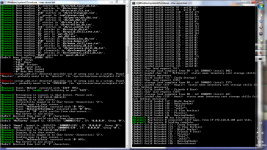
When I start my server it has 2 ghost errors that are not in the script it is saying it is in. We had errors with these words while setting up the server but we have fixed all errors.

false errors.png

 
Last edited by a moderator:
The error message says it all. You should change the Monster to monster and Emperium to EMPERIUM.

Correct me if I'm wrong.

 
Hello Anakid:

You are wrong and did not read my request properly !

We checked this script uncountable times.

1) The word "monster" or "Monster" is in that script, but in lowercase letters.

2) The word "Emperium" does not appear in that script.

3) When we take this script out of the init.conf ( using comment // ), the message gives that script before which does NOT contain one of those two "Codewords".

To us it seems the server saved error-messages somewhere and gives them now at the end of all loaded NPC scripts instead clearing this unknown, hidden error-storage.

The server works fine, but it's annoying and confusing to see that messages.

Regards

Snowflake

 
Last edited by a moderator:
Here is another screen shot of the same errors the DOES NOT EXIST IN ANY OF OUR SCRIPTS, we have checked all scripts numerous times. plus now the map server says there is 3 autotraders online after being shut down for over night, they are my chars and i have logged on all 3 accts and exited to windows and shut down the server and restarted it and they still appear. WHY? Please HELP !!!

false info on map server.png

 
Last edited by a moderator:
Do you have items or mobs with those names? AegisNames in the Item DB and SpriteNames in the mob DB are used by the script engine for things like

getitem Red_Potion, 1;monster "prontera", 150, 150, "Pink Jelly", PORING, 1;and as such, they can't be duplicate (and can't be the same as script variables.
The first error is telling you that you have a something with the same name as the 'monster' script command. You can safely ignore it, but if you want to silence it, find this code in script.c:

#ifdef ENABLE_CASE_CHECK if( (strncmp(p, ".@", 2) == 0) ) // Local scope vars are checked separately to decrease false positives existingentry = script->local_casecheck.add_str(p); else { existingentry = script->global_casecheck.add_str(p); if( existingentry ) { if( strcasecmp(p, "disguise") == 0 || strcasecmp(p, "Poison_Spore") == 0 || strcasecmp(p, "PecoPeco_Egg") == 0 || strcasecmp(p, "Soccer_Ball") == 0 || strcasecmp(p, "Horn") == 0 || strcasecmp(p, "Treasure_Box_") == 0 || strcasecmp(p, "Lord_of_Death") == 0 ) // Known duplicates, don't bother warning the user existingentry = NULL; } } if( existingentry ) { DeprecationWarning2("script_add_str", p, existingentry, script->parser_current_file); // TODO }#endif // ENABLE_CASE_CHECKand add another '|| strcasecmp(p, "monster") == 0' to the condition.Or simply rename your variable/item's AegisName to something else if you prefer not to make a source edit for this.

Second error is usually because of a mob named EMPERIUM. Rename it to MY_EMPERIUM, or EMPERIUM_, so that it won't conflict with the 'Emperium' item AegisName.

In any case, I improved a little the error reports, so that it no longer shows the last script it parsed, when it doesn't have any idea about the error source.

 
Last edited by a moderator:
Hello Haru
default_smile.png
,

I changed my mob_db2 as you told ( EMPERIUM => EMPERIUM_ ) and added

|| strcasecmp(p, "Monster") == 0
to script.c
 

Both Errors are gone now.
default_smile.png


Thank you very very very much !!!!!
default_smile.png


Best Regards

Snowflake

 
Last edited by a moderator:
Back
Top