GRF Editor

zip is fine or whatever you want to
default_biggrin.png
take your time dude! your tools are really nice, if they even existed back in 2006~ RO emulator world would be so different lol
 
Hello Tokeiburu,

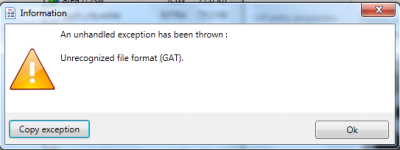
I have a question. Why I cant open some of the files using the GRF Editor? I am having an Error. Like This:

error.png

And the message on it is:

-------------- Message --------------Unrecognized file format (GAT).-------------- Stack trace -------------- at GrfToWpfBridge.Application.DefaultErrorHandler._reportAnyManagedExceptions(String message, Exception exception, ErrorLevel errorLevel) at GrfToWpfBridge.Application.DefaultErrorHandler.Handle(Exception exception, ErrorLevel errorLevel) at GRFEditor.WPF.PreviewTabs.FilePreviewTab._baseLoad(FileEntry entry) at GRFEditor.WPF.PreviewTabs.FilePreviewTab.<Update>b__2() at System.Threading.ThreadHelper.ThreadStart_Context(Object state) at System.Threading.ExecutionContext.RunInternal(ExecutionContext executionContext, ContextCallback callback, Object state, Boolean preserveSyncCtx) at System.Threading.ExecutionContext.Run(ExecutionContext executionContext, ContextCallback callback, Object state, Boolean preserveSyncCtx) at System.Threading.ExecutionContext.Run(ExecutionContext executionContext, ContextCallback callback, Object state) at System.Threading.ThreadHelper.ThreadStart()-------------- Exception --------------GRF.Core.Exceptions.FileFormatException: Unrecognized file format (GAT). at GRF.FileFormats.GatFormat.GatHeader..ctor(IBinaryReader data) at GRF.FileFormats.GatFormat.Gat..ctor(IBinaryReader data, GatPreviewFormat previewFormat) at GRF.Image.ImageProvider.GetImage(Byte[] dataDecompressed, String extension) at GRFEditor.WPF.PreviewTabs.PreviewMapGat._load(FileEntry entry) at GRFEditor.WPF.PreviewTabs.FilePreviewTab._baseLoad(FileEntry entry)

Please help me. I want to extract some files that I got online specially those maps.

 
Hello Tokeiburu,

I have a question. Why I cant open some of the files using the GRF Editor? I am having an Error. Like This:

attachicon.gif
error.png

And the message on it is:

Please help me. I want to extract some files that I got online specially those maps.
This error can be from multiple reasons... the file was encrypted, it can be using a different compression method, the content is, like the error says, not a gat one, etc.

 
@Tokei

Option, that allowed extraction in AppData folder has disappeared. ^ ^; It's removed from GRF Editor?

It was quite comfortable in some situations like extracting lot's of files from different GRF in different folders one by one right in one output folder.

 
Is it possible, some kind of notification or something when opening GRF editor, which says new version available?

 
@@Tokeiburu

If you dont mind, can you create an option that allow user to set a custom directory as default file extracting location ?

Sometime feel kinda lost to find the files I extracted when I opened more than 1 GRF to extract files.

 
@Tokei

Option, that allowed extraction in AppData folder has disappeared. ^ ^; It's removed from GRF Editor?

It was quite comfortable in some situations like extracting lot's of files from different GRF in different folders one by one right in one output folder.
Updated to 1.7.7.4; the option has been brought back. 

Is it possible, some kind of notification or something when opening GRF editor, which says new version available?
There used to be a similar feature before in GRFE, but it was too troublesome to maintain and I dropped it. On the other hand, I don't plan on updating GRF Editor much at all anymore. No new tools will be added to the software; the only remaining updates would be the lub decompiler (which has yet to be fixed/completed) and other bug fixes, which should be very rare by now.

@@Tokeiburu

If you dont mind, can you create an option that allow user to set a custom directory as default file extracting location ?

Sometime feel kinda lost to find the files I extracted when I opened more than 1 GRF to extract files.
Updated to 1.7.7.5. By default the files are extracted where your GRF has been opened, you can now change that from Tools > Settings > General > Override default extraction path > Edit the [Roaming folder] path.

 
is it possible to prevent opening the encrypted grf that encrypted by GRF Editor with other grf editor (ie: grfbuild, etc), player can merge the file via merge folder or merge grf

 
Is there a full change log? 

Also, in the newer versions I can't seem to find the GAT Editor that I loved. :x
Changelogs can be found in the first page description (may not be updated though). This Gat Editor had no reason to be in a GRF editor so it's been removed.

is it possible to prevent opening the encrypted grf that encrypted by GRF Editor with other grf editor (ie: grfbuild, etc), player can merge the file via merge folder or merge grf
Encryption protects your files' content and nothing more. It could protect the GRF's file table, but then you wouldn't be able to update your GRF with patchers... unless you made a custom patcher!

 
Encryption protects your files' content and nothing more. It could protect the GRF's file table, but then you wouldn't be able to update your GRF with patchers... unless you made a custom patcher!
can you add that feature on GRF Editor? i want to have one grf untouched by player

 
Bugreport related to GRF Editor & Encryption.

What i have:

  1. lzma compressed grfs (some of them)
  2. some of grfs not compressed by lzma (default compressing)
  3. some of grfs have redirected indexes.
  4. i'm add some grf to encryption, (do not modify client), and when i replaced encrypted grf with the old one -> client imposible to start.


The reason of this problem was in folder name where Ragnarok online files stored.

My folder name contains russian characters + "spaces".

After renaming to "only english characters name of the folder without spaces", all start to work fine.

 
Last edited by a moderator:
GRF Editor + GRF Encryption with 2012-04-10 wont start the game client at folders, where russian characters exist.

For example

C:GamesНовая папкаRAGNAROK -> will not work

C:GamesNew FolderRAGNAROK -> will work fine

 
Is there a full change log? 

Also, in the newer versions I can't seem to find the GAT Editor that I loved. :x
Changelogs can be found in the first page description (may not be updated though). This Gat Editor had no reason to be in a GRF editor so it's been removed.

>is it possible to prevent opening the encrypted grf that encrypted by GRF Editor with other grf editor (ie: grfbuild, etc), player can merge the file via merge folder or merge grf
Encryption protects your files' content and nothing more. It could protect the GRF's file table, but then you wouldn't be able to update your GRF with patchers... unless you made a custom patcher!
Dear Tokei, please take a look about problem above.

The problem in next:

when i use grf encryption for grfs i can't run game client (exe 2012-04-10) if it located at any folder with russian characters (non english)

How reproduce

1. Create folder: D:какая-то папкаsomethingRO

2. Place your encrypted files inside

3. Run Client -> it wont run, because of russian characters in path name....

But, if you rename "какая-то папка" to "some folder", you able to run game client with encrypted grfs again...

 
@@Tokeiburu

Hello, it is possible to fix this LUA function in GRF editor ?

grfff.jpg

It's achievement_list.lub

Thank you

 
Grf encryption

The encryption feature has been enabled again. It's similar to what it used to be and it has been tested on client versions ranging from 2012-08-01 to 2014-02-05. Some error messages will be displayed if necessary. If you have an issue, copy the error message (with the code, if there's one) and send me the client executable with the cps.dll file generated by GRF Editor. There shouldn't be compatibility issues anymore though!

 
I have tested with 2014-04-16a and its works.

@Tokeiburu. I have some question.

How to update grf with encrypt grf ?

Let me explain.

  1. I make a grf called, 24012015.grf (contains custom maps)
  2. I encrypt it with my password
  3. I update it to my web server
  4. Update my files using thor patcher
  5. Finish
Its true the step I make ? Is my custom maps will encrypt same with other files ? I just need confirmation. Thanks you.

 
Last edited by a moderator:
I have tested with 2014-04-16a and its works.

@Tokeiburu. I have some question.

How to update grf with encrypt grf ?

Let me explain.

  • I make a grf called, 24012015.grf (contains custom maps)
  • I encrypt it with my password
  • I update it to my web server
  • Update my files using thor patcher
  • Finish
Its true the step I make ? Is my custom maps will encrypt same with other files ? I just need confirmation. Thanks you.
I haven't fully tested this method (I usually use Thor files for patching instead). But yes, it will encrypt the files you selected in the GRF and overwrite or add those to your server's default GRF.

 
Back
Top