Neo-Mind
Community Contributors
- Messages
- 713
- Points
- 0
- Location
- The Mysterious Subcontinent
- Discord
- _Neo_ #7539
- Github
- Neo-Mind
- Emulator
Introduction
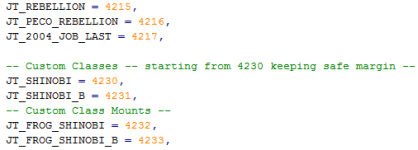
For our Example we will create the Custom Class "Shinobi" and its Child version i.e. "Baby Shinobi" along with their Cash Mounts/Halter Mounts. Each Job has 3 ID values :
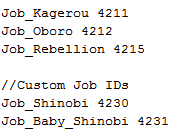
1) Job ID - we will use 4230 & 4231 respectively for the jobs (4232 & 4233 will be reserved for the mounts client side).
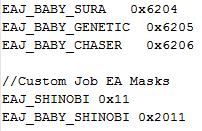
2) Map ID - Also called EA Mask. If we are extending a class we OR the existing class with a modifier. Since Shinobi is going to be a seperate branch, we will use 0x11 for Shinobi and 0x11 | 0x2000 for Baby Shinobi (0x2000 is the JOBL_BABY mask).
3) Msg ID - Defined in messages.conf file. We will use 700 and 701.
Before we begin, A few points to note:
1) For the client side i will be using my own patch from NEMO not Xray clients - So dont ask me about Xray.
2) This guide is meant to be an overview towards adding jobs - meaning that your job will be enabled once you have done the changes specified here . You can add further details on your own which depends on your Class.
3) If i am missing out on anything please let me know. Nobody is perfect including me

4) We will use Sprite and some data from Ninja class for the time being but you can add your own entries just as easily.
Server Source
1) src/common/mmo.h: look for JOB_REBELLION assignment and insert our Job IDs after it.
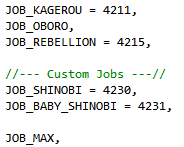
2) src/map/map.h: look for MAPID_BABY_CHASER and insert our Map IDs after it.
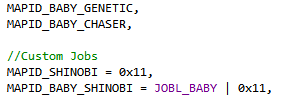
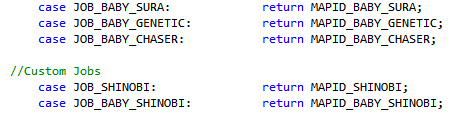
3) src/map/pc.c:
i) find case JOB_BABY_CHASER: and insert our cases after it
ii) find case MAPID_BABY_CHASER: and insert our cases after it
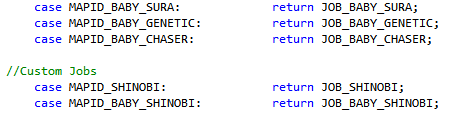
iii) find case JOB_REBELLION: followed by return msg_txt(655); and insert our cases after it. (returns the Msg ID)
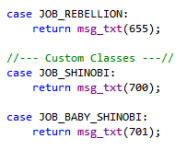
iv) find { "Rebellion", JOB_REBELLION }, and insert our Job Names after it
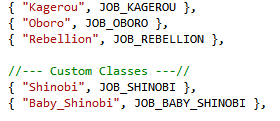
4) src/map/itemdb.c: Here we check the job masks that is specified in item_db.conf. There is one limitation, however.
Currently there is only 1 more slot left in the job mask since it is 32 bit. In case you need to add more you will need to
change the variable to 64 bit.
Find jobmask & 1<<30 and insert our class check after it.
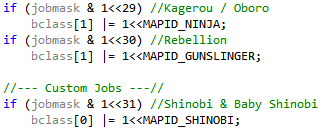
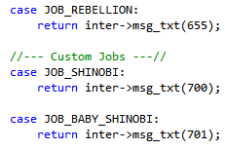
5) src/char/inter.c: Find case JOB_REBELLION: and insert our case after it.(returns the Msg ID)
Server Config
1) db/const.txt:
i) Find Job_Rebellion and insert our Job IDs after it
ii) Find EAJ_BABY_CHASER and insert our Map IDs after it
2) db/<pre-re|re>/exp.txt: Insert your IDs in one of the entries (or if you want to specify your own exp per level you can add that).
Since our jobs are meant to be amongst First Class, we will simply add it into existing ones.
i) Base:

ii) Job:

3) db/<pre-re|re>/job_db.conf: Add entry for your Job. We will copy the entry from Ninja with slight changes for now.
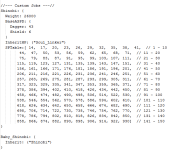
4) db/job_db2.txt: Add entry for your Job. Again we will reuse the data from Ninja.

5) conf/help.txt: Insert your class entries to the @go message
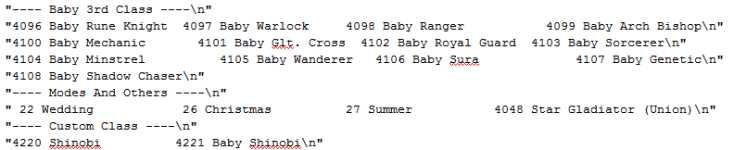
6) conf/messages.conf: Add the Msg IDs after Shadow Chaser T

7) db/<pre-re|re>/skill_tree.conf: Add entry for your Job similar to the others.
-pic to be added-
Client Lua Files
Now to make the client support Custom Jobs it should be patched with "Enable Custom Jobs" patch in NEMO.
Also you should copy the lua files inside Support folder to different area so we can Add entries of our jobs.
(LuaFiles514/Lua Files/Admin folder inside is what we need essentially)
1) PCIDs.lub :
i) First we add all our Job IDs (look for JT_2004_JOB_LAST entry).
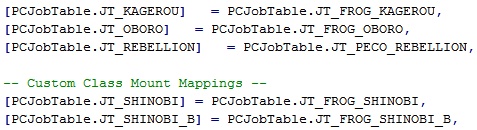
ii) Next we connect the Cash Mount Job IDs to Main Job IDs (Look for JT_REBELLION mapping).
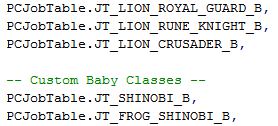
iii) Lastly we need to add our Baby Class & its mount to the Baby_List (Look for JT_LION_CRUSADER_B).
2) PCNames.lub: To illustrate that different names can be assigned based on gender, I am calling them as Shinobi M & Shinobi F for Male & Female respectively.
i) First we add the Job Name for Male Characters (Look for Rebellion)
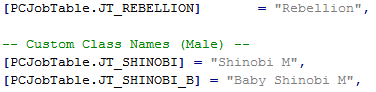
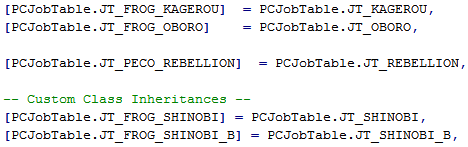
ii) Next we make the Cash Mounts inherit Names from their respective Main Jobs - since Mounting don't change the name (Look for JT_PECO_REBELLION).
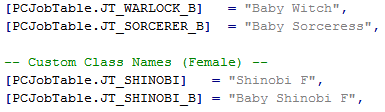
iii) Last but not least we add the Job Name for Female characters - Only necessary if it differs from Male name (Look for JT_SORCERER_B).
3) PCPaths.lub: Here we specify the job specific prefix used by the client to get the job sprite.
i) First we add the Path prefix for Jobs that is not shared with any existing ones.
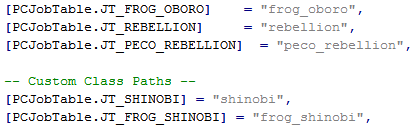
ii) Next we make the Jobs that has shared path inherit from existing (for e.g. Baby Jobs inherit from Adult versions).

4)PCHands.lub: Here we specify the job specific prefix used by the client to get the weapon and shield sprite locations
i) Like before, First we add the Hand prefix for Jobs that is not shared with any existing ones.
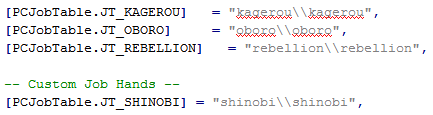
ii) Next we make the Jobs with shared prefix inherit from existing (e.g. Baby Jobs, Mounts, Baby Mounts etc. all can inherit from Adult versions).
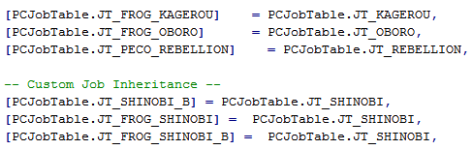
5)PCPals.lub: Here we specify the job specific prefix used by the client to get the Palette file location.
i) Like before, First we add the Pal prefix for Jobs that is not shared with any existing ones.
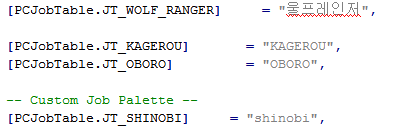
ii) Next we make the Jobs with shared prefix inherit from existing (e.g. Baby Jobs, Mounts, Baby Mounts etc. all can inherit from Adult versions).
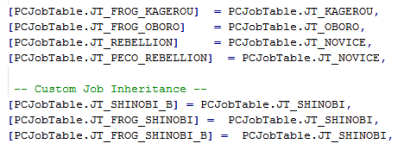
Note: You can also optionally add entries in PCImfs.lub file in case you have an Imf file, but I haven't seen any issues even without it.
Hence I am not pursuing it.
Once the edits are done pack it into your grf or put it in your data folder and use it.
With this much your job will be visible and able to do everything provided you have the sprite files in the right location.
spriteÀΰ£Á·¸öÅë³²<pathprefix>_³².spr and act for Male Job
spriteÀΰ£Á·¸öÅë¿©<pathprefix>_¿©.spr and act for Female Job
Snapshot: (to be added)
For our Example we will create the Custom Class "Shinobi" and its Child version i.e. "Baby Shinobi" along with their Cash Mounts/Halter Mounts. Each Job has 3 ID values :
1) Job ID - we will use 4230 & 4231 respectively for the jobs (4232 & 4233 will be reserved for the mounts client side).
2) Map ID - Also called EA Mask. If we are extending a class we OR the existing class with a modifier. Since Shinobi is going to be a seperate branch, we will use 0x11 for Shinobi and 0x11 | 0x2000 for Baby Shinobi (0x2000 is the JOBL_BABY mask).
3) Msg ID - Defined in messages.conf file. We will use 700 and 701.
Before we begin, A few points to note:
1) For the client side i will be using my own patch from NEMO not Xray clients - So dont ask me about Xray.
2) This guide is meant to be an overview towards adding jobs - meaning that your job will be enabled once you have done the changes specified here . You can add further details on your own which depends on your Class.
3) If i am missing out on anything please let me know. Nobody is perfect including me
4) We will use Sprite and some data from Ninja class for the time being but you can add your own entries just as easily.
Server Source
1) src/common/mmo.h: look for JOB_REBELLION assignment and insert our Job IDs after it.
2) src/map/map.h: look for MAPID_BABY_CHASER and insert our Map IDs after it.
3) src/map/pc.c:
i) find case JOB_BABY_CHASER: and insert our cases after it
ii) find case MAPID_BABY_CHASER: and insert our cases after it
iii) find case JOB_REBELLION: followed by return msg_txt(655); and insert our cases after it. (returns the Msg ID)
iv) find { "Rebellion", JOB_REBELLION }, and insert our Job Names after it
4) src/map/itemdb.c: Here we check the job masks that is specified in item_db.conf. There is one limitation, however.
Currently there is only 1 more slot left in the job mask since it is 32 bit. In case you need to add more you will need to
change the variable to 64 bit.
Find jobmask & 1<<30 and insert our class check after it.
5) src/char/inter.c: Find case JOB_REBELLION: and insert our case after it.(returns the Msg ID)
Server Config
1) db/const.txt:
i) Find Job_Rebellion and insert our Job IDs after it
ii) Find EAJ_BABY_CHASER and insert our Map IDs after it
2) db/<pre-re|re>/exp.txt: Insert your IDs in one of the entries (or if you want to specify your own exp per level you can add that).
Since our jobs are meant to be amongst First Class, we will simply add it into existing ones.
i) Base:
ii) Job:
3) db/<pre-re|re>/job_db.conf: Add entry for your Job. We will copy the entry from Ninja with slight changes for now.
4) db/job_db2.txt: Add entry for your Job. Again we will reuse the data from Ninja.
5) conf/help.txt: Insert your class entries to the @go message
6) conf/messages.conf: Add the Msg IDs after Shadow Chaser T
7) db/<pre-re|re>/skill_tree.conf: Add entry for your Job similar to the others.
-pic to be added-
Client Lua Files
Now to make the client support Custom Jobs it should be patched with "Enable Custom Jobs" patch in NEMO.
Also you should copy the lua files inside Support folder to different area so we can Add entries of our jobs.
(LuaFiles514/Lua Files/Admin folder inside is what we need essentially)
1) PCIDs.lub :
i) First we add all our Job IDs (look for JT_2004_JOB_LAST entry).
ii) Next we connect the Cash Mount Job IDs to Main Job IDs (Look for JT_REBELLION mapping).
iii) Lastly we need to add our Baby Class & its mount to the Baby_List (Look for JT_LION_CRUSADER_B).
2) PCNames.lub: To illustrate that different names can be assigned based on gender, I am calling them as Shinobi M & Shinobi F for Male & Female respectively.
i) First we add the Job Name for Male Characters (Look for Rebellion)
ii) Next we make the Cash Mounts inherit Names from their respective Main Jobs - since Mounting don't change the name (Look for JT_PECO_REBELLION).
iii) Last but not least we add the Job Name for Female characters - Only necessary if it differs from Male name (Look for JT_SORCERER_B).
3) PCPaths.lub: Here we specify the job specific prefix used by the client to get the job sprite.
i) First we add the Path prefix for Jobs that is not shared with any existing ones.
ii) Next we make the Jobs that has shared path inherit from existing (for e.g. Baby Jobs inherit from Adult versions).
4)PCHands.lub: Here we specify the job specific prefix used by the client to get the weapon and shield sprite locations
i) Like before, First we add the Hand prefix for Jobs that is not shared with any existing ones.
ii) Next we make the Jobs with shared prefix inherit from existing (e.g. Baby Jobs, Mounts, Baby Mounts etc. all can inherit from Adult versions).
5)PCPals.lub: Here we specify the job specific prefix used by the client to get the Palette file location.
i) Like before, First we add the Pal prefix for Jobs that is not shared with any existing ones.
ii) Next we make the Jobs with shared prefix inherit from existing (e.g. Baby Jobs, Mounts, Baby Mounts etc. all can inherit from Adult versions).
Note: You can also optionally add entries in PCImfs.lub file in case you have an Imf file, but I haven't seen any issues even without it.
Hence I am not pursuing it.
Once the edits are done pack it into your grf or put it in your data folder and use it.
With this much your job will be visible and able to do everything provided you have the sprite files in the right location.
spriteÀΰ£Á·¸öÅë³²<pathprefix>_³².spr and act for Male Job
spriteÀΰ£Á·¸öÅë¿©<pathprefix>_¿©.spr and act for Female Job
Snapshot: (to be added)


 How about changing the variable from 32bit to 64bit?