
You are using an out of date browser. It may not display this or other websites correctly.
You should upgrade or use an alternative browser.
You should upgrade or use an alternative browser.
[Guide] How to setup hercules
- Thread starter Patskie
- Start date


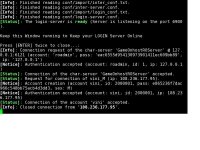
So here's my issue... I bought a dedicated server... it has been setup and no errors are showing... Yet as soon as I try to log in it says "connection from the account accepted" and immediately it says "closed connection from account" the Ip in my clientinfo is correct and my packet version is correct.
Last edited by a moderator:
Mikhail von Hohenheim
New member
- Messages
- 125
- Points
- 0
- Github
- mvhohenheim
- Emulator
Thank you I finished working with my server side.

and now how can I make the client side. ?
can I use this client ? http://www.nickyzai.com/?p=kro
P.s I try to make client many time but can't connect server to client
I'm also having this issue,, Client Can't connect to the server,,

Hi! Have you tried to check your grf? Maybe you forgot to change the ip address on itI'm also having this issue,, Client Can't connect to the server,,
login-server.bat keeps telling me:
"Connection of the char-server REFUSED"
map-server:
"[status]: Connecting to 127.0.0.1:6121
[status]: Logging in to char server...
[Warning]: Connection to Char Server lost."
char-sever:
"[Error]: Can not connect to login-server.
[Error]: The server communication passowrds <default s1/p1> are probably invalid.
[Error]: Also, please make sure your login db has the correct communication username/passwords and the gender of the account is S.
[Error]: The communication passwords are set in /conf/map-server.con and /conf/char-server.conf
[Warning]: Connection to the Login Server lost."
I've checked, double checked, triple checked that all the login info matches up. I set the account information on the login db to null and I'm still getting the same error. I don't know what to try from here.
This is my first time trying to set up a server though, so I could just be completely clueless..
"Connection of the char-server REFUSED"
map-server:
"[status]: Connecting to 127.0.0.1:6121
[status]: Logging in to char server...
[Warning]: Connection to Char Server lost."
char-sever:
"[Error]: Can not connect to login-server.
[Error]: The server communication passowrds <default s1/p1> are probably invalid.
[Error]: Also, please make sure your login db has the correct communication username/passwords and the gender of the account is S.
[Error]: The communication passwords are set in /conf/map-server.con and /conf/char-server.conf
[Warning]: Connection to the Login Server lost."
I've checked, double checked, triple checked that all the login info matches up. I set the account information on the login db to null and I'm still getting the same error. I don't know what to try from here.
This is my first time trying to set up a server though, so I could just be completely clueless..
Hello! you should match your userid and passwd to your map-server.conf & char-server.conflogin-server.bat keeps telling me:
"Connection of the char-server REFUSED"
map-server:
"[status]: Connecting to 127.0.0.1:6121
[status]: Logging in to char server...
[Warning]: Connection to Char Server lost."
char-sever:
"[Error]: Can not connect to login-server.
[Error]: The server communication passowrds <default s1/p1> are probably invalid.
[Error]: Also, please make sure your login db has the correct communication username/passwords and the gender of the account is S.
[Error]: The communication passwords are set in /conf/map-server.con and /conf/char-server.conf
[Warning]: Connection to the Login Server lost."
I've checked, double checked, triple checked that all the login info matches up. I set the account information on the login db to null and I'm still getting the same error. I don't know what to try from here.
This is my first time trying to set up a server though, so I could just be completely clueless..
with the one on your SQL in login table.
I've tried - http://i.imgur.com/KFmH8eQ.png here is a screenshot of what I have. Is that right?Hello! you should match your userid and passwd to your map-server.conf & char-server.conflogin-server.bat keeps telling me:
"Connection of the char-server REFUSED"
map-server:
"[status]: Connecting to 127.0.0.1:6121
[status]: Logging in to char server...
[Warning]: Connection to Char Server lost."
char-sever:
"[Error]: Can not connect to login-server.
[Error]: The server communication passowrds <default s1/p1> are probably invalid.
[Error]: Also, please make sure your login db has the correct communication username/passwords and the gender of the account is S.
[Error]: The communication passwords are set in /conf/map-server.con and /conf/char-server.conf
[Warning]: Connection to the Login Server lost."
I've checked, double checked, triple checked that all the login info matches up. I set the account information on the login db to null and I'm still getting the same error. I don't know what to try from here.
This is my first time trying to set up a server though, so I could just be completely clueless..
with the one on your SQL in login table.
I've tried - http://i.imgur.com/KFmH8eQ.png here is a screenshot of what I have. Is that right?Hello! you should match your userid and passwd to your map-server.conf & char-server.conflogin-server.bat keeps telling me:
"Connection of the char-server REFUSED"
map-server:
"[status]: Connecting to 127.0.0.1:6121
[status]: Logging in to char server...
[Warning]: Connection to Char Server lost."
char-sever:
"[Error]: Can not connect to login-server.
[Error]: The server communication passowrds <default s1/p1> are probably invalid.
[Error]: Also, please make sure your login db has the correct communication username/passwords and the gender of the account is S.
[Error]: The communication passwords are set in /conf/map-server.con and /conf/char-server.conf
[Warning]: Connection to the Login Server lost."
I've checked, double checked, triple checked that all the login info matches up. I set the account information on the login db to null and I'm still getting the same error. I don't know what to try from here.
This is my first time trying to set up a server though, so I could just be completely clueless..
with the one on your SQL in login table.
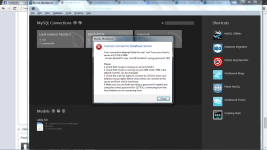
I noticed that your account id and email is not an account for server...
Here's a sample:

Hope this would solve your problem
Thank you so much! It's all working now.I've tried - http://i.imgur.com/KFmH8eQ.png here is a screenshot of what I have. Is that right?Hello! you should match your userid and passwd to your map-server.conf & char-server.conflogin-server.bat keeps telling me:
"Connection of the char-server REFUSED"
map-server:
"[status]: Connecting to 127.0.0.1:6121
[status]: Logging in to char server...
[Warning]: Connection to Char Server lost."
char-sever:
"[Error]: Can not connect to login-server.
[Error]: The server communication passowrds <default s1/p1> are probably invalid.
[Error]: Also, please make sure your login db has the correct communication username/passwords and the gender of the account is S.
[Error]: The communication passwords are set in /conf/map-server.con and /conf/char-server.conf
[Warning]: Connection to the Login Server lost."
I've checked, double checked, triple checked that all the login info matches up. I set the account information on the login db to null and I'm still getting the same error. I don't know what to try from here.
This is my first time trying to set up a server though, so I could just be completely clueless..
with the one on your SQL in login table.
I noticed that your account id and email is not an account for server...
Here's a sample:
Hope this would solve your problem

parakang666
New member
- Messages
- 1
- Points
- 0
 please help
satsugaides
New member
- Messages
- 22
- Points
- 0
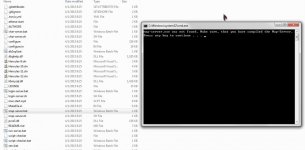
@parakang. You havent compiled your slns. Make sure you dont get any error when compiling.


It's just a small script line to bring up the login db log in order to edit the server username and password. Another option to edit this is to do the following:"31. Execute the following code
SELECT * FROM login"
This part really makes no sense to me, can I have a clarification? It is very vague, I see no place to "execute" code from what looks like command line.
1. You should have 2 Main Databases named 'logs' and/or 'Hercules' (According to guide, it should be hercules)
`logs` is the smaller database with logs for atcommand, npclog, etc
`Hercules` is the HUGE database for ipbans, login, mail, etc.
2. Click Hercules, Click table, then Click the dropdown arrow on table to suspend the 40+ databases and scroll down to 'login'
Open it with a right click and select 1000 something something, I don't remember.... The login should have the following format:
Accound ID || user_id || user_pass || sex || email ||
----------------------------------------------------------------------------------------------------------
3. You need to edit the user id and password that matches your conf folder. If they do not match you will get the famous mysql connection lost connection using the password:YES!
~Hope that helped. I don't have Workbench on my mac and I'm just visualizing it in my head!
Last edited by a moderator:
Akaneharuka
New member
Excuse me I am really really new to this emulator.
Can I use Microsoft visual studio 2013 with this emulator ?
Can I use Microsoft visual studio 2013 with this emulator ?
TheForgotten
New member
- Messages
- 1
- Points
- 0
the links at the end of this are dead rendering me stuck at step 20. Does anyone else have any more information on the MySQL portion of this guide?
Super Arki
New member
- Messages
- 19
- Points
- 0
// Copyright © Hercules Dev Team, licensed under GNU GPL.Just comment out #define tagssir, just a follow up question.. how to set the server to Pre-Renewal? or I wan't the casting time use the Pre-Re formula.Maybe you set your server to pre-rewhy i cant see the new quest in renewal like dewata,bifrost etc
Thanks. Hope to have time creating a guide on linux>Keep it up! nice guide, appreciate it.. a + for you sir! Thank you.&nb
sp;
thanks in advance!
Link : https://github.com/HerculesWS/Hercules/blob/master/src/config/renewal.h
// See the LICENSE file
// Portions Copyright © Athena Dev Teams
#ifndef CONFIG_RENEWAL_H
CONFIG_RENEWAL_H
/**
* Hercules configuration file (http://herc.ws)
* For detailed guidance on these check http://herc.ws/wiki/SRC/config/
**/
/**
* @INFO: This file holds general-purpose renewal settings, for class-specific ones check /src/config/classes folder
**/
/**
* Renewal full toggle switch.
*
* Uncomment this line to disable all of the below settings at once.
* Note: in UNIX builds, this can be easily done without touching this
* line, by passing --disable-renewal to the configure script:
* ./configure --disable-renewal
*/
DISABLE_RENEWAL
#ifndef DISABLE_RENEWAL // Do not change this line
/// game renewal server mode
/// (disable by commenting the line)
///
/// leave this line to enable renewal specific support such as renewal formulas
RENEWAL
/// renewal cast time
/// (disable by commenting the line)
///
/// leave this line to enable renewal casting time algorithms
/// cast time is decreased by DEX * 2 + INT while 20% of the cast time is not reduced by stats.
/// example:
/// on a skill whos cast time is 10s, only 8s may be reduced. the other 2s are part of a
/// "fixed cast time" which can only be reduced by specialist items and skills
RENEWAL_CAST
/// renewal drop rate algorithms
/// (disable by commenting the line)
///
/// leave this line to enable renewal item drop rate algorithms
/// while enabled a special modified based on the difference between the player and monster level is applied
/// based on the http://irowiki.org/wiki/Drop_System#Level_Factor table
#define RENEWAL_DROP
/// renewal exp rate algorithms
/// (disable by commenting the line)
///
/// leave this line to enable renewal item exp rate algorithms
/// while enabled a special modified based on the difference between the player and monster level is applied
RENEWAL_EXP
/// renewal level modifier on damage
/// (disable by commenting the line)
///
// leave this line to enable renewal base level modifier on skill damage (selected skills only)
#define RENEWAL_LVDMG
/// renewal enchant deadly poison algorithm
///
/// leave this line to enable the renewed EDP algorithm
/// under renewal mode:
/// - damage is NOT increased by 400%
/// - it does NOT affect grimtooth
/// - weapon and status ATK are increased
/// - some skill's damage ratio has modified
RENEWAL_EDP
/// renewal ASPD [malufett]
///
/// leave this line to enable renewal ASPD
/// - shield penalty is applied
/// - AGI has a greater factor in ASPD increase
/// - there is a change in how skills/items give ASPD
/// - some skill/item ASPD bonuses won't stack
RENEWAL_ASPD
#endif // DISABLE_RENEWAL
#undef DISABLE_RENEWAL
#endif // CONFIG_RENEWAL_H
Like this sir Pat?