[Help]Quest UI Cooldown tab

arminarlett

New member
Messages
3
Points
0
So.. i got this to work but i really would like to know what is required for the client to display this tab, can someone help me figure it out?
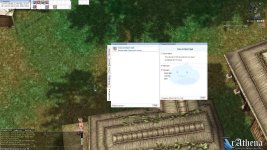
screen4CrAM000.jpg

 
client side

System/OngoingQuestInfoList_True.lub (make sure what ongoinquest is reading your client)

Server side

db/quest_db.conf

If you want to display the time, you need to use the setting called "TimeLimit".

For example..

{
    Id: 12317
    Name: "Trace of Time Travel"
    TimeLimit: 82800
},

 
i manage to figure out questinfo_f.lub is inherited from loaded grf's so i needed to add it to other grfs to make it function, i just wanted to understand how the cooldown tab is rendered cause in a lot of servers its just a dead tab and cooltimequests are displayed in the main active tab. Im assuming its an emulator fix that was made for it to function properly.

 
i manage to figure out questinfo_f.lub is inherited from loaded grf's so i needed to add it to other grfs to make it function, i just wanted to understand how the cooldown tab is rendered cause in a lot of servers its just a dead tab and cooltimequests are displayed in the main active tab. Im assuming its an emulator fix that was made for it to function properly.
I am making a hard guess here since I never used it. But did you try setting "CoolTimeQuest = 1" in OngoingQuestInfoList_True ? The quest from your screenshot has this property set.

 
I made it work but when applying on a different client it just won't work, I'm assuming it requires a certain client version does anyone have any clue when this tab was implemented? I've gathered that the UI was changed march 2018 in kro and initially it didn't had the last tab, currently kro has it working but I can't find out when and what got changed for it to work properly, thanks for the help.

 
Back
Top