Hercules on RaspberryPi 3

Habilis

New member
Messages
225
Points
0
Age
36
Location
Montreal, Canada
IRC Nickname
Habilis
Emulator
Hello community!

I'm new (well not so new anymore... Had server hosting experience back in 2007 with eAthena).

Well, enough of lifestories. After all, you would read a book, if you wanted a story.
default_wink.png


So, I'm writing here just to share this proof of concept.

Running Hercules server on RaspberryPi 3 is, indeed, possible.

I've just started. So far, I've been able to setup and connect to server.

lA9j4ZO.png


As soon as I will finish sorting out Client PreRe 2013-12-30 mess

(It is a mess, since most links are dead)

I will Invite some friends to gather feedback about their overall experience playing on the server hosted on RaspberryPi,

I thought, that could be a nice experience to share with you guys.

UPD : Ow, and I suppose, the choice of Hercules is pretty obvious ?
default_wink.png
 (
 back in 2007, I hosted that eAthena server on a similar spec PC as the RaspberryPi 3.)

 
Last edited by a moderator:
Hi ! Your install make me curious a lot because i want to try to install Hercules on a Raspberry Pi 3 ! And apparently you did it ! First, congrats and second, can you explain every step you did to install Hercules on this and if you saw some errors etc...

Thank you
default_wink.png


The install is, really, the same as any other computer running the same Linux distro.

I was trully surprised, why some guy strugled so much installing the Emulator on a RaspberryPi, on rAthena forum.

Anyways, here is a link to herc wiki on installing Hercules on debian (Raspbian in my case).

http://herc.ws/wiki/Installation_(Debian)

I refered to this link for installing and compiling.

I dont know about performance of this little guy.

So far, Im running on it :

nginX+php-fpm

- my blog written on Laravel 5 using SSL

- OwnCloud installation serving of a raid1 array of 2 Samsung fit USB drives of 128gb (Probably not as wise as it may seem but whynot...)

- My Ragnarok Online website

- Hercules

Will need to see, how will it run under stress of, say, 50 players online....

more online, however....

I dont think a hobby server will possibly score one day....

 
Last edited by a moderator:
Oh thank you for the informations ! 

If i use a RPi, it's just for me and some friends (for the moment
default_tongue.png
). But if i want to open a server, i think after 30+ players i will change for a real server
default_wink.png
.

Thank you for the link too i'll check on this and maybe buy a RPi 3
default_wink.png
. You convince me haha!

 
Soon will be writing a

Step by step guide on how to setup a server on your RaspberryPi 3

For my RaspberryPi Related blog, will publish a version of it here. though, I don't think it is meaningful, as there are already nice guides on how to setup Hercules on linux...

0uwvFz0.png


Did you run into any issues following the Debian guide? There were a few syntax problems I ran into. Aside from fixing a few mistakes I made though, my Raspberry Pi 3 is running Hercules. Now to get my client functional on my gaming PC.

I'd love to see your guide. I wrote down all the steps I took to build mine, but it's not perfect.

 
No, no problems at all!

All went nice and smooth.

Did you took note of the problems you ran into?

Share please!

Maybe, I could check to see if I have solutions and mark them as possible mistakes in my guide?

Thanks.

 
Last edited by a moderator:
No, no problems at all!

All went nice and smooth.

Did you took note of the problems you ran into?

Share please!

Maybe, I could check to see if I have solutions and mark them as possible mistakes in my guide?

Thanks.
One of the things I ran into was having to sudo up for a lot of things, despite the "hercuser" I created having the same permissions as the original "pi" user. For instance, I had to use it to compile - "sudo ./configure". I also ran into issues with the SQL command syntax for creating the MySQL user. The Debian guide uses % instead of localhost, which didn't work for me.


CREATE USER 'ragnarok'@'localhost' IDENTIFIED BY 'ragnarok';
GRANT ALL PRIVILEGES ON ragnarok.* to 'ragnarok'@'localhost' IDENTIFIED BY 'ragnarok'
 

Then I had to run this instead of the "-prootpassword" bit because it kept giving me an error.
 
Code:
mysql -u root -p hercuser_rag < main.sql
mysql -u root -p hercuser_log < logs.sql
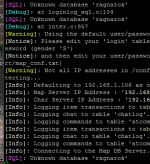
It does look like I've done the databases incorrectly since I get "Unknown database 'ragnarok'" when it tries to connect to the Map DB Server and Character DB Server.

HercDatabaseProblem.PNG

Do you have any recommendations?
 
Last edited by a moderator:
Well, looks like you've mixed it all up...

It doesn't take sudo to run ./configure unless the directories are owned by other user..

I didn't do a single sudo.

The problem about unknown databse is that if you run these commands

mysql -u root -p hercuser_rag < main.sql
mysql -u root -p hercuser_log < logs.sql

You import to hercuser_rag and hercuser_log 

But in your server config you try to access database ragnarok ...

You need to configure your server properly.

BTW, Wiki is outdated I think

 
Last edited by a moderator:
Well, looks like you've mixed it all up...

It doesn't take sudo to run ./configure unless the directories are owned by other user..

I didn't do a single sudo.

The problem about unknown databse is that if you run these commands

mysql -u root -p hercuser_rag < main.sql
mysql -u root -p hercuser_log < logs.sql

You import to hercuser_rag and hercuser_log 

But in your server config you try to access database ragnarok ...

You need to configure your server properly.

BTW, Wiki is outdated I think

Thanks, I thought it was something to do with how I configured the database itself. I found sql-connection.conf and changed things around. I think the permission issues came from screwing around with the default pi user before creating the new user. I'll probably rebuild it all once I have a better grasp of how everything is working together.

Got it running properly now! I'll rebuild it tomorrow, test, and document it all.

 
Last edited by a moderator:
Well, looks like you've mixed it all up...

It doesn't take sudo to run ./configure unless the directories are owned by other user..

I didn't do a single sudo.

The problem about unknown databse is that if you run these commands

mysql -u root -p hercuser_rag < main.sql
mysql -u root -p hercuser_log < logs.sql

You import to hercuser_rag and hercuser_log 

But in your server config you try to access database ragnarok ...

You need to configure your server properly.

BTW, Wiki is outdated I think

Thanks, I thought it was something to do with how I configured the database itself. I found sql-connection.conf and changed things around. I think the permission issues came from screwing around with the default pi user before creating the new user. I'll probably rebuild it all once I have a better grasp of how everything is working together.

Got it running properly now! I'll rebuild it tomorrow, test, and document it all.
https://habilisbest.com

there is a step by step guide

step 1 configure it the way I do it.

https://habilisbest.com/raspberrypi-secure-personal-server-step-1-configuring

Soon I will write the article on how to setup Hercules on RaspberryPi.

 
Last edited by a moderator:
Its also possible on a Raspberry Pi 1. I tried that a year ago
default_smile.png

Its kinda funny and it runs good, compiling took a while.

 
I let go of my RaspberryPi 1 as test server for some very light applications

RaspberryPi 1 with its 

Single core 700Mhz processor 

500 mb RAM

Struggling a lot at compile.

I tried Installing Node JS on RaspberryPi 1 once

To build SCSS into CSS and move bunch of JS files each operation took about 20 minutes...

On RaspberryPi 3 

Installing NodeJs is faster.

 
Last edited by a moderator:
Back
Top