Follow along with the video below to see how to install our site as a web app on your home screen.
Note: This feature may not be available in some browsers.
Due to recent spam attacks that heavily used compormised accounts we did reset all user passwords, AGAIN, if it happens and your account got compromised again due to re-used passwords your account will be perma-banned.
Hello, what is this message exactly and how do I connect to my server, the kRO client i'm using has the date 2019-02-25 is it same date for the ragexe.exe or it going to be different?, please give me information on what is this message and how to solve it and connect.
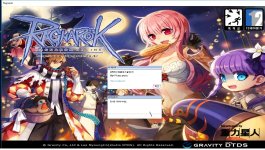
I rename clientinfo.xml to sclientinfo.xml and I put my server's ip and login port in it, but when I login to my server, it takes a while before it fails to login;I checked the server cmd but it didn't say that there was any login attempt.
if you can connect with an old client then doesn't it solve your title problem.
but if youre looking for new clients -> http://nemo.herc.ws/downloads/ <-
read the instructions
make sure to patch the client / change mmo.h and recompile.
Isn't there any more changes I have to do I think that the selection on this screen is something I have to change (above the username box), but I don't know how, I don't know how this client works.
Like i said thats probably not your client.
Download a client here -> http://nemo.herc.ws/downloads/
Patch it with this -> https://gitlab.com/4144/Nemo
Select Recommended patches.
This will fix that -> Read msgstringtable.txt (Recommended), just make sure you have an updated msgstringtable in your grf(3200+ lines).
Other issues regarding NEMO/New Client, there are solution on the comments ->