
You are using an out of date browser. It may not display this or other websites correctly.
You should upgrade or use an alternative browser.
You should upgrade or use an alternative browser.
How do you make Ragnarok Graphics
- Thread starter Noil
- Start date


fxfreitas
New member
First of all:
You just need paint and the basic notion of anatomy and geometry, no much, no more.
Something Like This:
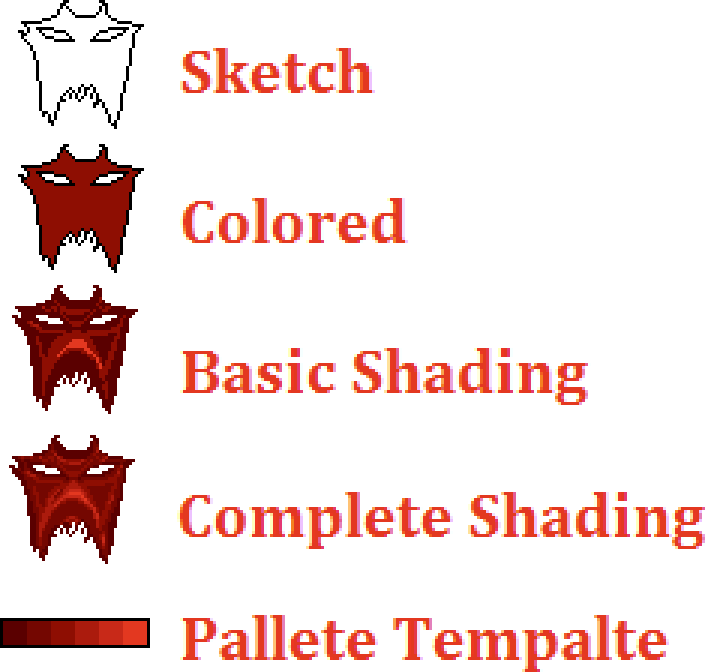
Step 1. Make the outlines, making a sketch of you work.
Step 2. Add the color
Step 3. Shade it and remove the outlines, Darken, midcolor, lighten... Ohh its so simple, no!
Step 4. Ragnarok use a maximum of 12 tonalities of same color to shade a sprite, but in various sprites, we se a minimum of 5 tonalities. Somewhere in this forum, a print with the Ragnarok pallete template can be found, and used for a base ^^
You dont need the 12 colors to shade you sprite, but use a minimum of 5 colors to make him look smooth.
See the oficial sprites to learn the style.
A image for reference even help when you making a themed sprite, like the diabolus manteau, uses his illustration to make his sprites.
You just need paint and the basic notion of anatomy and geometry, no much, no more.
Something Like This:
Step 1. Make the outlines, making a sketch of you work.
Step 2. Add the color
Step 3. Shade it and remove the outlines, Darken, midcolor, lighten... Ohh its so simple, no!
Step 4. Ragnarok use a maximum of 12 tonalities of same color to shade a sprite, but in various sprites, we se a minimum of 5 tonalities. Somewhere in this forum, a print with the Ragnarok pallete template can be found, and used for a base ^^
You dont need the 12 colors to shade you sprite, but use a minimum of 5 colors to make him look smooth.
See the oficial sprites to learn the style.
A image for reference even help when you making a themed sprite, like the diabolus manteau, uses his illustration to make his sprites.
Last edited by a moderator:
