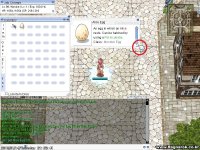
N nasagnilac New member Messages 121 Points 0 Github gmblank Jan 14, 2016 #2 Please check the image thnx. Last edited by a moderator: Jan 14, 2016
evilpuncker vai se tratar garota Messages 2,178 Points 0 Age 109 Location bronzil Github EPuncker Emulator Client Version 2019-05-30a MAIN Jan 14, 2016 #3 there is no image
N nasagnilac New member Messages 121 Points 0 Github gmblank Jan 14, 2016 #4 evilpuncker said: there is no image Click to expand... Sorry, Check it again please.
evilpuncker vai se tratar garota Messages 2,178 Points 0 Age 109 Location bronzil Github EPuncker Emulator Client Version 2019-05-30a MAIN Jan 14, 2016 #5 I don't think you can unless you go back to a client that doesn't have it, or maybe try the trick of doing that image into a 1x1 pink pixel
I don't think you can unless you go back to a client that doesn't have it, or maybe try the trick of doing that image into a 1x1 pink pixel
Shourei New member Messages 34 Points 0 Github tsan79 Jan 15, 2016 #6 I think the easiest way is to remove it visually. i.e it will still work, but you just can't see it. If i remember it correctly.. go to your grf then.. find: data / texture / À¯ÀúÀÎÅÍÆäÀ̽º / basic_interface / btn_comparison_resize data / texture / À¯ÀúÀÎÅÍÆäÀ̽º / basic_interface / btn_coparison_resize Replace it with the pink #ff00ff or any you desire.
I think the easiest way is to remove it visually. i.e it will still work, but you just can't see it. If i remember it correctly.. go to your grf then.. find: data / texture / À¯ÀúÀÎÅÍÆäÀ̽º / basic_interface / btn_comparison_resize data / texture / À¯ÀúÀÎÅÍÆäÀ̽º / basic_interface / btn_coparison_resize Replace it with the pink #ff00ff or any you desire.