
You are using an out of date browser. It may not display this or other websites correctly.
You should upgrade or use an alternative browser.
You should upgrade or use an alternative browser.
I have problem with my FluxCP
- Thread starter GoodDay69
- Start date
nyxfatalis
New member
- Messages
- 64
- Points
- 0
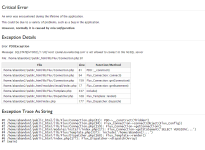
I've been using mysql account but I still face the same problem. I have tried to delete and re upload the fluxcp files and copy it to the public_html but still the same problem. I have changed the settings in application.php, error.php, server.php but the problem remains the same. There are other ways I can use?As I see in your screen shot the login credentials you are using cant connect to your database, you must use the mysql account that have privilege to your database, you can use your ragnarok mysql account on your flux cp
Hello,
What you need to do is add another user in your AsuraHosting phpmyadmin to allow connection access from other host. (Can't explain very well)
If you want, you can contact me by my signature messenger and I will help you fix it
Hope it helps,
Thanks.
Hello Sir,
I add your ym. U can check. Thanks.
AddedHello,
What you need to do is add another user in your AsuraHosting phpmyadmin to allow connection access from other host. (Can't explain very well)
If you want, you can contact me by my signature messenger and I will help you fix it
Hope it helps,
Thanks.
Hello Sir,
I add your ym. U can check. Thanks.
Thanks.

Xgear
Community Contributors
- Messages
- 249
- Points
- 0
- Age
- 40
You're connecting to a server thats not located at 'localhost', which means you need to add host/server permissions on top of your user permissions.
For security reasons, you should probabbly specify a specific IP address to connect from, however if you don't have a static ipaddress, setting the host to '%' would let any IP connect to mysql.
For security reasons, you should probabbly specify a specific IP address to connect from, however if you don't have a static ipaddress, setting the host to '%' would let any IP connect to mysql.
I already change to " & ".. The problem solve but it show another error.. Flux_LoginError.. I dont know why.. :'(You're connecting to a server thats not located at 'localhost', which means you need to add host/server permissions on top of your user permissions.
For security reasons, you should probabbly specify a specific IP address to connect from, however if you don't have a static ipaddress, setting the host to '%' would let any IP connect to mysql.
