
You are using an out of date browser. It may not display this or other websites correctly.
You should upgrade or use an alternative browser.
You should upgrade or use an alternative browser.
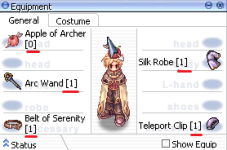
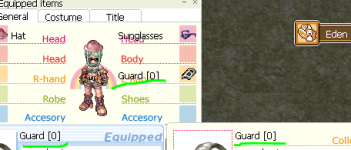
I want to show slot item on my windows equipment.
- Thread starter Daraen
- Start date

AnnieRuru
~~Cute~Cute~Scripter~~
- Messages
- 1,677
- Points
- 0
- Location
- your next door ~
- Discord
- AnnieRuru#1609
- Github
- AnnieRuru
- Emulator
- Client Version
- 2019-05-30aRagexeRE
this has nothing to do with hercules =/Nobody takes care of the Hercules emulator anymore?
in fact you post in correct location ... client support
indeed, what you are asking for is client hexing
there are only very small amount of people understand the code behind hex editor ...
unfortunately, I'm not one of them
have you tried download a hex editor and change the hex value yourself ?
I don't even know where to start either

Daraen
New member
- Messages
- 134
- Points
- 0
- Emulator
Thank you @AnnieRuru for your answer.
Indeed, I did not look for this side by changing the hex value of the exe.
I especially thought it was on the iteminfo side ...
I've been looking for quite a while and now working with the Hercules emulator so that's why I mentioned "Hercules" hahaha.
If someone else has a clue to give me, I'm a taker!
Sorry for my bad English I use the translator for easier communication.
Indeed, I did not look for this side by changing the hex value of the exe.
I especially thought it was on the iteminfo side ...
I've been looking for quite a while and now working with the Hercules emulator so that's why I mentioned "Hercules" hahaha.
If someone else has a clue to give me, I'm a taker!
Sorry for my bad English I use the translator for easier communication.
Daraen
New member
- Messages
- 134
- Points
- 0
- Emulator
I return to the charge and I'm sorry if this is a problem :/
As you can see the slots are also displayed on the description.
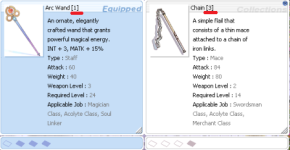
Not duplicated on the name in the black box.

For information, and she is 100% sure. This does not come from manually adding [0] or [1] etc next to the object name in iteminfo.lua.
If really no one has a solution, I'll close the topic.
Thanks for your help anyway.
As you can see the slots are also displayed on the description.
Not duplicated on the name in the black box.
For information, and she is 100% sure. This does not come from manually adding [0] or [1] etc next to the object name in iteminfo.lua.
If really no one has a solution, I'll close the topic.
Thanks for your help anyway.

X-EcutiOnner
New member
- Messages
- 53
- Points
- 0
- Discord
- X-EcutiOnner#8371
- Github
- X-EcutiOnner
- Emulator
- Client Version
- Last of us...
If you need to do like this not need to HEXing.
This feature can do by are following file.
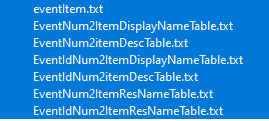
Use as ItemInfo OLD style.
PS. If you use as EventItem you can encrypt ItemInfo in GRF.
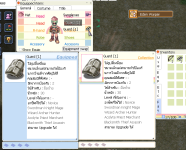
This feature can do by are following file.
Use as ItemInfo OLD style.
PS. If you use as EventItem you can encrypt ItemInfo in GRF.
Last edited by a moderator:
AnnieRuru
~~Cute~Cute~Scripter~~
- Messages
- 1,677
- Points
- 0
- Location
- your next door ~
- Discord
- AnnieRuru#1609
- Github
- AnnieRuru
- Emulator
- Client Version
- 2019-05-30aRagexeRE
I think he wants 2 things
1. he wants to show the [0]
yes most item already can show [1] [2] [3], but if the item has no slot, he still wants to show the [0]
2. Alt+Q equipment doesn't show [0], [1], [2], [3]
old item file can do that no.2 ?
interesting
newer one that use itemInfo_Sak.lub has these
function main()
for ItemID, DESC in pairs(tbl) do
result, msg = pcall(AddItem, ItemID, DESC.unidentifiedDisplayName, DESC.unidentifiedResourceName, DESC.identifiedDisplayName, DESC.identifiedResourceName, DESC.slotCount, DESC.ClassNum)
if not msg then
result, msg = pcall(AddItem, ItemID, DESC.unidentifiedDisplayName, DESC.unidentifiedResourceName, DESC.identifiedDisplayName, DESC.identifiedResourceName, DESC.slotCount, DESC.ClassNum, DESC.costume)
end
if not result then
return false, msg
end
for k, v in pairs(DESC.unidentifiedDescriptionName) do
result, msg = AddItemUnidentifiedDesc(ItemID, v)
if not result then
return false, msg
end
end
for k, v in pairs(DESC.identifiedDescriptionName) do
result, msg = AddItemIdentifiedDesc(ItemID, v)
if not result then
return false, msg
end
end
if nil ~= DESC.EffectID and nil ~= AddItemEffectInfo then
result, msg = AddItemEffectInfo(ItemID, DESC.EffectID)
if not result then
return false, msg
end
end
if nil ~= DESC.costume and nil ~= AddItemIsCostume then
result, msg = AddItemIsCostume(ItemID, DESC.costume)
if not result then
return false, msg
end
end
end
return true, "good"
end
function main_server()
for ItemID, DESC in pairs(tbl) do
result, msg = AddItem(ItemID, DESC.identifiedDisplayName, DESC.slotCount)
if not result then
return false, msg
end
end
return true, "good"
end
DESC.slotCount .... but doesn't seem to have anything to do here
1. he wants to show the [0]
yes most item already can show [1] [2] [3], but if the item has no slot, he still wants to show the [0]
2. Alt+Q equipment doesn't show [0], [1], [2], [3]
old item file can do that no.2 ?
interesting
newer one that use itemInfo_Sak.lub has these
function main()
for ItemID, DESC in pairs(tbl) do
result, msg = pcall(AddItem, ItemID, DESC.unidentifiedDisplayName, DESC.unidentifiedResourceName, DESC.identifiedDisplayName, DESC.identifiedResourceName, DESC.slotCount, DESC.ClassNum)
if not msg then
result, msg = pcall(AddItem, ItemID, DESC.unidentifiedDisplayName, DESC.unidentifiedResourceName, DESC.identifiedDisplayName, DESC.identifiedResourceName, DESC.slotCount, DESC.ClassNum, DESC.costume)
end
if not result then
return false, msg
end
for k, v in pairs(DESC.unidentifiedDescriptionName) do
result, msg = AddItemUnidentifiedDesc(ItemID, v)
if not result then
return false, msg
end
end
for k, v in pairs(DESC.identifiedDescriptionName) do
result, msg = AddItemIdentifiedDesc(ItemID, v)
if not result then
return false, msg
end
end
if nil ~= DESC.EffectID and nil ~= AddItemEffectInfo then
result, msg = AddItemEffectInfo(ItemID, DESC.EffectID)
if not result then
return false, msg
end
end
if nil ~= DESC.costume and nil ~= AddItemIsCostume then
result, msg = AddItemIsCostume(ItemID, DESC.costume)
if not result then
return false, msg
end
end
end
return true, "good"
end
function main_server()
for ItemID, DESC in pairs(tbl) do
result, msg = AddItem(ItemID, DESC.identifiedDisplayName, DESC.slotCount)
if not result then
return false, msg
end
end
return true, "good"
end
DESC.slotCount .... but doesn't seem to have anything to do here
X-EcutiOnner
New member
- Messages
- 53
- Points
- 0
- Discord
- X-EcutiOnner#8371
- Github
- X-EcutiOnner
- Emulator
- Client Version
- Last of us...
I think he wants 2 things
1. he wants to show the [0]
yes most item already can show [1] [2] [3], but if the item has no slot, he still wants to show the [0]
2. Alt+Q equipment doesn't show [0], [1], [2], [3]
old item file can do that no.2 ?
interesting
You can do that as EventItem.
Daraen
New member
- Messages
- 134
- Points
- 0
- Emulator
Thank you both for your response!
It seems to me that recent client no longer use EventItem, I am currently using version 2018-04-18b.
I'm still going to try to do a few things with the files I own. Should I declare with Nemo that I use my grf files rather than my iteminfo.lua?
As said before I apologize for my bad English I use the translator. : /
It seems to me that recent client no longer use EventItem, I am currently using version 2018-04-18b.
I'm still going to try to do a few things with the files I own. Should I declare with Nemo that I use my grf files rather than my iteminfo.lua?
As said before I apologize for my bad English I use the translator. : /
Last edited by a moderator:
AnnieRuru
~~Cute~Cute~Scripter~~
- Messages
- 1,677
- Points
- 0
- Location
- your next door ~
- Discord
- AnnieRuru#1609
- Github
- AnnieRuru
- Emulator
- Client Version
- 2019-05-30aRagexeRE
so its not compatible with newest client ?
no result
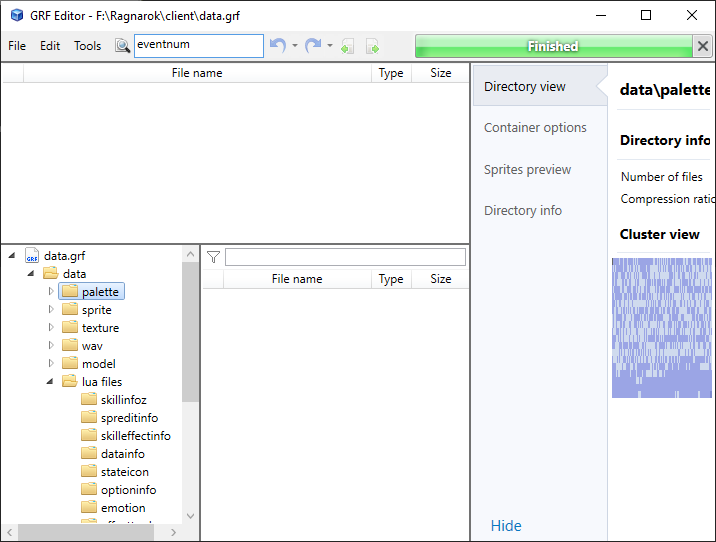
topic starter beats me by a minute =/
Daraen
New member
- Messages
- 134
- Points
- 0
- Emulator
X-EcutiOnner
New member
- Messages
- 53
- Points
- 0
- Discord
- X-EcutiOnner#8371
- Github
- X-EcutiOnner
- Emulator
- Client Version
- Last of us...
I'm use 2020-09-02bRagexeRE and work fine.
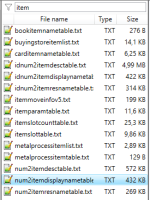
EventItem.txt can read FIRST before ItemInfo.lub.
Try this to testing. (@item 2102)
View attachment Data.7z
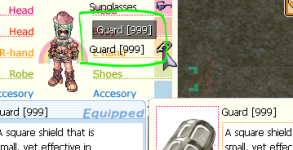
EventItem.txt can read FIRST before ItemInfo.lub.
Try this to testing. (@item 2102)
View attachment Data.7z
Daraen
New member
- Messages
- 134
- Points
- 0
- Emulator
I wouldn't want to sound like an inconvenient, but you're talking about EventItem.txt but you haven't given it to me in your download. SorryI'm use 2020-09-02bRagexeRE and work fine.
EventItem.txt can read FIRST before ItemInfo.lub.
Try this to testing. (@item 2102)
View attachment 6466
View attachment 6467

X-EcutiOnner
New member
- Messages
- 53
- Points
- 0
- Discord
- X-EcutiOnner#8371
- Github
- X-EcutiOnner
- Emulator
- Client Version
- Last of us...
I wouldn't want to sound like an inconvenient, but you're talking about EventItem.txt but you haven't given it to me in your download. Sorry
I mean EventItem is are prefix with "Event" item_db with old item style.
AnnieRuru
~~Cute~Cute~Scripter~~
- Messages
- 1,677
- Points
- 0
- Location
- your next door ~
- Discord
- AnnieRuru#1609
- Github
- AnnieRuru
- Emulator
- Client Version
- 2019-05-30aRagexeRE
I also couldn't get it to work
the item ID in the file is 2102
2102#Guard [999]#
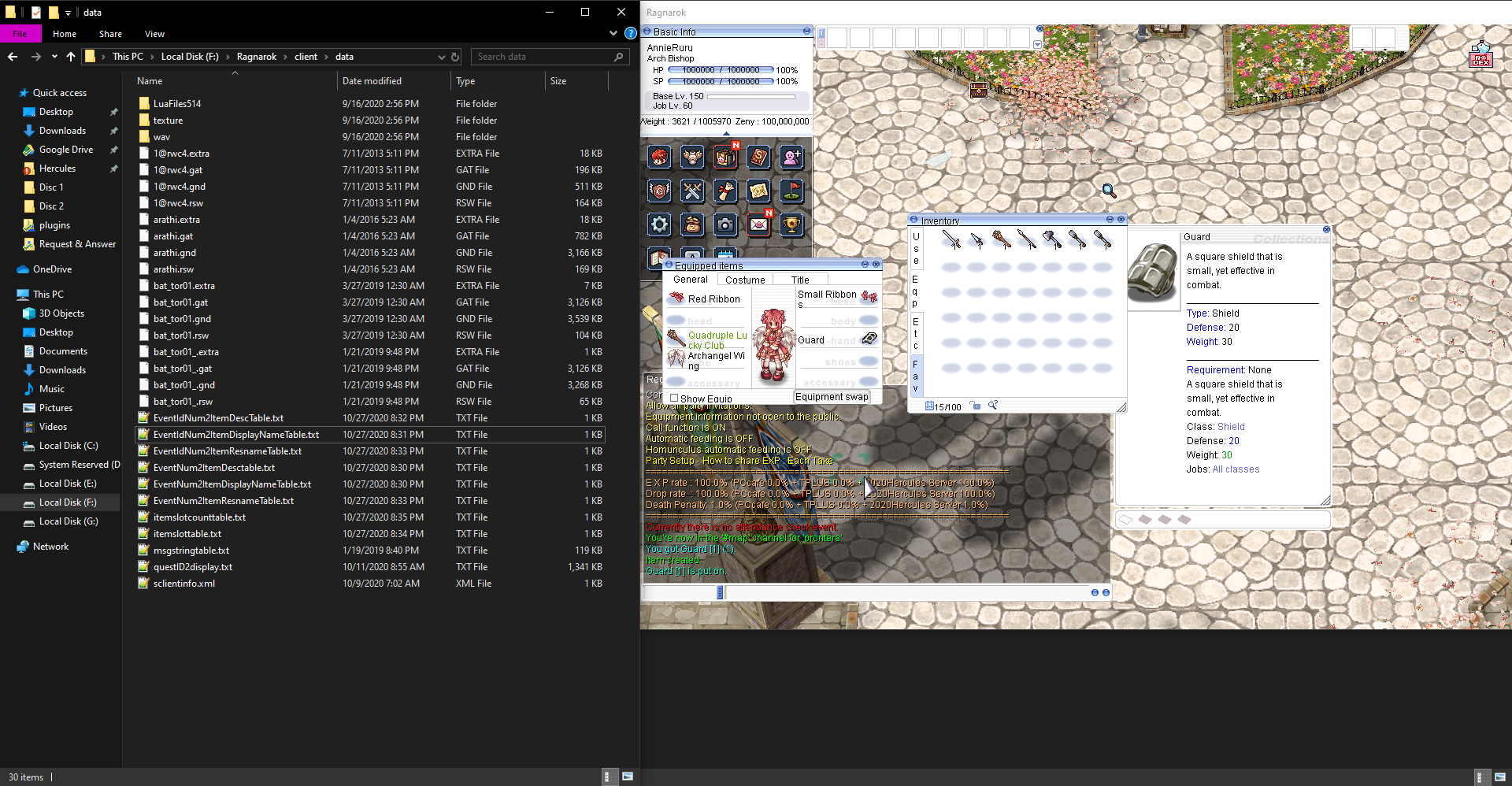
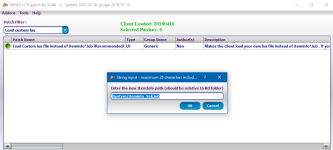
I double check in nemo and doesn't has anything with 'event' or 'item'
my client read system\itemInfo_Sak.lub, has to disable that first ?
the item ID in the file is 2102
2102#Guard [999]#
I double check in nemo and doesn't has anything with 'event' or 'item'
my client read system\itemInfo_Sak.lub, has to disable that first ?
Last edited by a moderator:
Daraen
New member
- Messages
- 134
- Points
- 0
- Emulator
I did the same ... I don't understand where it should be declared or imported.
The easiest way would be to send us a "tutorial" if it doesn't take a lot of time.
I am convinced that a lot of people would like to do this.
Thank you once again for the help and the answers provided!
@AnnieRuru
I think we can't turn it off but just read a custom one. As I have already said 2 times I use iteminfo.lua
But it's true, Eventitem remains a mystery ^^
The easiest way would be to send us a "tutorial" if it doesn't take a lot of time.
I am convinced that a lot of people would like to do this.
Thank you once again for the help and the answers provided!
@AnnieRuru
I think we can't turn it off but just read a custom one. As I have already said 2 times I use iteminfo.lua
But it's true, Eventitem remains a mystery ^^
X-EcutiOnner
New member
- Messages
- 53
- Points
- 0
- Discord
- X-EcutiOnner#8371
- Github
- X-EcutiOnner
- Emulator
- Client Version
- Last of us...
[No message]