
You are using an out of date browser. It may not display this or other websites correctly.
You should upgrade or use an alternative browser.
You should upgrade or use an alternative browser.
I want to show slot item on my windows equipment.
- Thread starter Daraen
- Start date

Daraen
New member
- Messages
- 134
- Points
- 0
- Emulator
The description has been modified with the one inside my grf. However, the name still hasn't changed: /
base:
I edit because I found a few things.
After modifying the names of the txt files, it is also necessary to delete the item from the iteminfo file, in my case, I was in my ITEMINFO.LUA and I completely removed the item.
I then get this:
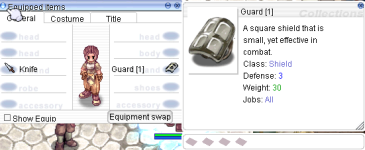
Problem, the slot is not displayed despite having inserted in itemslotcountable that the object has one.

base:
I edit because I found a few things.
After modifying the names of the txt files, it is also necessary to delete the item from the iteminfo file, in my case, I was in my ITEMINFO.LUA and I completely removed the item.
I then get this:
Problem, the slot is not displayed despite having inserted in itemslotcountable that the object has one.
Last edited by a moderator:

AnnieRuru
~~Cute~Cute~Scripter~~
- Messages
- 1,677
- Points
- 0
- Location
- your next door ~
- Discord
- AnnieRuru#1609
- Github
- AnnieRuru
- Emulator
- Client Version
- 2019-05-30aRagexeRE
Unfortunately also still the same as Author
data/EventIdNum2ItemDescTable.txt
2102#
This extra line is added by AnnieRuru
-=-=-=-=-=-=-=-=-=-=-=-=-=-=-=-=-
#
data/EventIdNum2ItemDisplayNameTable.txt
2102#TEST ONLY#
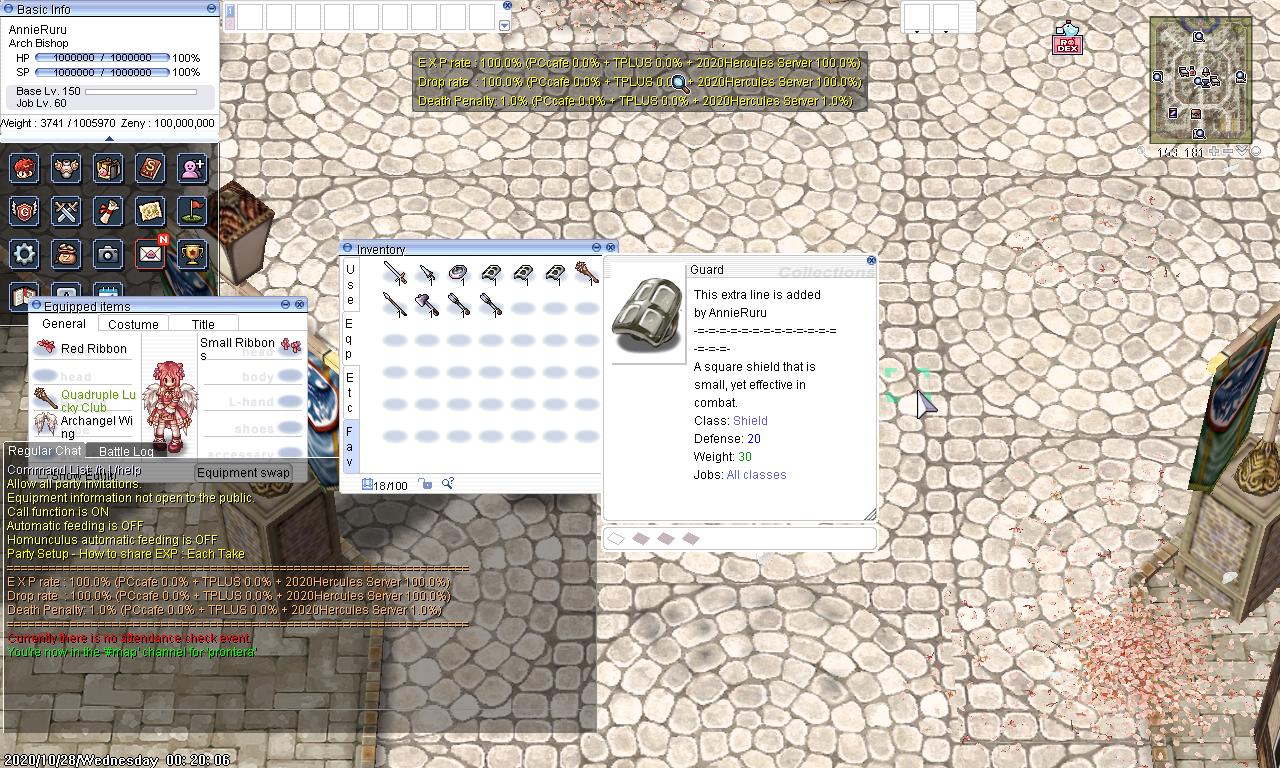
it looks like adding new line instead of overwriting the value
this trick seems to be very useful for adding custom items though, but ... overwrite existing items ?
why we have different result ?
EDIT:
how come you can get that ?
data/EventIdNum2ItemDescTable.txt
2102#
This extra line is added by AnnieRuru
-=-=-=-=-=-=-=-=-=-=-=-=-=-=-=-=-
#
data/EventIdNum2ItemDisplayNameTable.txt
2102#TEST ONLY#
it looks like adding new line instead of overwriting the value
this trick seems to be very useful for adding custom items though, but ... overwrite existing items ?
why we have different result ?
EDIT:
isn't Dastgir said that ? itemInfo.lub will overwrite EventIdNum2ItemDisplayNameTable
- This file is loaded before itemInfo, so if you have same item in itemInfo, resname and displayname will be overwritten with one on itemInfo, while both Description will appear one below one.
how come you can get that ?
Last edited by a moderator:
Daraen
New member
- Messages
- 134
- Points
- 0
- Emulator
I have new results, take a look at my previous post @AnnieRuruUnfortunately also still the same as Author
data/EventIdNum2ItemDescTable.txt
2102#
This extra line is added by AnnieRuru
-=-=-=-=-=-=-=-=-=-=-=-=-=-=-=-=-
#
2102#
This extra line is added by AnnieRuru
-=-=-=-=-=-=-=-=-=-=-=-=-=-=-=-=-
#
data/EventIdNum2ItemDisplayNameTable.txt
2102#TEST ONLY#
2102#TEST ONLY#
it looks like adding new line instead of overwriting the value
this trick seems to be very useful for adding custom items though, but ... overwrite existing items ?
why we have different result ?

X-EcutiOnner
New member
- Messages
- 53
- Points
- 0
- Discord
- X-EcutiOnner#8371
- Github
- X-EcutiOnner
- Emulator
- Client Version
- Last of us...
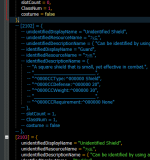
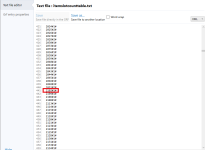
Ah sorry, please comment out or delete item description in lub first.
Last edited by a moderator:
AnnieRuru
~~Cute~Cute~Scripter~~
- Messages
- 1,677
- Points
- 0
- Location
- your next door ~
- Discord
- AnnieRuru#1609
- Github
- AnnieRuru
- Emulator
- Client Version
- 2019-05-30aRagexeRE
Daraen
New member
- Messages
- 134
- Points
- 0
- Emulator
Is it possible to make so that only "slotcount" on iteminfo.lua is read?
Because I still cannot display the slots despite having added the items in itemslotcounttable.txt
EDIT: If anyone has an idea for doing this, I'm a taker.
I have now been looking for a little over 8 hours how to display the slots as on my screenshoot.
If we follow the initial subject which was to display the slots in alt + q, this is successful.
The problem is that now the slots no longer display in descriptions: /
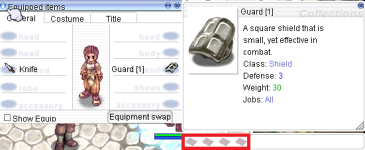
It is possible to do both according to this screenshoot:
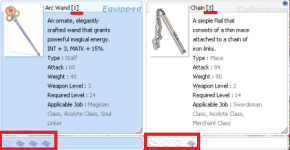
Because I still cannot display the slots despite having added the items in itemslotcounttable.txt
EDIT: If anyone has an idea for doing this, I'm a taker.
I have now been looking for a little over 8 hours how to display the slots as on my screenshoot.
If we follow the initial subject which was to display the slots in alt + q, this is successful.
The problem is that now the slots no longer display in descriptions: /
It is possible to do both according to this screenshoot:
Last edited by a moderator:
X-EcutiOnner
New member
- Messages
- 53
- Points
- 0
- Discord
- X-EcutiOnner#8371
- Github
- X-EcutiOnner
- Emulator
- Client Version
- Last of us...
It need to edit function in lub for item slot only.
Daraen
New member
- Messages
- 134
- Points
- 0
- Emulator
Iteminfo? I don't know which files you are talking about.It need to edit function in lub for item slot only.
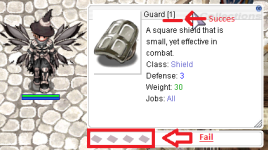
Still stuck on it :/
Last edited by a moderator:
X-EcutiOnner
New member
- Messages
- 53
- Points
- 0
- Discord
- X-EcutiOnner#8371
- Github
- X-EcutiOnner
- Emulator
- Client Version
- Last of us...
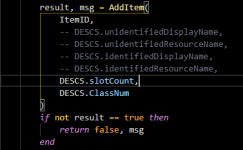
I mean you need to coding this function in iteminfo.lub like this.
Why?
For make iteminfo read slot from lub and read others from txt.
Or up to you, This is just an introduction.
Why?
For make iteminfo read slot from lub and read others from txt.
Or up to you, This is just an introduction.
if you want to add the slot on the item description you should add it on ROfolder/system/iteminfo.lua which is stated of sir X-ecutionner on how, if you want to read inside your grf. follow the guide the last post from X-ecutionner on how to add item from the old ways. then instead making the itemslot slotCount: 1; use DESCS.SlotCount, so the client will read the the data from your grf.Thank you for this start of the trail, I will explore it and see what comes out of it!
two ways actually
either you add your item description in iteminfo. or make a itemslotinfo.txt inside your grf.
sorry for my bad english.! please enlighten me if im wrong base on my understanding.
Daraen
New member
- Messages
- 134
- Points
- 0
- Emulator
itemslotinfo.txt seems the easiest thing to do. Despite this I can not find any example to be able to do it correctly.
Thank you for your answer anyway
It will also appear that itemslotinfo not works...
itemslotcounttable is the file that appears to display the slot. unfortunately it doesn't seem to work for me. I'll think about it a little more tonight.
Itemslotcounttable.txt no longer read by the exe
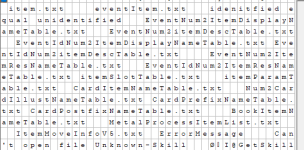
Thank you for your answer anyway
It will also appear that itemslotinfo not works...
itemslotcounttable is the file that appears to display the slot. unfortunately it doesn't seem to work for me. I'll think about it a little more tonight.
Itemslotcounttable.txt no longer read by the exe
Last edited by a moderator:
Daraen
New member
- Messages
- 134
- Points
- 0
- Emulator
I mean you need to coding this function in iteminfo.lub like this.
Why?
For make iteminfo read slot from lub and read others from txt.
Or up to you, This is just an introduction.
View attachment 6486
if you want to add the slot on the item description you should add it on ROfolder/system/iteminfo.lua which is stated of sir X-ecutionner on how, if you want to read inside your grf. follow the guide the last post from X-ecutionner on how to add item from the old ways. then instead making the itemslot slotCount: 1; use DESCS.SlotCount, so the client will read the the data from your grf.
two ways actually
either you add your item description in iteminfo. or make a itemslotinfo.txt inside your grf.
sorry for my bad english.! please enlighten me if im wrong base on my understanding.
I think your solutions are not working, I have tried a lot of things but none are working.
If anyone else has an idea, I'm a taker.
Daraen
New member
- Messages
- 134
- Points
- 0
- Emulator
If no one else has any other idea / clue to pull this off, then we can close the topic.
Perhaps it is possible to modify the exe with the hexadecimal in order to make it read again itemslotcounttable.txt as before.
But it looks like the exe is broken after that and it is no longer possible to start.
Perhaps it is possible to modify the exe with the hexadecimal in order to make it read again itemslotcounttable.txt as before.
But it looks like the exe is broken after that and it is no longer possible to start.