Login Background

aabarreto

New member
Messages
32
Points
0
So, I finally managed to run my server, thanks to the advice of Daraen and using anacondaq's guide.

Now I'm trying to learn a few first steps, as in changing login background...

I used this website tool: http://rathena.sourceforge.net/tools/login_background/ and the image below, a 1024x768 .jpg (I made sure of the resolution and extension), created a .grf for both login backgrounds and tried to merge with my GRF Editor, when the following error appeared:
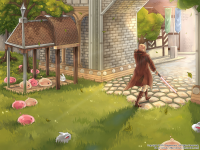
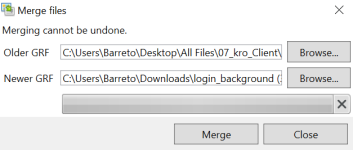
image.pngimage.pngimage.png  

 
So, I finally managed to run my server, thanks to the advice of Daraen and using anacondaq's guide.

Now I'm trying to learn a few first steps, as in changing login background...

I used this website tool: http://rathena.sourceforge.net/tools/login_background/ and the image below, a 1024x768 .jpg (I made sure of the resolution and extension), created a .grf for both login backgrounds and tried to merge with my GRF Editor, when the following error appeared:
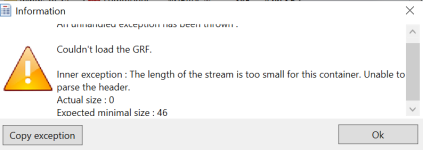
View attachment 6746View attachment 6747View attachment 6748  
There is no real need to create a special grf to change the login screen, replace it directly in the data.grf/data/texture/À¯ÀúÀÎÅÍÆäÀ̽º/.
the images must be in .bmp.

try this 

View attachment loginscreen.rar
 

EDIT:

Result 
1611774441-works.jpg


Last edited by a moderator:
There is no real need to create a special grf to change the login screen, replace it directly in the data.grf/data/texture/À¯ÀúÀÎÅÍÆäÀ̽º/.
the images must be in .bmp.

try this 

View attachment 6749
 

EDIT:

Result 
I deleted my server to start it over, learning more things... But I did try this on a private server I play and it didn't work... Maybe because they force whatever is in the data server? I don't know... Anyway, how to slice it into 12 pieces? And I should just extract the folder with grf editor and replace the items or I did it wrong?

 
I deleted my server to start it over, learning more things... But I did try this on a private server I play and it didn't work... Maybe because they force whatever is in the data server? I don't know... Anyway, how to slice it into 12 pieces? And I should just extract the folder with grf editor and replace the items or I did it wrong?
Personally I proceed like this:

- I download the image I want in the login screen.
- I go to this link: https://pinetools.com/split-image and I split the image into 4 * 3
- I reopen all the images in an image editor, paint, photopea, photoshop whatever, and I re-save the 12 images in .bmp format
- Finally, I go to my client file, I open data.grf, I go to data / texture / À¯ÀúÀÎÅÍÆäÀ̽º / and I replace the existing files with my 12 images in .bmp formats

Then I save and start the game.

Your image will appear.

Note that the client reads two types of login screen, it charges one randomly from your client. But for my part, no problem if you follow what I tell you to the letter.

 
Personally I proceed like this:

- I download the image I want in the login screen.
- I go to this link: https://pinetools.com/split-image and I split the image into 4 * 3
- I reopen all the images in an image editor, paint, photopea, photoshop whatever, and I re-save the 12 images in .bmp format
- Finally, I go to my client file, I open data.grf, I go to data / texture / À¯ÀúÀÎÅÍÆäÀ̽º / and I replace the existing files with my 12 images in .bmp formats

Then I save and start the game.

Your image will appear.

Note that the client reads two types of login screen, it charges one randomly from your client. But for my part, no problem if you follow what I tell you to the letter.
Would you mind to explain the randomness? Are there two "packs" os 12 .bmp files and it picks one of those packs at random? Can't I change both?

 
Would you mind to explain the randomness? Are there two "packs" os 12 .bmp files and it picks one of those packs at random? Can't I change both?
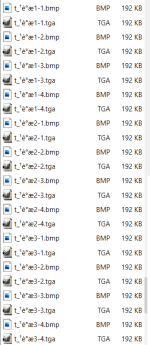
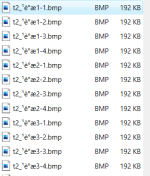
In your data.grf you will find these files.

If you want to have one and the same connection image, copy paste your image cut in 12 in .bmp format and paste it in a folder.
rename your images as displayed on the screenshots and save them in your data.grf> data / texture / À¯ÀúÀÎÅÍÆäÀ̽º /

2.png1.png

 
In your data.grf you will find these files.

If you want to have one and the same connection image, copy paste your image cut in 12 in .bmp format and paste it in a folder.
rename your images as displayed on the screenshots and save them in your data.grf> data / texture / À¯ÀúÀÎÅÍÆäÀ̽º /

View attachment 6751View attachment 6750
I believe I managed to find out what's wrong. The server uses two more .grf and probably loads from another one... I'll try the others.
Anyway, I don't know if I get how to save it inside data.grf... I can make it extract the folder and replace the files there, but I'm not sure how to replace inside the .grf... Will look into it as well, but it won't work just replacing in the extracted folder?

Edit: ok, learned how to replace the files in the .grf

 
Last edited by a moderator:
On your client, check if you diffed it to show the 1st login background or the 2nd or both.

 
Back
Top