Hello Guys,
I am using this server/client files http://herc.ws/board/topic/10667-release-2013-12-23-ragexe-fullclient/?hl=2013-12-23
Screenshot: http://imageshack.com/a/img903/1071/4Czt8P.jpg
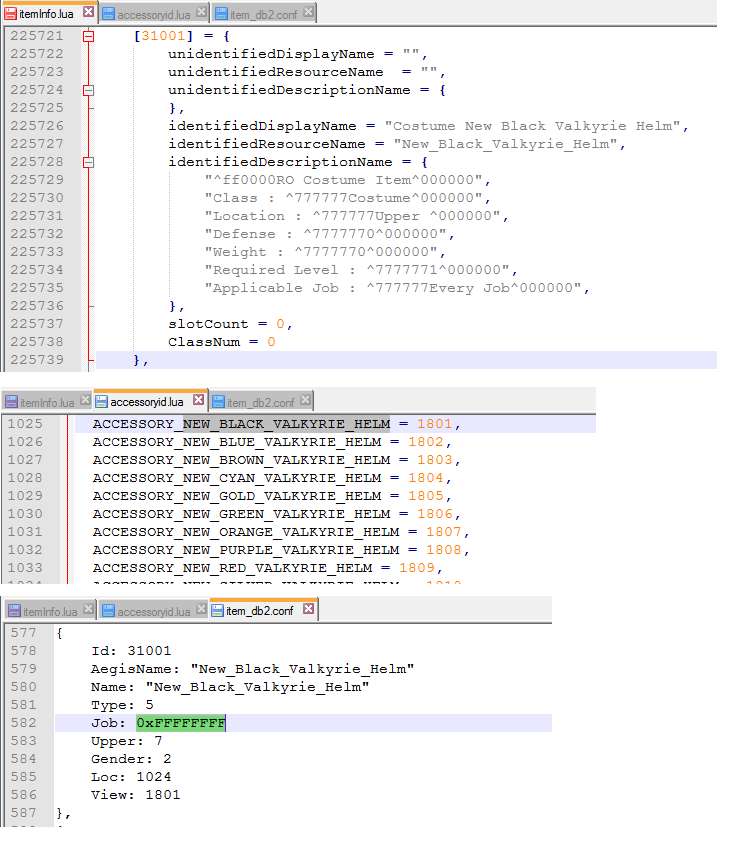
But I am confused about the lub files. I am trying to add item in my files but when I tests it the item did'nt show and the icon is not correct. Also the itemname is unknown item.
Sample Procedure:
1. I did copy the lub file/s in folder and paste a new name
rootClient Folderdataluafiles514lua filesdatainfoaccessoryid.lub -- copy to --> rootClient Folderdataluafiles514lua filesdatainfoaccessoryid.lua
rootClient Folderdataluafiles514lua filesdatainfoaccname.lub -- copy to --> rootClient Folderdataluafiles514lua filesdatainfoaccname.lua
- my question is I don't know if the server is reading the lua files. is there a setup that I need to do to make it work?
2. I also add item in item_db.conf
3. I also put the files need in /texture/ and /sprite/ in the data folder of my client.
-- did I miss something? Thankyo in advanced!

I am using this server/client files http://herc.ws/board/topic/10667-release-2013-12-23-ragexe-fullclient/?hl=2013-12-23
Screenshot: http://imageshack.com/a/img903/1071/4Czt8P.jpg
But I am confused about the lub files. I am trying to add item in my files but when I tests it the item did'nt show and the icon is not correct. Also the itemname is unknown item.
Sample Procedure:
1. I did copy the lub file/s in folder and paste a new name
rootClient Folderdataluafiles514lua filesdatainfoaccessoryid.lub -- copy to --> rootClient Folderdataluafiles514lua filesdatainfoaccessoryid.lua
rootClient Folderdataluafiles514lua filesdatainfoaccname.lub -- copy to --> rootClient Folderdataluafiles514lua filesdatainfoaccname.lua
- my question is I don't know if the server is reading the lua files. is there a setup that I need to do to make it work?
2. I also add item in item_db.conf
3. I also put the files need in /texture/ and /sprite/ in the data folder of my client.
-- did I miss something? Thankyo in advanced!