Missing Sprites

Hit`

New member
Messages
39
Points
0
Not really sure if this goes here kindly move if I'm not in the right section please.

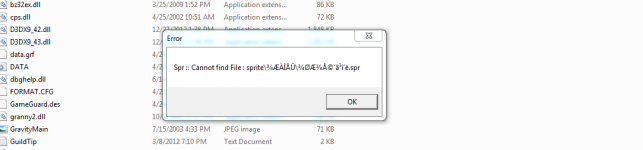
Whenever I use @item 5377 I always keep on having this error. Please see screenshot below.

Things that I used :

kRO - https://www.nickyzai.com/?p=kro ( 2016-01-24 )

Data Folder - http://herc.ws/board/topic/398-client-translation-project/

Client - 2014-02-05

Diff used -
3 Chat Flood Remove Limit
9 Disable 1rag1 type parameters (Recommended)
13 Disable Ragexe Filename Check (Recommended)
15 Disable HShield (Recommended)
16 Disable Swear Filter
23 Enable /who command (Recommended)
24 Fix Camera Angles (Recommended)
30 Increase Zoom Out 50%
33 Always Call SelectKoreaClientInfo() (Recommended)
34 Enable /showname (Recommended)
36 Read msgstringtable.txt (Recommended)
37 Read questid2display.txt (Recommended)
38 Remove Gravity Ads (Recommended)
39 Remove Gravity Logo (Recommended)
40 Restore Login Window (Recommended)
41 Disable Nagle Algorithm (Recommended)
44 Translate Client (Recommended)
46 Use Normal Guild Brackets (Recommended)
47 Use Ragnarok Icon
48 Use Plain Text Descriptions (Recommended)
49 Enable Multiple GRFs (Recommended)
50 Skip License Screen
53 Use Ascii on All LangTypes (Recommended)
64 @ Bug Fix (Recommended)
67 Disable Quake skill effect
73 Remove Hourly Announce (Recommended)
74 Increase Screenshot Quality
75 Enable Flag Emoticons
84 Remove Serial Display (Recommended)
90 Enable DNS Support (Recommended)
96 Remove GM Sprites
97 Cancel to Login Window (Recommended)
213 Disable Help Message on Login (Recommended)
215 Increase Map Quality

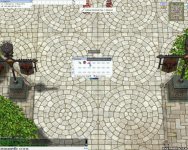
screenBaldur003.jpg

123123.png

 
In itemInfo.lub you put the resourcename as the displayname.

To fix the sprite error, find the sprite you want and make sure it has the same name as your (un)identifiedResourceName.

 
Make sure you tick "Ignore Missing Palette Errors/Resorces" in your client diff.

Using your grf editor, rename the sprites you want to use. In this case, we will use 'donald_trump'.

You need to edit the drop (¾ÆÀÌÅÛ) - it has .spr and .act files.

If a headgear, edit (¾Ç¼¼»ç¸®) and do it in both folders.

In texture folder, make sure it is the same in /collection /item.

Basically, make sure whatever the file name in your grf is has to be the same as your resource name.

Go to your itemInfo.lub and edit it like such.

Code:
        [8064] = {
        unidentifiedDisplayName = "Donald Trump Doll",
        unidentifiedResourceName = "donald_trump",
        unidentifiedDescriptionName = {
            "An unpopular action figure.",
            "^ffffff_^000000",
            "Weight : ^7777771^000000",
        },
        identifiedDisplayName = "Donald Trump Doll",
        identifiedResourceName = "donald_trump",
        identifiedDescriptionName = {
            "An unpopular action figure.",
            "^ffffff_^000000",
            "Weight: ^7777771^000000",
        },
        slotCount = 0,
        ClassNum = 0
    },    
 
 Hi. Sorry for the late reply. I opened my ItemInfo.lub and here's what its look like

 
 [5377] = {

        unidentifiedDisplayName = "¾Ç¼¼»ç¸®",

        unidentifiedResourceName = "¸®º»",

        unidentifiedDescriptionName = { "°¨Á¤µÇÁö ¾ÊÀ½. [µ¸º¸±â] ¸¦ »ç¿ëÇÏ¿© °¨Á¤ÇÒ ¼ö ÀÖ´Ù." },

        identifiedDisplayName = "¾ØÆ¼Å© ´ã¹î´ë",

        identifiedResourceName = "¾ØÆ¼Å©´ã¹î´ë",

        identifiedDescriptionName = {

            "¿¾³¯ ¿¾Àû ÇÒ¸Ó´Ï ÇҾƹöÁö°¡ »ç¿ëÇßÀ» °Í ¸¸ °°Àº ±ä ´ã¹î´ë.",

            "Àΰ£Çü ÀûÀ¸·ÎºÎÅÍÀÇ ´ë¹ÌÁö 2% °¨¼Ò.",

            "°è¿­ : ^777777Åõ±¸^000000    ¹æ¾î : ^7777770^000000",

            "À§Ä¡ : ^777777ÇÏ´Ü^000000    ¹«°Ô : ^77777710^000000",

            "ÀåÂø : ^777777ÀüÁ÷¾÷ ÀåÂø°¡´É^000000"

        },

        slotCount = 0,

        ClassNum = 383

    },

Everything inside is like that. Do I really have to retype everything in English or is there like a lub that's completely translated?

 
Ha, you haven't installed the translation
default_tongue.png
 

https://github.com/ROClientSide/Translation

 
Thank you for helping me out, sir!

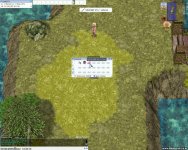
Gibberish text on item 5377 is already fixed ( See Screenshot1 )

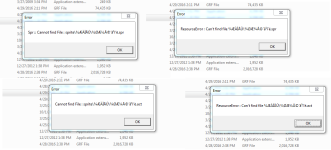
But whenever I equip it, these errors come up ( See Screenshot2 )

Screenshot1.jpg

Screenshot2.png

 
Back
Top