NEMO - Client Patcher

since you are using 2012 client I recommend you to use WeedDiffGen.

Note what Neo said:

1) WeeDiffGen - isn't working for 2013 clients + it depends on dlls (not that its a bad thing but i like scripting 
default_tongue.png
)
His patcher is more compatible on 2013 clients.


Actually the plan is to support all clients but yes already WeeDiff is there for 2012 so I am not too concerned for older clients right now.

Ofcourse you can post any bugs you find. 

@nemo its working now.

but i have some issues.

Enable Title Bar Menu
-> I try minimize my client and its have a delay. haha.
why ?

Increase Attack Display
-> This have problem. When i attack, my client crash.

Nemo I hope you will add custom font
default_smile.png


This below is my diff for my client 2013-08-07a

64 @ Bug Fix (Recommended)88 Allow space in guild name33 Always Call SelectKoreaClientInfo() (Recommended)51 Ascii & Arial on All Langtypes (Recommended)97 Cancel to Login Window (Recommended)8 Custom Window Title9 Disable 1rag1 type parameters (Recommended)15 Disable HShield (Recommended)14 Disable Hallucination Wavy Screen (Recommended)41 Disable Nagle Algorithm (Recommended)61 Disable Packet Encryption (Recommended)13 Disable Ragexe Filename Check (Recommended)90 Enable DNS Support (Recommended)49 Enable Multiple GRFs (Recommended)19 Enable Title Bar Menu20 Extend Chat Box21 Extend Chat Room Box69 Extend Npc Dialog Box22 Extend PM Box24 Fix Camera Angles (Recommended)71 Ignore Missing File Error72 Ignore Missing Palette Error28 Increase Headgear ViewID74 Increase Screenshot Quality32 Increase Zoom Out Max36 Read msgstringtable.txt (Recommended)37 Read questid2display.txt (Recommended)96 Remove GM Sprites38 Remove Gravity Ads (Recommended)39 Remove Gravity Logo (Recommended)73 Remove Hourly Announce (Recommended)84 Remove Serial Display (Recommended)40 Restore Login Window (Recommended)50 Skip License Screen44 Translate Client (Recommended)45 Use Custom Aura Sprites48 Use Plain Text Descriptions (Recommended)47 Use Ragnarok Icon

Now getting happy
default_smile.png


I have added Custom Font patch. Test it out and let me know. Also Increase Attack Display patch has been fixed.

 
Update:

Fixed bug in Increase Attack display (thanks mrlongshen for informing the bug)

Removed Debug message from Custom Job patch (thanks ossi for pointing it out)

and yes the rar file is also updated.

themon what all patches did you use?
Like I said what you see in my post is the error I get in my client that I diff using xdiff which is working fine before.

I only got that message after trying to diff new client using Nemo. and the patches that I apply to the New Nemo Client is almost the same in my xdiff client. I just change the uncheck Disable Packet Encryption and checking the three packet encrypt keys 

 
@nemo,

I have tested the custom font.

I need to change the langtype to my country 1st.

then for the first trial, I tested on candara font.

candara.png

its work !

For the 2nd time, I tried on the Arial Black.

ariablack.png

its works !

For third times, I tried on the Arial but italic.

arialitalic2.pngarialitalic.png

its fails.

For the 4th times. I tried on the Arial but bold.

arialbold2.pngarialbold1.png

So, I realize, for normal font type is right.

The bugs is on Italic, and bold. Maybe ?

@nemo maybe take an action. hehe~

 
@Neo

Can you add "Add Custom DLL" Patch?

 
@nemo,

I have tested the custom font.

I need to change the langtype to my country 1st.

then for the first trial, I tested on candara font.

attachicon.gif
candara.png

its work !

For the 2nd time, I tried on the Arial Black.

attachicon.gif
ariablack.png

its works !

For third times, I tried on the Arial but italic.

attachicon.gif
arialitalic2.png
attachicon.gif
arialitalic.png

its fails.

For the 4th times. I tried on the Arial but bold.

attachicon.gif
arialbold2.png
attachicon.gif
arialbold1.png

So, I realize, for normal font type is right.

The bugs is on Italic, and bold. Maybe ?

@nemo maybe take an action. hehe~
mrlongshen actually you can only specify the font names... bold & italics etc is chosen by the client. Even in the WeeDiff patcher it was same way.

I have updated Nemo to accept only font names now to avoid confusion.

@Neo

Can you add "Add Custom DLL" Patch?
Shikazu has already made a DLL importer. won't it be redundant to have a patch which loads custom dll?

 
@nemo,

I have tested the custom font.

I need to change the langtype to my country 1st.

then for the first trial, I tested on candara font.

attachicon.gif
candara.png

its work !

For the 2nd time, I tried on the Arial Black.

attachicon.gif
ariablack.png

its works !

For third times, I tried on the Arial but italic.

attachicon.gif
arialitalic2.png
attachicon.gif
arialitalic.png

its fails.

For the 4th times. I tried on the Arial but bold.

attachicon.gif
arialbold2.png
attachicon.gif
arialbold1.png

So, I realize, for normal font type is right.

The bugs is on Italic, and bold. Maybe ?

@nemo maybe take an action. hehe~
mrlongshen actually you can only specify the font names... bold & italics etc is chosen by the client. Even in the WeeDiff patcher it was same way.

I have updated Nemo to accept only font names now to avoid confusion.

>>>>
@Neo

Can you add "Add Custom DLL" Patch?
Shikazu has already made a DLL importer. won't it be redundant to have a patch which loads custom dll?
I previously used https://svn.netvor.sk/umage/dllinject/ which worked on 2012 clients, but if I use it on 2013-08-07 it gives error "xyz.exe is not a Valid Win32 Executable".

If I use Shikazu DLL, it was giving some error, Maybe I will try to use it again.

It was DllMain Error, My Format is(matching with the sample one given with Liberty)

extern "C" DLL_EXPORT BOOL APIENTRY DllMain(HINSTANCE hInst, DWORD reason, LPVOID reserved) 

Error = "The procedure entry point DllMain@12 could not be located in the dynamic link library blabla.dll"

 
Last edited by a moderator:
can some one help me. im using k3dt's 20130807ragexe whenever i use fullscreen the client automatically close and another thing whenever i play a record the client crashes. how to fix this thanks in advance
default_smile.png
im using your diff patcher
default_smile.png


@nemo,

I have tested the custom font.

I need to change the langtype to my country 1st.

then for the first trial, I tested on candara font.

attachicon.gif
candara.png

its work !

For the 2nd time, I tried on the Arial Black.

attachicon.gif
ariablack.png

its works !

For third times, I tried on the Arial but italic.

attachicon.gif
arialitalic2.png
attachicon.gif
arialitalic.png

its fails.

For the 4th times. I tried on the Arial but bold.

attachicon.gif
arialbold2.png
attachicon.gif
arialbold1.png

So, I realize, for normal font type is right.

The bugs is on Italic, and bold. Maybe ?

@nemo maybe take an action. hehe~
mrlongshen actually you can only specify the font names... bold & italics etc is chosen by the client. Even in the WeeDiff patcher it was same way.

I have updated Nemo to accept only font names now to avoid confusion.

>@Neo

Can you add "Add Custom DLL" Patch?
Shikazu has already made a DLL importer. won't it be redundant to have a patch which loads custom dll?
ok thanks alot.

sir. can you add custom NPC range ID ?

support 32k ?

 
Hello.
 
Can you add "[Enable  ASCII in Text]" Patch?
 
sorry my bad english (google translate)
 
Last edited by a moderator:
Update:

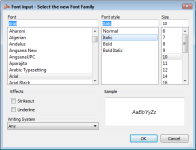
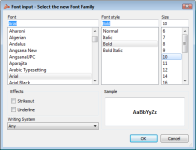
1) Changed Font selection Window - added preview sections for selected font.

2) Added patch "Load Custom Quest Lua/Lub" request by ossi0110 - Enables loading of custom lua files in quest folder for use in
     quest window.  (Ossi can you put in the details of what all to edit in relation to that)

   The patch takes a text file as input which should contain the list of all files to load.

   For e.g. If i wish to load => luafiles514/lua files/quest/LocalQuest/local_myquest_list.lub and 

  luafiles514/lua files/quest/LocalQuest/QuestInfo/l_myquests_list.lub

   text file should contain.

LocalQuest/local_myquest_listLocalQuest/QuestInfo/l_myquests_list


Hello.
 
Can you add "[Enable  ASCII in Text]" Patch?
 
sorry my bad english (google translate)
Have you tried "Ascii & Arial on All Langtypes"

 
Last edited by a moderator:
Update:

1) Changed Font selection Window - added preview sections for selected font.

2) Added patch "Load Custom Quest Lua/Lub" request by ossi0110 - Enables loading of custom lua files in quest folder for use in

     quest window.  (Ossi can you put in the details of what all to edit in relation to that)

   The patch takes a text file as input which should contain the list of all files to load.

   For e.g. If i wish to load => luafiles514/lua files/quest/LocalQuest/local_myquest_list.lub and 

  luafiles514/lua files/quest/LocalQuest/QuestInfo/l_myquests_list.lub

   text file should contain.

LocalQuest/local_myquest_listLocalQuest/QuestInfo/l_myquests_list


Hello.
 
Can you add "[Enable  ASCII in Text]" Patch?
 
sorry my bad english (google translate)
Have you tried "Ascii & Arial on All Langtypes"
yes, but I need this option because my language (Portuguese-Brazil). uses some characters

 
Hi NEO.

I am using the chinese patch. So the patch have register button.

20131123184127.jpg

It will crash patch when click this button.

20131123184304.jpg

Can you fix it? or Do not display this button?

 
Update:

1) Have added the bifrost quest translation now (credits to Boom for the translation that fits).

2) Browse button have been added for easier selection for file as input to Load Custom Quest Lua/Lub patch.

@rosfus

the Register button was intended to open kRO's webpage for registering in older clients.

In new clients login window was brought back to the new ones so you can expect bugs like these.

I am planning on two options for the Register button (dunno when i will get time to work on those.)

1) Patch to enable it and you can specify the website to open (in essence a proper register button).

2) Patch to hide it.

 
En.. The patch is new. This button is showing in langtype 3, if change langtype to 2 it will auto hide.

 
Update:

Added Enable Flag Emoticons patch.

The patch takes an input file now which you can use for specifying which ctrl+number combination shows which flag. If a number is not specified, it will show nothing.

I have already added a file called flags.txt with the default settings. You can use it directly or for reference.

 
Back
Top